5
HCD-FL3
SECTION 2
GENERAL
This section is extracted from
instruction manual.
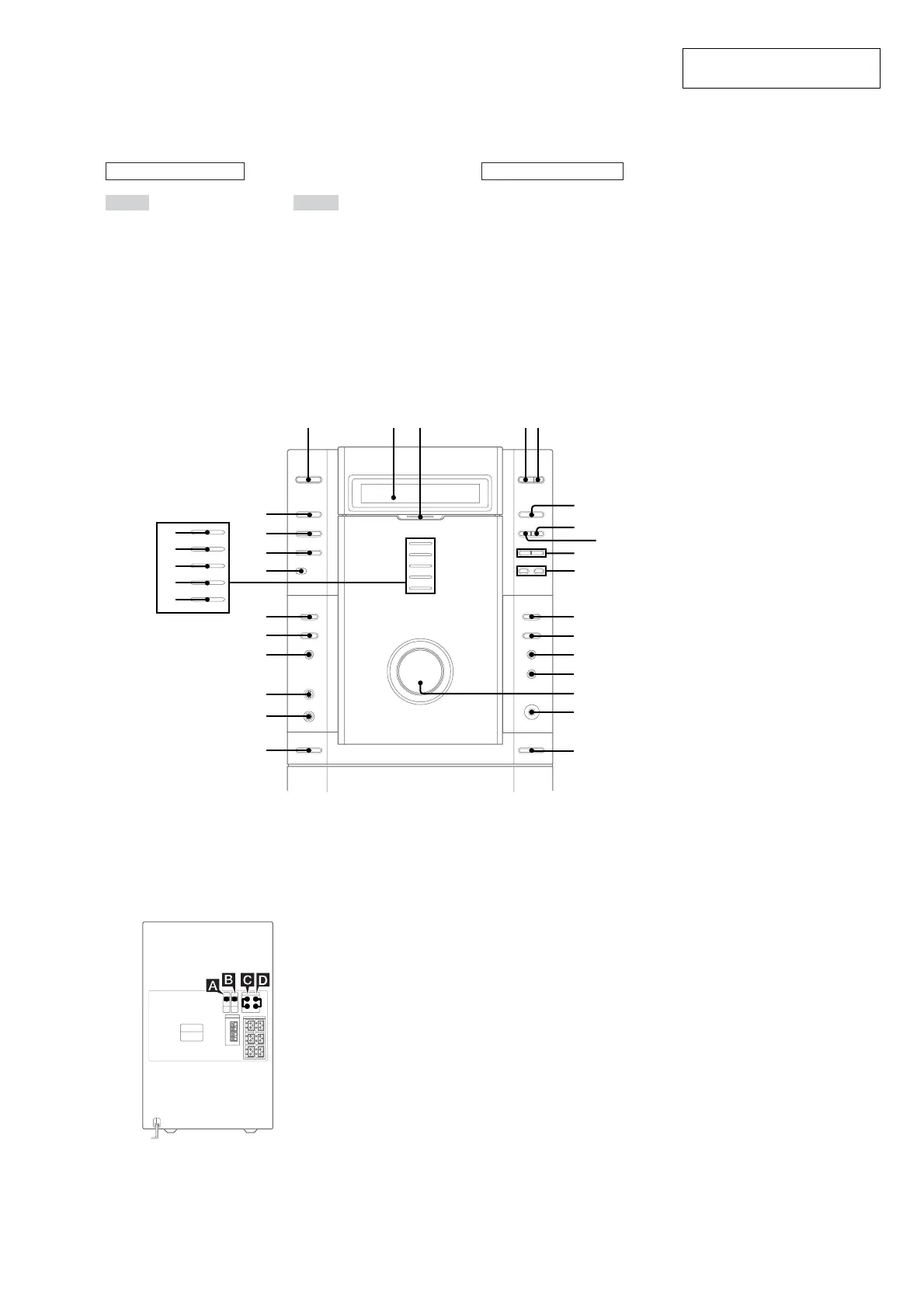
LOCATION OF CONTROLS
– Front Panel –
ALPHABETICAL ORDER
A – G
CD es
CD SYNC HI-DUB qd
DIGITAL wd
DISC SELECT 4
DISC 1 indicator wk
DISC 2 indicator wj
DISC 3 indicator wh
DISC 4 indicator wg
DISC 5 indicator wf
Display window 2
DISPLAY wa
EFFECT qs
GROOVE qa
M – V
MD (VIDEO) ws
MIC jack ql
MIC LEVEL w;
MULTI CHANNEL DECODING
indicator 3
PHONES jack qh
REC PAUSE/START qf
Remote sensor wl
TAPE A/B e;
TUNER/BAND ea
VOLUME qg
BUTTON DESCRIPTIONS
?/1 (power) 1
Z (disc tray) 5
Z A (deck A) qk
Z B (deck B) qj
hH (play) 6
X (pause) 8
x (stop) 7
./> (go back/go forward)
9
–/m, M/+
(rewind, fast forward)
q;
Z
ZZ
xX
>.
M +– m
hH
?/1
1
6
8
452 3
es
ea
e;
wd
ws
wa
w;
ql
qk
qa
qs
qd
qf
qg
qh
qj
7
9
q;
wk
wj
wh
wg
wf
wl
A OPTICAL DIGITAL IN jack
Use a digital optical cable (square, not
supplied) to connect an MD deck or DVD
player to this jack. You can then record or
listen to digital audio from the MD deck or
DVD player through this system.
B OPTICAL CD DIGITAL OUT jack
Use a digital optical cable (square, not
supplied) to connect an MD deck to this jack.
You can then output the digital audio to the
MD deck from this system.
C MD (VIDEO) IN jacks
Use audio cords (not supplied) to connect an
MD deck or VCR to these jacks. You can then
listen to analog audio from the MD deck or
VCR through this system.
D MD (VIDEO) OUT jacks
Use audio cords (not supplied) to connect an
MD deck or VCR to these jacks. You can then
output audio to the MD deck or VCR from this
system.
Tip
When you remove the optical cover, keep it for future
use.
– Back Panel –



 To Next Page