106
GB
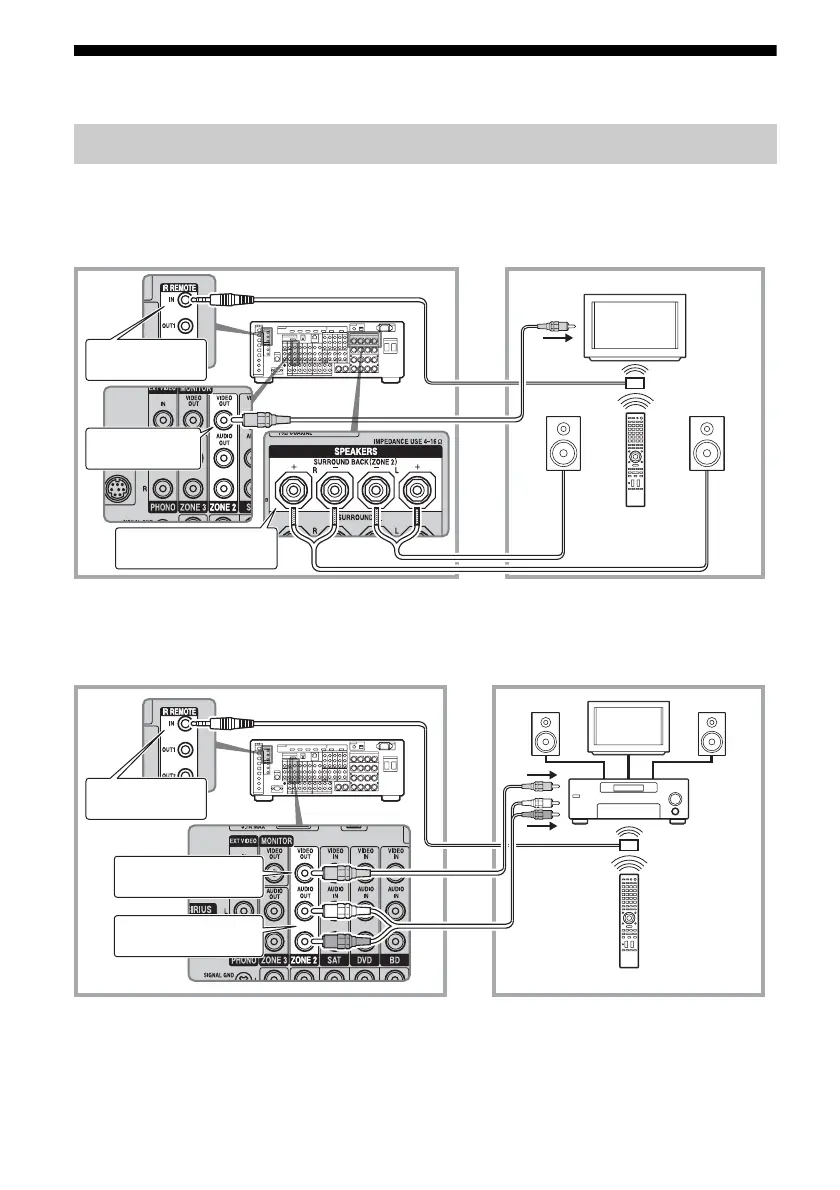
Making a multi-zone connection
1 Outputs sound from speakers in zone 2 using the SURROUND
BACK SPEAKERS terminals of the receiver.
2 Outputs sound from speakers in zone 2 using the receiver and
another amplifier.
A IR repeater (not supplied)
B Speakers
C Sony Amplifier/Receiver
* You can also connect to the COMPONENT VIDEO ZONE 2 OUT jack.
1:Zone 2 connections
Main zone Zone 2
TV
monitor
ZONE 2 VIDEO
OUT*
B
STR-DA5500ES
B
SURROUND BACK
SPEAKERS
A
Multifunction remote
IR REMOTE IN
Main zone Zone 2
TV
monitor
ZONE 2 AUDIO OUT
A
BB
C
STR-DA5500ES
Multifunction remote
IR REMOTE IN
ZONE 2 VIDEO OUT*















 To Next Page