69
GB
Tuning
Enter the frequency of a station directly by
using the numeric buttons on the multifunction
remote. This operation cannot be performed
using the simple remote.
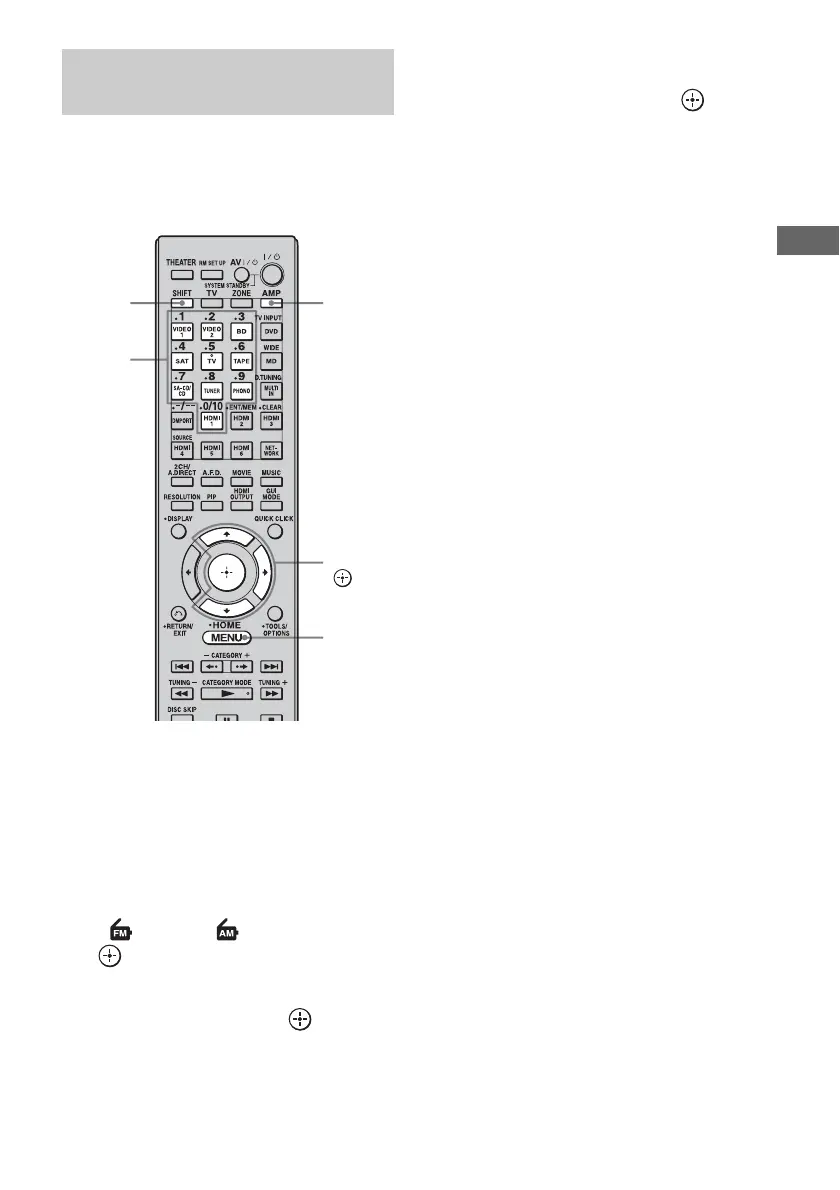
1 Press AMP.
The receiver can be operated using the
remote.
2 Press MENU.
The menu is displayed on the TV screen.
3 Press V/v repeatedly to select
“FM” or “AM,” then press
or b.
4 Press V/v to select “Direct
Tuning,” then press .
5 Press SHIFT, then press the
numeric buttons to enter the
frequency, then press .
Example 1: FM 102.50 MHz
Select 1 b 0 b 2 b 5 (b 0*)
Example 2: AM 1,350 kHz
Select 1 b 3 b 5 b 0
*Press the numeric button 0 when you are
using the European model.
Tip
If you have tuned in an AM station, adjust the
direction of the AM loop antenna (aerial) for
optimum reception.
If you cannot tune in a station
“– – – .– – MHz” appears and then the display
returns to the current frequency.
Make sure you have entered the right
frequency. If not, repeat step 5. If you still
cannot tune in a station, the frequency is not
used in your area.
Tuning into a station directly
(Direct Tuning)
AMP
V/v/b,
MENU
Numeric
buttons
SHIFT















 To Next Page