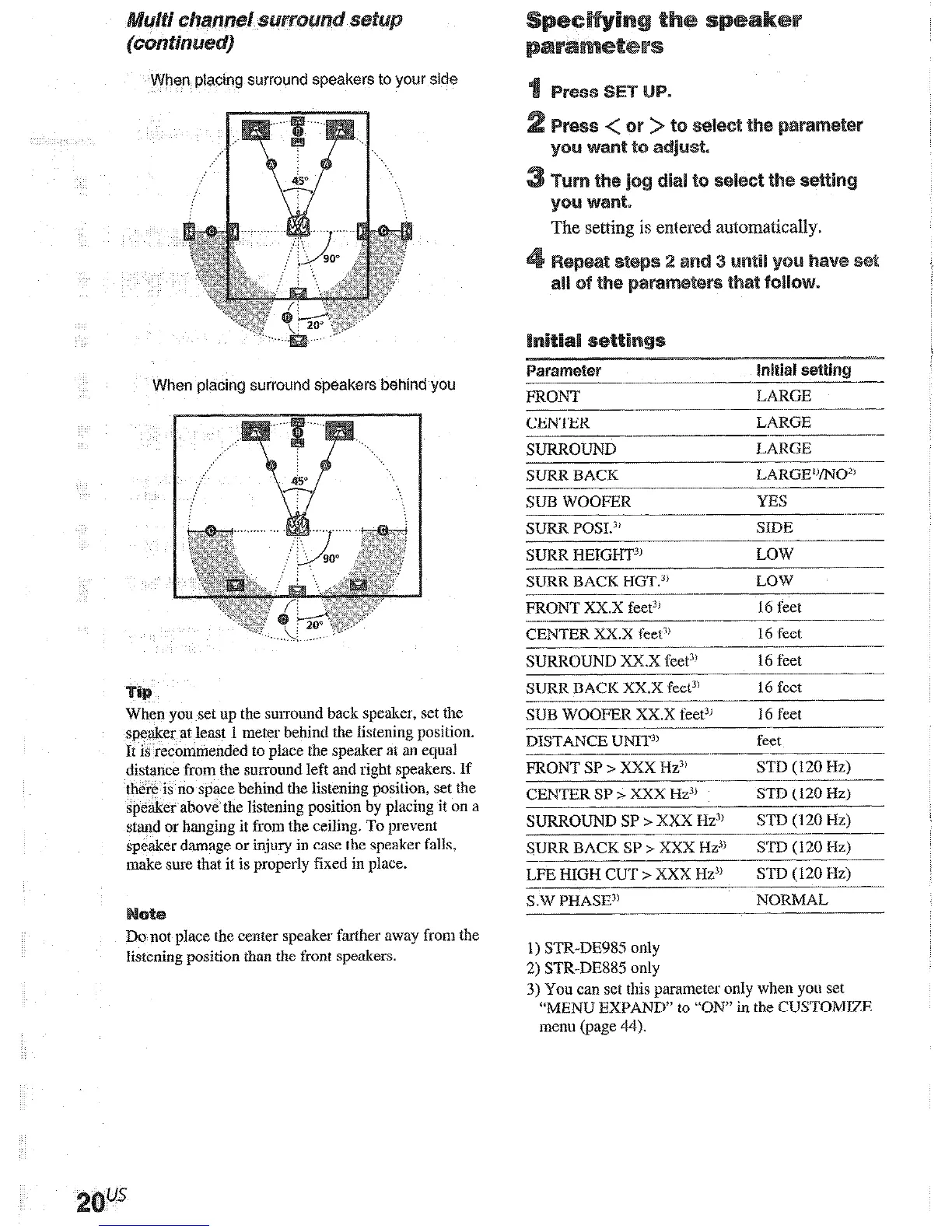
When placing surround speakers to your side
When placing surround speakers behind you
When you set up the surround back speaker, set the
speaker at least 1 meter behind the Iistcning posilion.
It is recommended to place the speaker at an equa1
distance from the surround left and right speakers. If
there is no space behind the listening position, set the
speaker above the listening position by placing it on a
stand or hanging it from the ceiling. To prevent
speaker damage or injury in case the speaker falls,
make sure that it is properly fixed in place.
Do not place the center speaker farther away from the
listening position than the front speakers.
The setting is entered automatically.
2s
ve set
me
CENTER
LARGE
-.---__
-..~-.--
SURROUND
LARGE
SURR BACK
LARCiE’VNO*’
SUB WOOFER
YES
SURR P0SI.j
SIDE
-__.
-... ___-.
SURR HEIGHT3’
LOW--
SURR BACK HGT.“’
LOW
FRONT Xx.X fee@
16 feet
CENTER Xx.X feet’)
16 feet
---.-.
____---
.-...-.___
SURROUND XX.X ceet3’
16 feet
SIJRR BACK Xx.X feet”
16 feet
SUB WOOFER Xx.X t’eetl’
I6 feet
DISTANCE U%Il?’
-___~
feet
-~
__-
-..___
FRONT SP > XXX Hz”
STD ( 120 Hz)
CENTER SP z XXX Hz3’
STD (120 Hz)
SURROUND SP > XXX Hz”
SIB (120 Hz)
~.-
SURR BACK SP > XXX Hz.‘”
STD (120 Hz)
L.FE HIGH CUT > XXX Hz”
STD (120 Hz)
SW PHASP
NORMAL
-
___ _______
1) STR-DE985 only
2) STR-DE885 only
3) You can set this parameter only when you set
“MENU EXPAND” to “ON” in the CUSTOMIZE
menu (page 44).
If you connect large speakers that will
effectively reproduce bass frequencies, select
“LARGE”. Normally, select “LARGE”.
If tile sound is distorted, or you feel a lack of
surround effects when using multi charnel
surround sound, select “SMALL” to activate
the bass redirection circuitry and output the
fmnt chamlel bass frequencies from the sub
woofer.
When the front speakers are set to “SMALL”,
the center, surround, and surround back
spe,akers are also automalicdly set to
“SMALII’ (unless previously set to 7Vo”).
If you connect a large speaker that will
effectively reproduce bass frequencies, select
“LARGE”. Normally, select “LARGE”.
However, if the front speakers are set to
“SMALL”, you cannot set the center speaker to
“LARGE”,
If the somld is distorted, or you feel a lack of
surround effects when using multi channel
sut~ound sound, select “SMALL” to activate
the bass redirection circuitry and output the
center chamiel bass frequencies from the front
speakers (if set to “LARGE”) or sub woofer.*’
if you do not connect a center speaker, select
“NO”. The sound of the center channel will be
ontput from the front speakers.*2
If you connect large speakers &at will
effectively reproduce bass frequencies, select
“LARGE”. Normally, select “LARGE”.
However, if the front speakers are set to
“SMALL”, you calmot set the surround
speakers to ‘&LARGE”.
If the sound is distorted, or you feel a lack of
stmound effects when using multi channel
surround sound, select “SMALL” to activate
the bass redirection circnit~y and output the
surround chamlel bass frequencies from the sub
woofer or other “LARGE” speakers.
If you do not connect surround speakers, select
-NO”,*3











 To Next Page