Reorient or relocate the receiving antenna.
Increase the separation between the equipment and
receiver.
Connect the equipment into an outlet on a circuit
different from that to which the receiver is
connected.
Consult the dealer or an experienced radio/TV
technician for help.
,AUTION
ou are cautioned that any changes or modification
at expressly approved in this manual could void
sur authority to operate this equipment.
lote to CATV system installer:
his reminder is provided to call CATV system
Istaller’s attention to Article 820-40 of the NEC that
rovides guidelines for proper grounding and, in
articular, specifies that the cable ground shall be
mnected to the grounding system of the building, as
lose to the point of cable entry as practical.
‘or customers in Canada
:AUTION
‘0 PREVENT ELECTRIC SHOCK, DO NOT USE
‘HIS POLARIZED AC PLUG WITH AN
.XTENSION CORD, RECEPTACLE OR OTHER
JUTLET UNLESS THE BLADES CAN BE FULLY
VSERTED TO PREVENT BLADE EXPOSURE.
:or customers in the United States and
banada
/>
ENERGY STAR@ is a U.S. registered
w mark.
AS an ENERGY STAR” partner, SOW
Corporation has determined that this
product meets the ENERGY STAR@
guidelines for energy efficiency.
his receiver incorporates Dolby* Digital and Pro
ogic Surround and the DTS** Digital Surround
ystem.
Manufactured under license from Dolby
Laboratories.
“Dolby”, I‘ Pro Logic” and the double-D symbol are
trademarks of Dolby Laboratories.
b “DTS”, “ES” and “DTS Digital Surround” are
registered trademarks of Digital Theater Systems,
Inc.
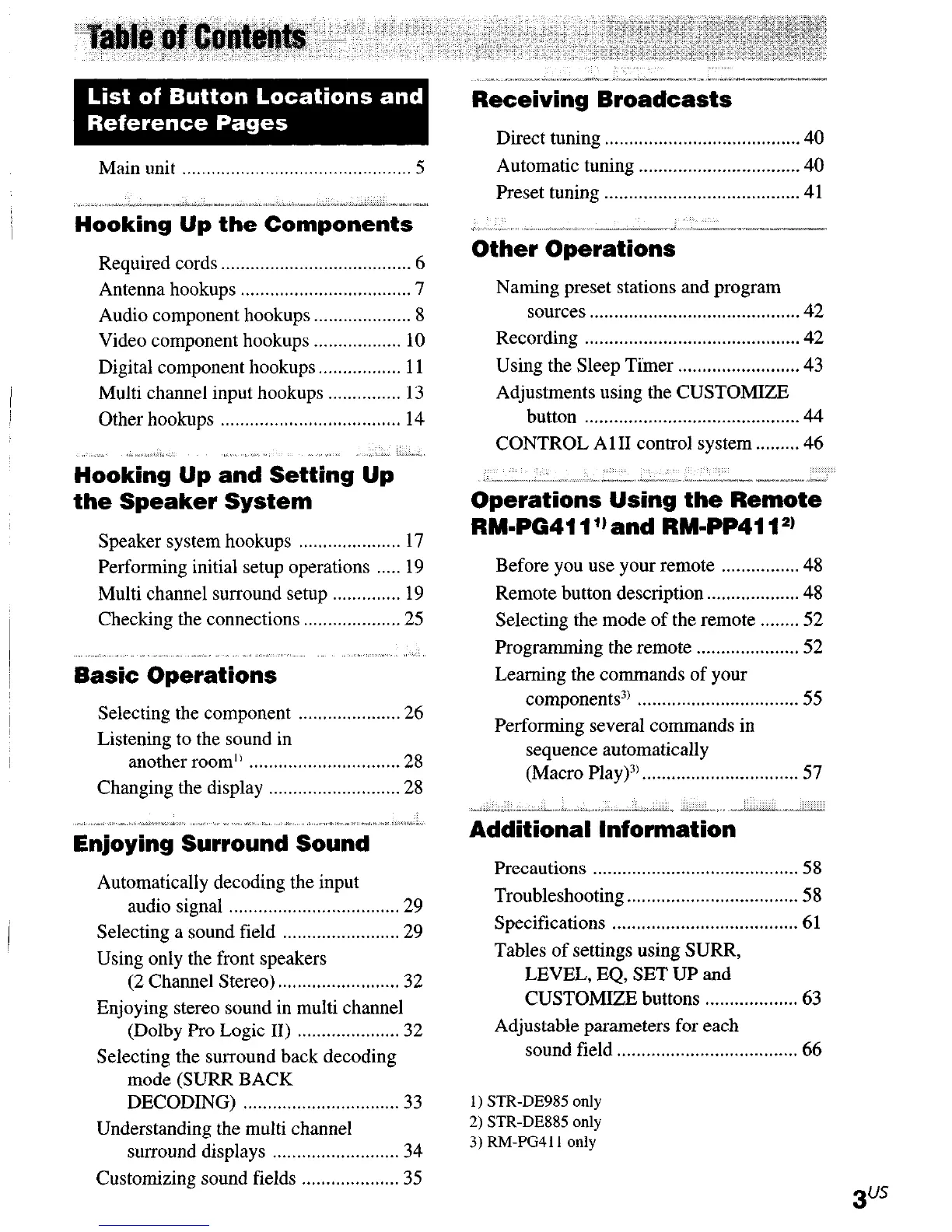
Main unit
...............................................
5
.... I_.....X.~~.ICltYI~~*...“..“.....l_
.. ,~._l>;“.l;,,i”--‘~~>_-l-~
Hooking Up the Components
Required cords
.......................................
6
Antenna hookups
...................................
I
Audio component hookups
....................
8
Video component hookups
.................. 10
Digital component hookups..
............... 11
Multi channel input hookups
............... 13
Other hookups
..................................... 14
,,.,, ._“_,”
H:okin~ Up and Setting Up
the Speaker System
Speaker system hookups
..................... 17
Performing initial setup operations
..... 19
Multi channel surround setup
.............. 19
Checking
the connections .................... 25
.............
Basic Operations
Selecting the component
..................... 26
Listening to the sound in
another room’)
............................... 28
Changing the display
........................... 28
1”1 “..“.._
........... “.X”.-X-.X_f
Enjoying Surround Sound
.....
Automatically decoding the input
audio
signal ................................... 29
Selecting a sound field
........................ 29
Using only the front speakers
(2 Channel
Stereo) ......................... 32
Enjoying stereo sound in multi channel
(Dolby Pro Logic
II) ..................... 32
Selecting the surround back decoding
mode (SURR BACK
DECODING)
................................ 33
Understanding the multi channel
surround
displays .......................... 34
Customizing sound fields
.................... 35
;^L -IlliI-.EI.^I-II-.~P_ .-- “,.ll-“lllli-“Ixl _-_/I-~~_x_
Receiving Broadcasts
Direct tuning . . . . . . . . . . . . . . . . . . . . . . . . . . . . . . . . . . . . . . . . 40
Automatic tuning . . . . . . . . . . . . . . . . . . . . . . . . . . . . . . . . . 40
Preset tuning . . . . . . . . . . . . . . . . . . . . . . . . . . . . . . . . . . . . . . . .
41
” ,..“.. ,; -,.-,..“-..___. ^
-l_l. I~i(i_i”“IX~
Other Operations
Naming preset stations and program
sources . . . . . . . . . . . . . . . . . . . . . . . . . . . . . . . . . . . . . . . . . . . 42
Recording . . . . . . . . . . . . . . . . . . . . . . . . . . . . . . . . . . . . . . . . . . . . 42
Using the Sleep Timer
. . . . . . . . . . . . . . . . . . . . . . . . . 43
Adjustments using the CUSTOMIZE
button . . . . . . . . . . . . . . . . . . . . . . . . . . . . . . . . . . . . . . . . . . . . 44
CONTROL A 1 II control system . . . . . . . . . 46
“,-.“- .lll.,,~ _.“.-._“_ “.--_” - _-” .--_^_. “_xl_as”_
Operations Using the Remote
RM-PG411 l) and RM=PP411*)
Before you use your remote
. . . . . . . . . . . . . . . . 48
Remote button description . . . . . . . ..-..... 48
Selecting the mode of the remote . . . . . . . . 52
Programming the remote
. . . . . . . . . . . . . . . . . . . . . 52
Learning the commands of your
components3) . . . . . . . . . . . . . . . . . . . . . . . . . . . . . . . . .
55
Performing several commands in
sequence automatically
(Macro Play)3) . . . . . . . . . . . . . . . . . . . . . . . . . . . . . . . .
57
,,-- -“_ I^..^ .-; ~. ,“,_ .-.. _~“*___ -._-_, c--~--x-~~--
Additional Information
Precautions . . . . . . . . . . . . . . . . . . . . . . . . . . . . . . . . . . . . . . . . . .
58
Troubleshooting . . . . . . . . . . . . . . . . . . . . . . . . . . . . . . . . . . .
58
Specifications . . . . . . . . . . . . . . . . . . . . . . . . . . . . . . . . . . . . . .
61
Tables of settings using SURR,
LEVEL, EQ, SET UP and
CUSTOMIZE buttons
. . . . . . . . . . . . . . . . . . . 63
Adjustable parameters for each
sound field . . . . . . . . . . . . . . . . . . . . . . . . . . . . . . . . . . . . .
66
1) STR-DE985 only
2) STR-DE885 only
3) RM-PG411 only











 To Next Page