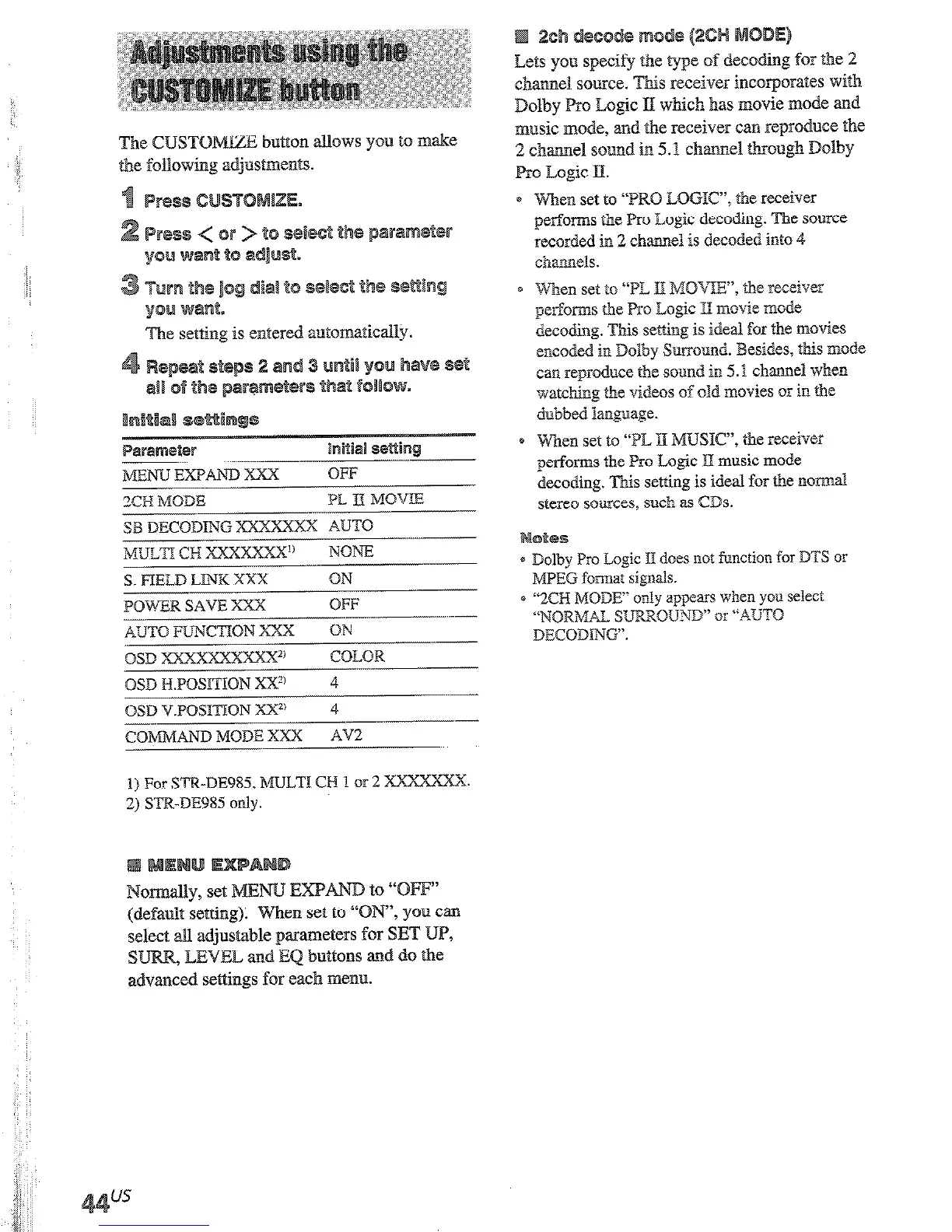
s. FIELD LINK xxx
QN
POWER SAVE XXX
OFF
AUTO FUNCTION xxx
OiJ
QSD xxxxxxxxxx2’
COLOR
QSD ELPOSITIQN XX”
4
QSD V.PQSITZQN xX2’
4
-_
COMMAND MODE XXX
AV2
1) For STR-BE%% MULTI CH 1 or 2 XXXXXXX.
2) ST&DE985 only.
m
“OFF’
(default setting). When set to “
‘, you can
select alI adjustable parameters for SET UP,
s
, LEVEL and EQ buttons and do tbe
advanced settings for each menu.
Lets
you specify the type of decoding for the 2
chatmel source. This receiver incorporates with
Dolby Pro Logic PI which has movie mode and
music mode, and the receiver can reproduce the
2 chamd sound in 5.1 cbmel tbmugh Dolby
Pro Logic II.
When set to “PRO LOGIC, the receiver
netimms the Pro L&c decodinp. The source
recorded in 2 channel is decoded into 4
channels.
When set to “TL li; MOVW, alhe receiver
p-forms the Pro Logic 3 movie mode
decoding. This setting is ideal fm the movies
encoded in Dolby Sunound. Besides, this mode
can reproduuce tie sound in 5.1 channel when
watching the videos of old movies or in tbe
dubbed language.
Wncn set to “PL E IMUSIC”, the receiver
performs the Pro Logic E music mode
decoding. This setting is ideal for tbe norm&
stereo sowces, such as CDs.
= Dolby Pro Logic ‘[4 does not function for DTS or
MPEG format signals.
0 “2CH MODE“ only appears when yoo select
“NQWMrZI SUWRQUnlD” or “AUTQ
DECODING”.
You can set this parameter usin
DECBDMG on the front panel.
page 33.
Lets you assign a function to MULTI CH
(fOr
STR-DE985, MaTI a-3 1 or 2). UQU cannot
assign -Lr@JNE;IB m PNONgB.
For
S’TR-DE985, you cannot assign the same
function to both B/%a’T% eH 1 and 2.
Lets you apply the last selected sound field to a
program source whenever it is selected. For
example, if you listen to CD with STmWNI
as the sound field, change to a different
program source, then return to CD,
STAD
will be applied again.
Let3 you turn on the receiver atztomatically
when the component connected via CCXVTROL
Al cords (see page 14) is turned on and the
playback is started.
When set to “OW, you can save the power
consumption of the receiver during standby
mode.
Lets you switch the function of this
the Sony components cohlnected via
Al cords (see page 14) automaticall,
connected component is set to play 1
Lets yen select the color of the on-s
d&glSiy.
display horizontally.
display vertically.
Lets you select the command mode
remote. Change the command mode
use 2 Sony receivers in the
same
rrx











 To Next Page