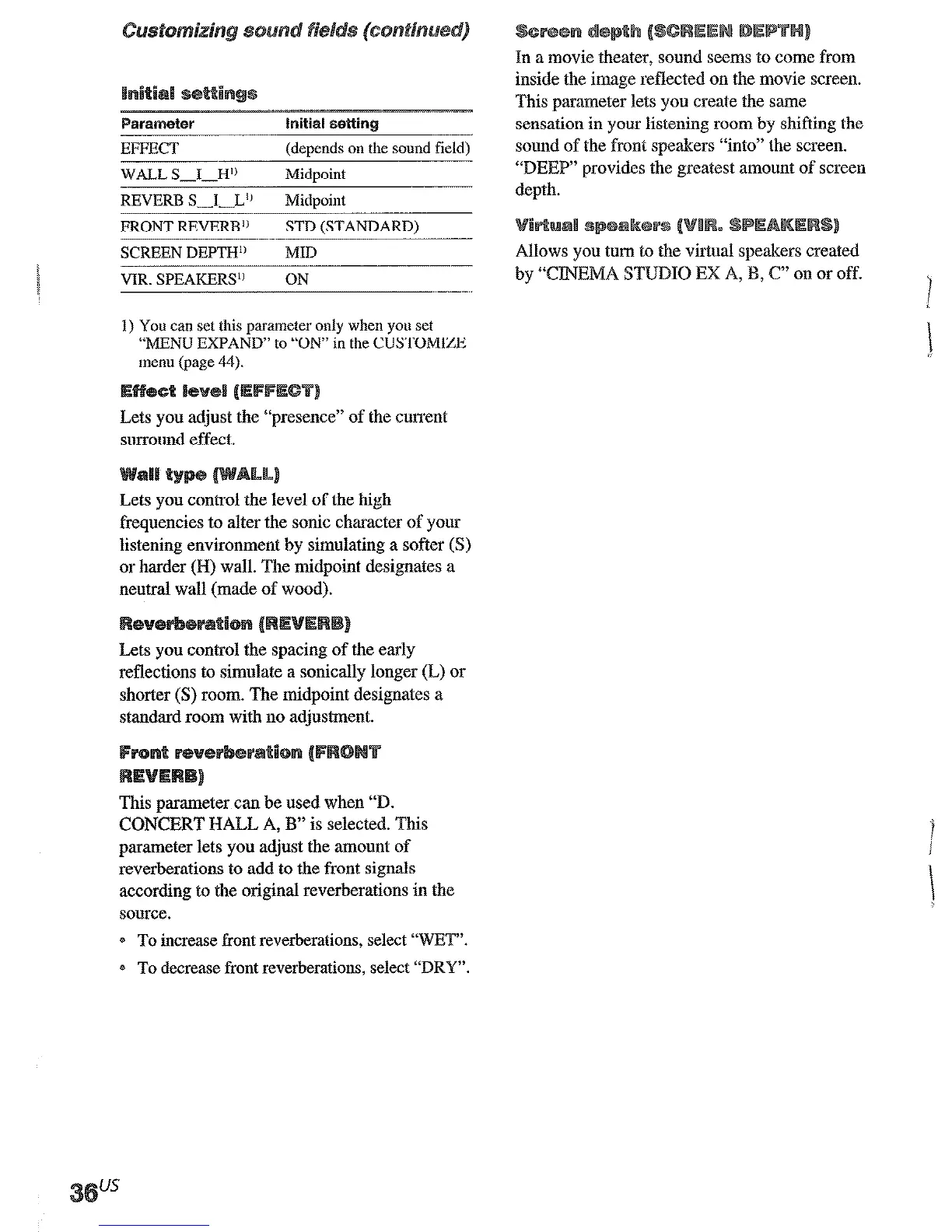
parameter Initial a@~in~
EFFECT
(deoends on the sound field)
WALL S.J-H1’
REVERB S-I-L”
Midpoint
Midpoint
FRONT REVERB’) STD (STANDARD)
SCREEN DEPTH” MID
VIR. SPEAKERS” ON
1) You can set this parameter only when you set
“MENU EXPAND” to “ON” in the CUSTOMIZE
menu @age 44).
Lets you acljust the “presence” of the
current
surround effect.
Lets you control the level of the high
frequencies to alter the sonic character of
yam
listening environment by simulating a softer (S)
or harder (H) wall. The midpoint designates a
neutral wall (made of wood).
reflections to simulate a sonically longer (L) or
shorter (S) room. The midpoint designates a
standard room with no adjustment.
This parameter can be used when ‘3.
CONCERT HALL A, B” is selected. This
parameter lets you adjust the amount of
reverberations to add to the front signals
according to the original reverberations in the
source.
* To increase tionc reverberations, select “WET”.
* To decrease front reverberations, select “DRY”.
inside the image reflected on the movie screen.
This parameter lets you create the xarue
sensation in your listening room by shifting the
sound of the front speakers “into” the screen.
“DEEP” provides the greatest amount of screen
depth.
Allows you turn to the virtual speakers created
by “CJNl3VIA STUDIO 33X A, B, c” on or off.
1
i
t
The LEVEL menu contains parameters that lel
you adjust the balance and volumes of each
speaker. The settiugs arc applied to all sound
fields.
The button lights up and the first parameter
The setting is entered automatically.
parameter
FRONT L-1-R
Center
CENTER LEVEL XXX dl?
OdB
SURR L LEVEL XXX dB OdB
SURR R LEVEL XXX dB
OdB
SURR BACK LEVEL XXX dB 0 dB
S. WOOFER LEVEL XXX dB
0 dB
L.FE MIX LEVEL XXX dB”
D. RANGE COMP. XXX”
OdB
OFF
1) You can set this parameter only when yen set
“MENU EXPAND” to “ON” in the ClJSTOMIZE
menu (page 44).











 To Next Page