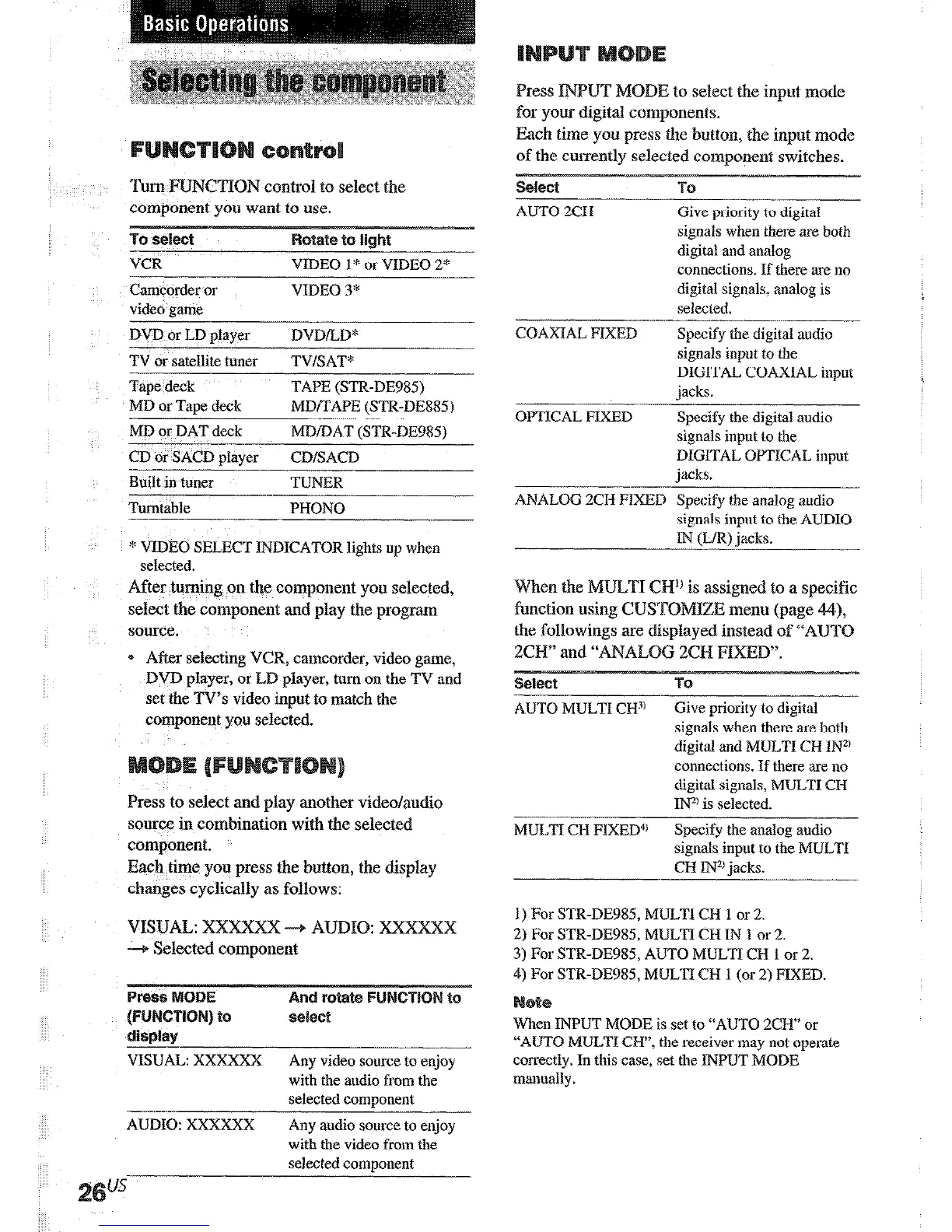
Turn ACTION control to select the
component you want to use.
To
select
borate to tight
VCR
VIDEO 1 * or VIDEO 2*
Camcorder or
VIDEO 3*
video game
DVD or LD player
DVDiLD*
TV or satellite tuner
TV/SAT*
Tape deck
TAPE (SIR-DE985)
MD or Taoe deck
MD/TAPE (SIR-DE8851
MD or DAT deck
--.
CD or SACD player
MD/DAT (STR-DE985)
CDiSACD
Built in tuner
TUNER
Turntable
PHONO
* VIDEO SELECT INDICATOR lights up when
selected.
After turning on the component you selected,
select the component and play the program
source.
* After
selecting VCR,
camcorder, video game,
DVD
player, or LD player, turn on the
TV and
set the TV’s video input to match the
component you selected.
Press to select and play another video/audio
source in combination with the selected
component.
Each time you press the button, the display
changes cyclically as follows:
VISUAL: XX~ -+ AUDIO: XXXXXX
-+ Selected component
VISUAL: XXXXXX
Any video source to enjoy
with the audio from the
selected comoonent
AUDIO: XXXXXX
Any audio source to enjoy
with the video from the
selected component
Press INPUT MODE to select the input mode
for your digital components.
Each time you press the button, the input mode
AUTO 2CH .-
-_
Give priority to digital
signals when there are both
digital and analog
connections. If there are no
digital signals; analog is
selected.
COAXIAL FIXED
OPTICAL FIXED
Specify the digital audio
signals input to the
DIGITAL COAXIAL input
jacks.
Specify the digital audio
signals input to the
DIGITAL OPTICAL input
jacks.
ANALOG WI-I FIXED Specify the analog audio
signals input to the AUDIO
1Ii (L/R) jacks.
-
When the MULTI CH’) is assigned to a specific
function using CU~~O~IZ~ menu (page 44)
the followings are displayed instead of “AUTG
ZCH” and “ANALOG 2CI-I PIXED”.
Select
TO
AUTO MULTI CH”’
Give priority to digital
signals when there are both
digital and MULTI CR INZ)
connections. If there are no
digital signals, MULTI CH
IIF
is selected.
MULTI CH FIXED4’
Specify the analog audio
signals inpnt to the MULTI
CH INa jacks.
1) For STR-DE985 MULTI CH 1 or 2.
2) For STR-DE985, MULTI CH IN 1 or 2.
3) For STR-DE985, AtJTO MULTI CH I or 2.
4) For STR-DE985 MULTI CH I (or 2) FIXED.
When INPUT MODE is set to “AIJTO 2Cw” or
“AUTO MULTI CH”, the receiver may not operate
correctly. In this case, set the INPUT MODE
manually.
Press MU~~Tl/2CH ANALOG DIRECT to
enjoy the audio source connected to the
ULTI CR IN’) jacks or analog 2 channel
input jacks. Only volume control and the front
spe‘aker balance can be adjusted when set to
2CH ANALOG DIRECT. When set to MULT
CH DIRECT), you can adjust balance and
level of all the speakers. When this function is
on, the surround effects are turned off.
select
MULTI CH
DIRECT”
--
2CH ANALOG
DIRECT
__-.
TO
Enjoy the audio source
connected to the MULTI CH
IN” jacks. MULTI CHIN”
indicistor lights up in the
display. This mode is suitable
for enjoying high quality











 To Next Page