Remote
Operations Fumetim
E%MQrm
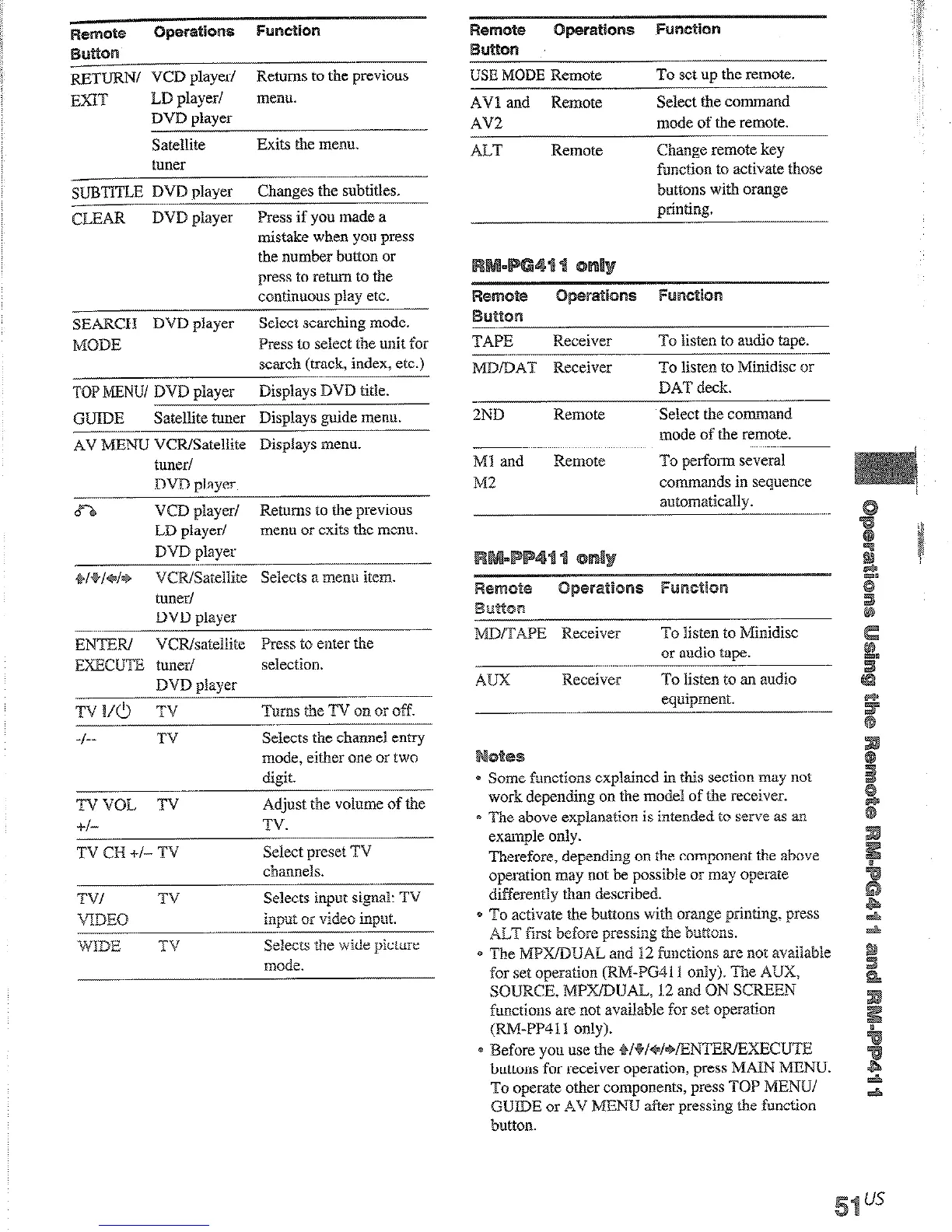
USE MODE Remote
To set up the remote.
Remotci
0peratlons Function
Buttton
~TlJRN/ VCD
player/
Returns to the previous
EXIT
LD player/ menu.
DVD player
Satellite
Exits the menu.
f,l”CT
.tYWAiQPl
dps tracks.
AVl and Remote
AV2
Select the command
mode of the remote.
ALT
Remote
Change remote key
function to activate those
buttons with orange
orintina.
SUBTITLE DVD player
Changes the subtitles.
--..-...-
CLEAR
DVD player
Press if you made a
mistake when you press
the number button or
press to return to the
continuous play etc.
:arches tracks
orward or backwardl.
SEARCH DVD player
Seiect searching mode.
MODE
Press to select the unit for
search (track, index, etc.)
TAPE
Receiver
-.
MDfDAT Receiver
ZND
Remote
To Men to audio tape.
To listen to Minidisc or
DAT deck.
Select the command
mode of the remote.
Ml and
Remote
To perform several
M2
commands in sequence
automaticallv.
1st forwards or
winds.
TOP MENU/ DVD player
Displays DVD title.
arts play.
GUIDE
Satellite tuner Displays guide menu.
. ..-
AV MENU VCR/Satellite Displays menu.
tuner/
DVD slaver
8-b
VCD playcrl Returns to the previous
LD player/
menn or exits the menu.
DVD slaver
+f+ld*
VCRfSateilite Selects a meno item.
tuner/
mses play
or record.
also starts recording
ith components in
cord standby.)
DVD
player
MD/TAPE Receiver
To listen to Minidisc
or audio tape.
ENTER/ VCRfsateliite Press to enter the
EXECUTE tuner/
selection.
DVD player
TV I/O TV
Turns the TV on or off.
f
_ __
TV
Selects the channel entry
mode, either one or two
digit.
TVVOL TV-
Adjust the volume of the
AWX
Receiver To listen to an audio
eouinment.
.ops play.
0 Some functions explained in this section may not
work depending on the model of the receiver.
e The above explanation is intended to serve as an
example only.
Therefore, depending on the
component the
above
operation may not be possible or may operate
differently than described.
a To activate the buttons with orange printing. press
ALT first before pressing me buttons.
* The MPXfDUAL and 12 functions are not available
for set
operation @J&P641 1 only). The AUX,
SOURCE, MPXDLJAL, 12 and ON SCREEN
functions are not available for set operation
(RM-PI311 only).
e Before you use the sBf+f~f=+fENTERfEXECLJ’i”E
buttons for receiver operation, press MAIN MENU.
To operate other components, press TOP MENUf
GUIDE or AV MENU after pressing the function
button.
+f-
TV.
TV CH +f- TV
TV/ TV
VDEQ
Select preset TV
channels.
Selects input signal: TV
input or video
input.
:lects information
splayed on the TV
‘reen.
WIDE TV
Selects the wide picture
mode.
:lects information on
e display.











 To Next Page