Introduction
DVR User Manual
4
1.3 Front Panel Descriptions
The following descriptions are for reference only.
Name Descriptions
REC When recording the light is blue
Net When you have access to a network the light is blue
Power Power indicator: when powered the light is blue
1.4 Rear Panel Descriptions
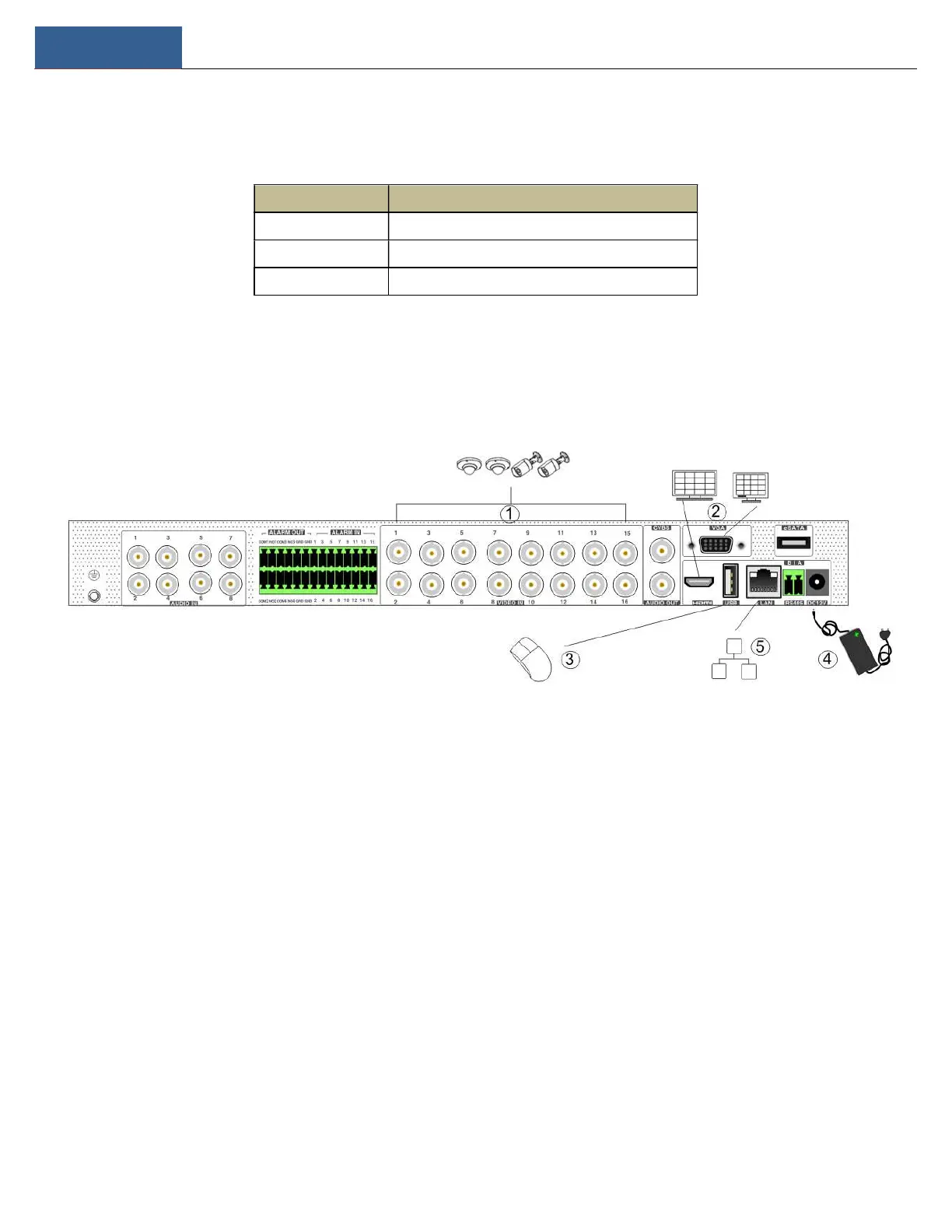
To quickly get started, connect the following to your recorder in the following order. Please refer to the following figure (H24HRL shown for reference).
1. Connect analog cameras to the video input ports (BNC) of the recorder.
2. Connect a monitor to the recorder via VGA or HDMI cable (not included).
3. Connect the included optical mouse into any USB port of the recorder.
4. Connect the power adapter to the recorder and plug power cord into a 120VAC 50/60Hz outlet.
5. Connect recorder to network (optional, but necessary if you plan to use IP cameras or connect to recorder remotely)
1.5 Connections
Video Connections
Video Input:Supports BNC video input.
Video Output: Supports CVBS/VGA/HDMI video output. You can connect to a monitor through these video output interfaces simultaneously or
independently.
Audio Connections
Audio Input: Connect to microphone, pickup, etc.
Audio Output: Connect to headphone, sound box or other audio output devices.



 To Next Page