PTZ
DVR User Manual
29
6 PTZ
6.1 PTZ Control Interface Introduction
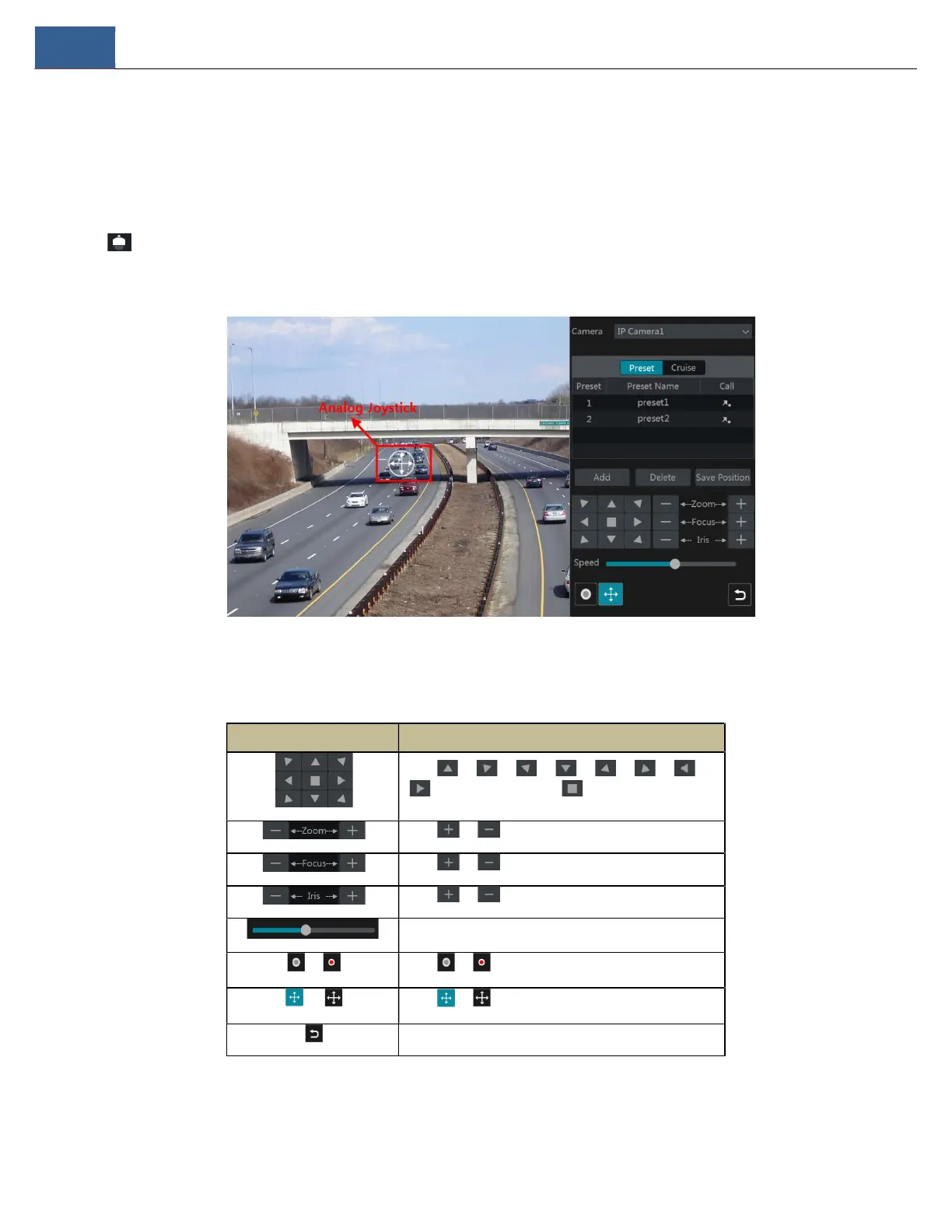
You can control the IP dome or PTZ camera for PTZ control.
Click on the tool bar at the bottom of the live view window to go to the PTZ control interface as shown below. You can select another IP
dome or PTZ which connects to the IP camera on the top right of the interface for PTZ control.
Guide to the buttons on the bottom right of the interface:
Button Meaning
Click / / / / / / /
to rotate the dome. Click to stop rotating the dome.
Click / to zoom in / out on camera image.
Click / to increase / decrease the focal length.
Click / to increase / decrease the iris of the dome.
Drag the slider to adjust the rotating speed of the dome.
/ Click / to start / stop recording.
/
Click / to hide / show the analog joystick.
Click to return to the live view interface.
Analog Joystick Control
The analog joystick on the left side of the interface provides quick PTZ control. The dome or PTZ will rotate when you drag the analog joystick. The



 To Next Page