FAQ
DVR User Manual
91
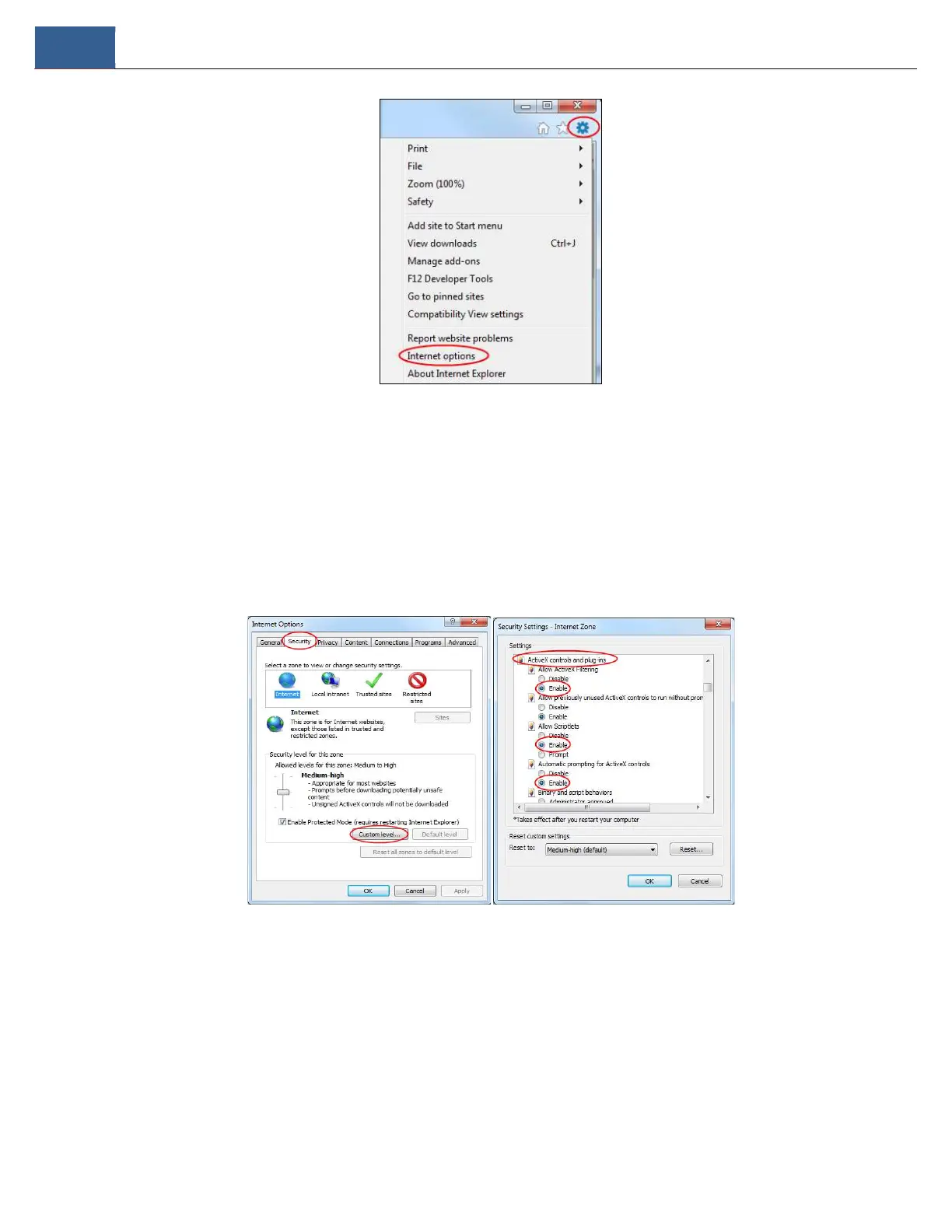
② Select SecurityCustom Level. Refer to Fig 10-1.
③ Enable all the sub options under “ActiveX controls and plug-ins”. Refer to Fig 10-2.
④ Then click “OK” to finish setup.
b. Other plug-ins or anti-virus may block ActiveX. Please disable or do the required settings.
Fig 10-1 Fig 10-2
Q9. How do I play the backup file?
a. Recording backed up by DVR: insert the USB device in which the record backup files is saved to the USB interface of the PC and then open the
USB device path. The record can be backed up in the private format and AVI format by DVR.
If you select the private format when backing up record by DVR, a RPAS (Recording Player Application Software)compression package will be
backed up to the USB device automatically along with the record data. Uncompress the “RPAS.zip” and then click “RPAS.exe” to set up RPAS. After
the setup is completed, open RPAS player and then click “Open Folder” button in the middle of the interface to select the record data. Refer to Fig
11-1.



 To Next Page