14.2 Operation
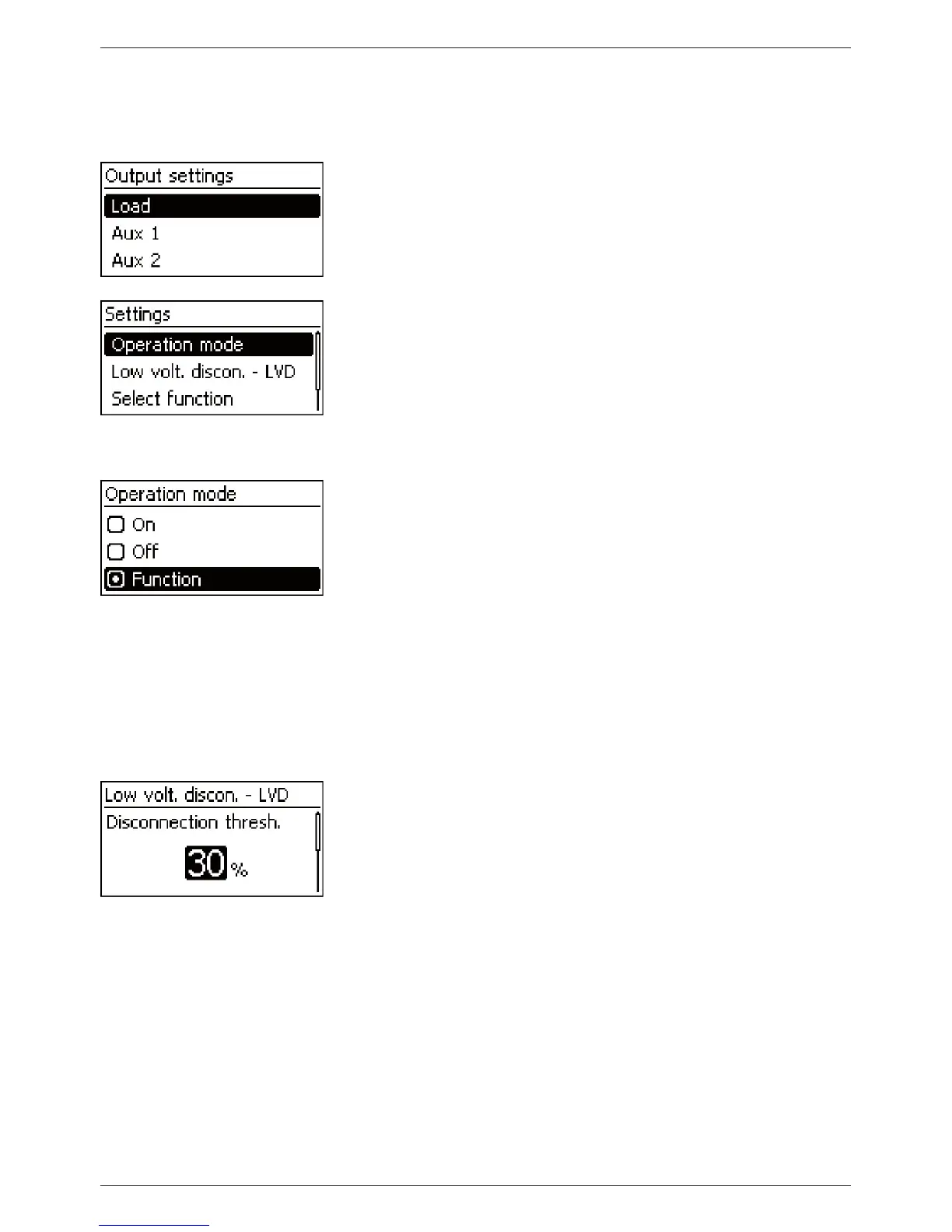
The control functions are set for each output using the following steps:
Setting the operating mode
‘Main menu’
‘Output settings’
1. Select an output in the ‘Output settings’ window (Fig. left).
2. Press ‘SET’. The menu for setting the output appears,
‘Operation mode’ is selected (Fig. left).
3. Press ‘SET’. The option fields for setting the operating mode
are displayed.
Note
The load output is switched on in the factory settings (oper-
ating mode = ‘On’ ).
4. Press
sr to select an option field:
‘On’: the output is switched on.
‘Off’: the output is switched off.
‘Function’: the control functions automatically switch the
output.
5. Press ‘SET’. The selected operating mode is switched on
(Fig. left).
6. Press ‘ESC’ to leave the page.
Setting the deep discharge protection
‘Main menu’
‘Output settings’ <Output> ‘Low volt.
discon. - LVD’
1. Press ‘SET’. The switch-off threshold is displayed (Fig. left).
2. Use
sr to set the switch-off threshold and confirm with
‘SET’.
Note
Avalue≥30%isrecommended
3. Press
s. The switch-on difference is shown.
4. Press ‘SET’, use
sr to set the switch-on difference and confirm
with ‘SET’ .
5. Press ‘ESC’ to leave the page.



 To Next Page