3-2
122997-341 Operator Manual Component Identification
3.2 POWER-OFF/
STANDBY Switch
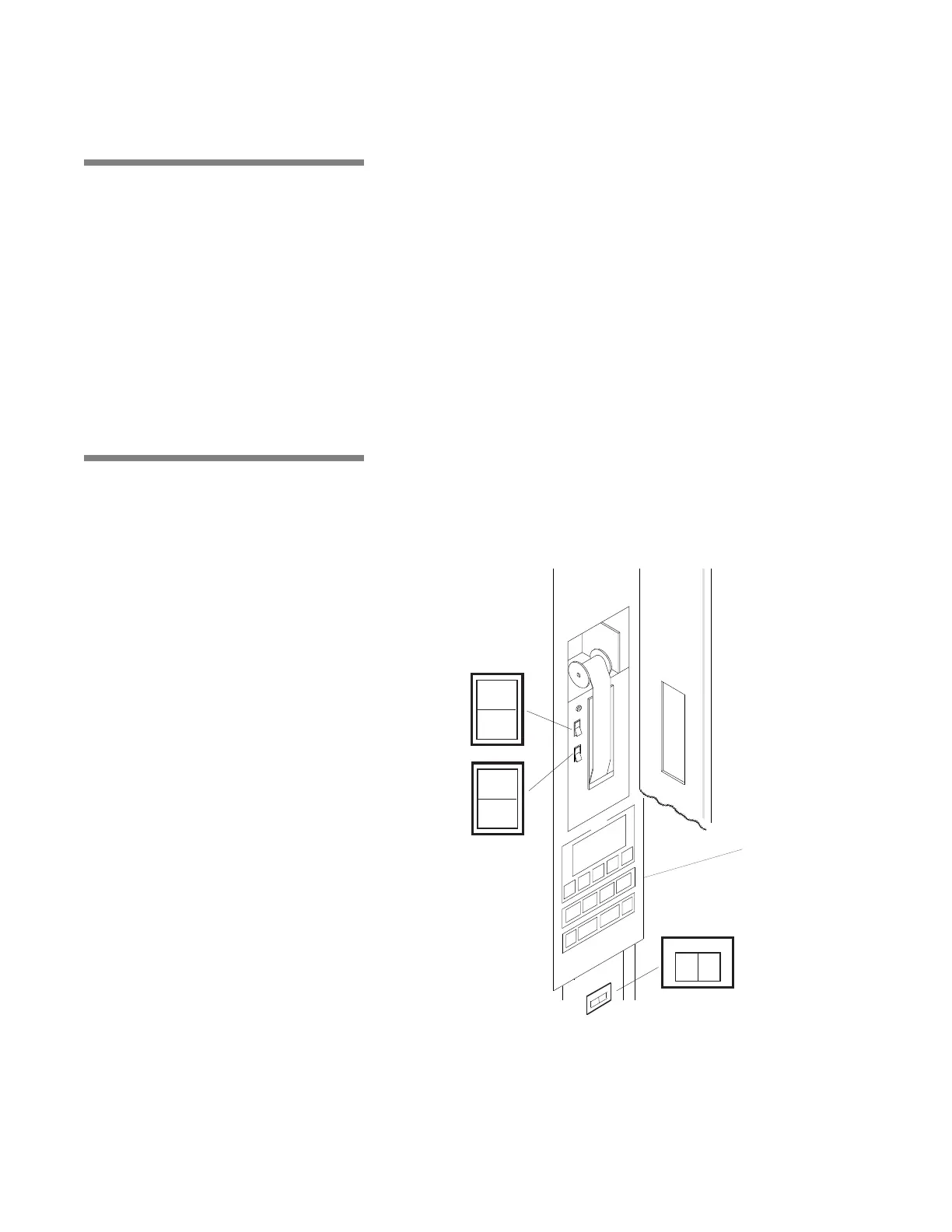
POWER-OFF/STANDBY switch, located behind the printer door,
includes two settings which direct operation of control (see Figure 3-
2):
• POWER – Press top portion of POWER-OFF/STANDBY switch to
initialize control and place control in Ready Mode.
• OFF/STANDBY – Press bottom portion of POWER-OFF/
STANDBY switch to initiate Shutdown Cycle and place control in
Standby Mode.
NOTE: Control should be placed in Standby Mode for last cycle of the
day and when washer is not in use for an extended period of time.
IMPORTANT: POWER-OFF/STANDBY switch does not turn off
electrical power to unit.
3.3 Interior Light Interior light, can be manually controlled by operator through a tog-
gle switch located behind printer door, below control panel, on load
side (see Figure 3-2). Interior light illuminates wash chamber when
loading or unloading washer, or it can left ON during a whole wash-
ing cycle to view washing process.
POWER
OFF
STANDBY
PRINT
PRINT
VALUES
ON
OFF
INTERIOR LIGHT
Figure 3-2. Control Column
Control Panel



 To Next Page