3-3
Component Identification Operator Manual 122997-341
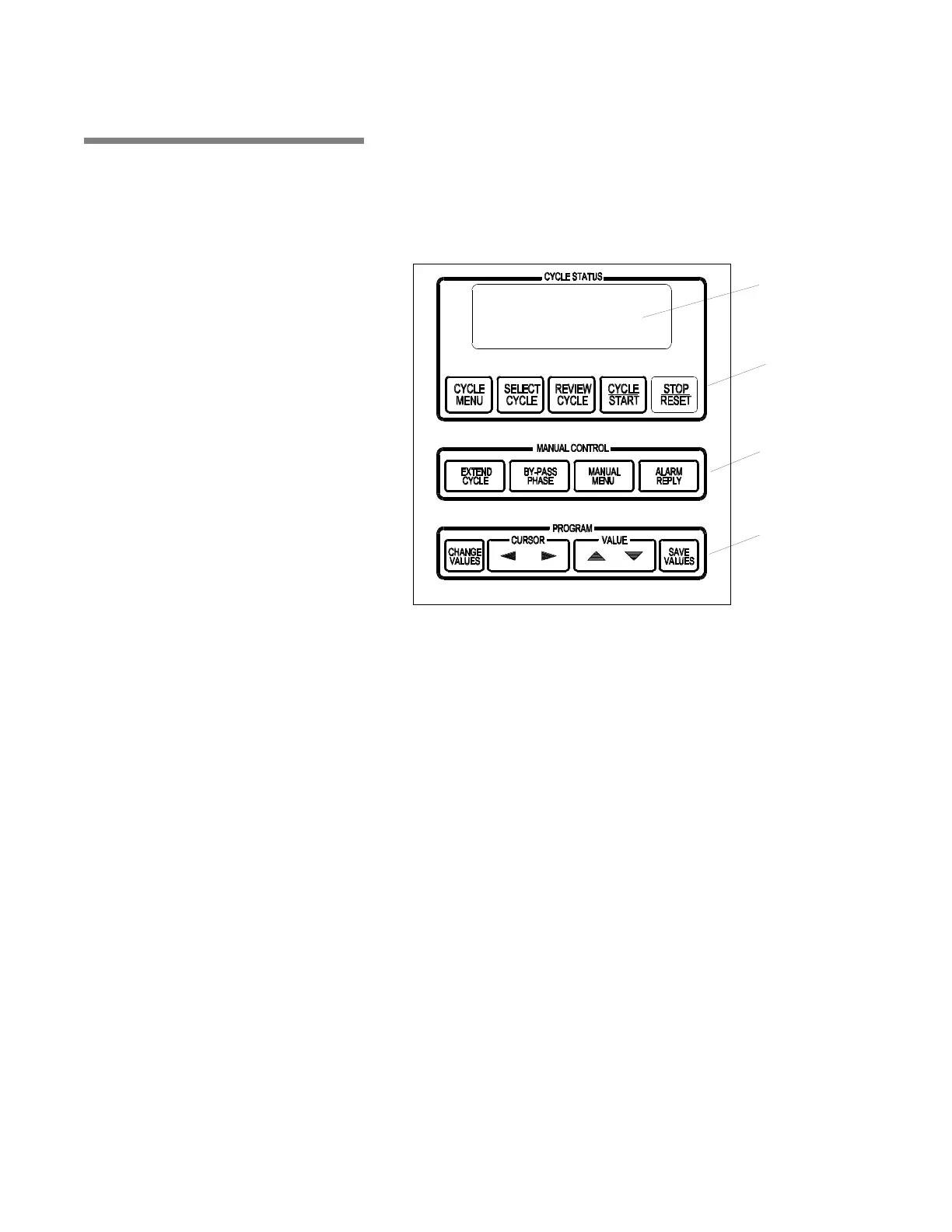
3.4 Control Panel Control Panel is used to direct all washer functions (see Figure 3-3).
Operator may program specific cycles, review and select cycles,
start, stop or reset cycle operation, extend or bypass cycle phases,
and monitor cycle performance.
3.4.1 Display Screen Two line alpha-numeric screen displays cycle program data on
demand, in-cycle performance data and operator instructions. Dis-
play screen also indicates certain abnormal conditions that may
occur during a cycle.
3.4.2 Cycle Status Touch
Pads
• CYCLE MENU touch pad – press to view first cycle menu. Press
again to advance screen to next cycle menu. Three menus are
available, each with four cycles.
• SELECT CYCLE touch pad – press until desired cycle name
flashes.
NOTE: When a displayed cycle name or phase value is selected,
corresponding word or digit flashes.
• REVIEW CYCLE touch pad – press to review cycle phases and
values programmed for selected cycle.
• CYCLE/START touch pad – press once to display name of
selected cycle. Press a second time to start cycle.
NOTE: Selected cycle name remains on screen for 5 seconds
Figure 3-3. Control Panel
Display Screen
Cycle Status
Touch Pads
Manual Control
Touch Pads
Program Touch
Pads



 To Next Page