3-5
Component Identification Operator Manual 122997-341
• CURSOR (left or right) touch pad – press until item to be
changed (word, letter, or number) flashes.
• VALUE (up or down) touch pad – depending on item flashing
(selected), press to either toggle between answer selections or
scroll through alphabet and numbers 0 through 9.
NOTE: Alphabet includes characters for an underline (_) and a
space ( ).
• SAVE VALUES touch pad – press to save changes made, exit
Change Values mode and return screen to cycle menu.
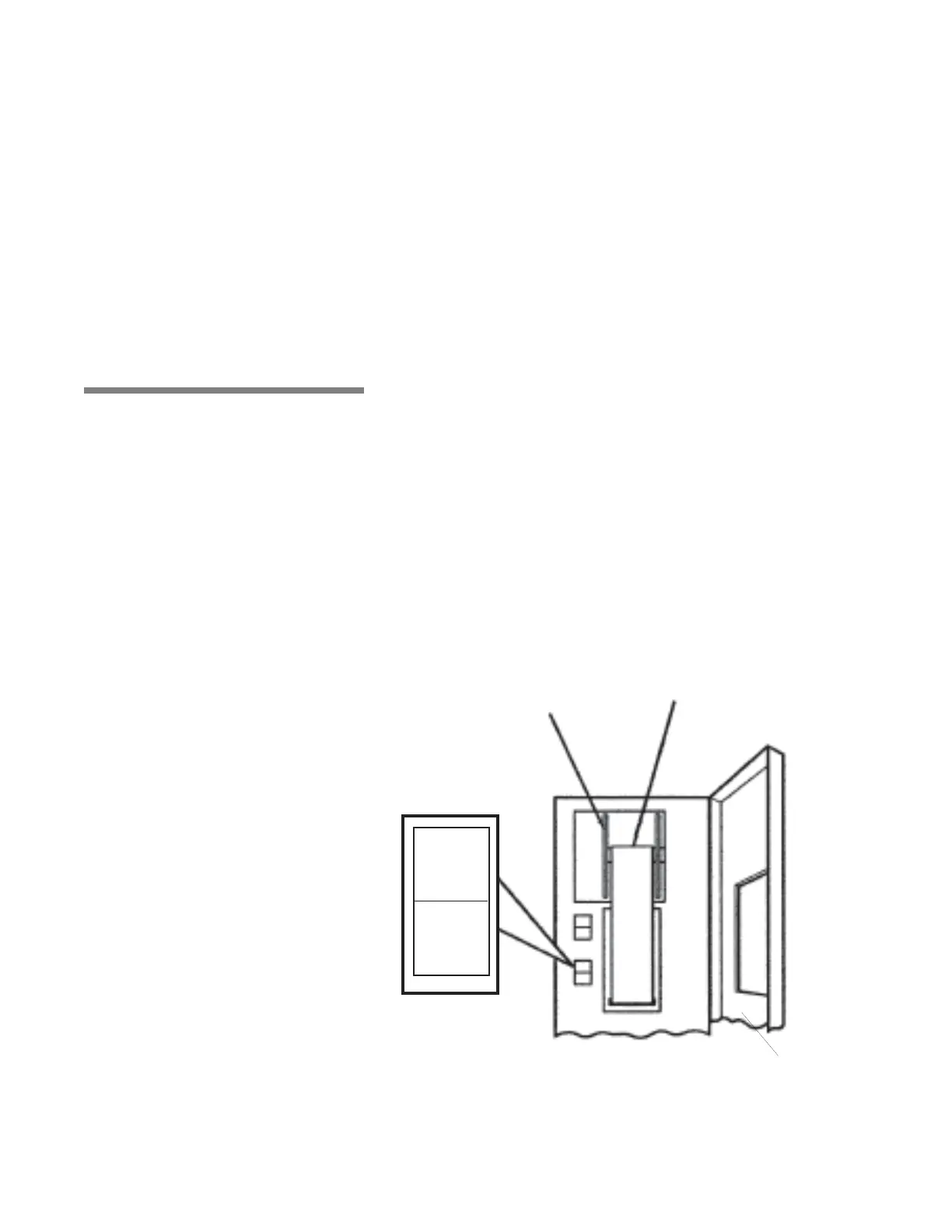
3.5 Printer Printer records pertinent cycle data on 2-1/4" wide thermal paper
(see Figure 3-4). Refer to S
ECTION 6.7, PRINTER PAPER, for information
on changing paper roll and storing thermal paper.
3.5.1 Printer Function Switch Printer Function Switch controls the following two printer functions:
• PRINT – press top of Printer Function Switch to generate a print
of alkaline and acid detergent setpoints (if conductivity option)
and all RTD temperatures (actual water temperature).
• PRINT VALUES – press bottom of Printer Function Switch to
generate a complete printout of all cycle parameters.
PRINT
PRINT
VALUES
Figure 3-4. Printer
Thermal Paper
Take-Up Spindle
Printer Door



 To Next Page