Start POSITool
Operation manual
ID 442233.05
WE KEEP THINGS MOVING
13
4
• Step 5: This step provides the user with databases of the STÖBER standard
motors. When a motor is selected, the motor data are entered in the project.
• Step 6: This step concerns the configuration of the inverter. This includes the
setting of the type of inverter used, the option modules and the braking
resistor. With the SDS 5000, the IGB-Motionbus is activated during this step.
A control bar is available to switch between the different steps. You can skip
between steps, terminate the configuration or exit the configuration.
Additional assistants are loaded to the project when applications and the inverter
controller are selected. These show a selected set of available parameters. The
assistants make parameterization easy and clear.
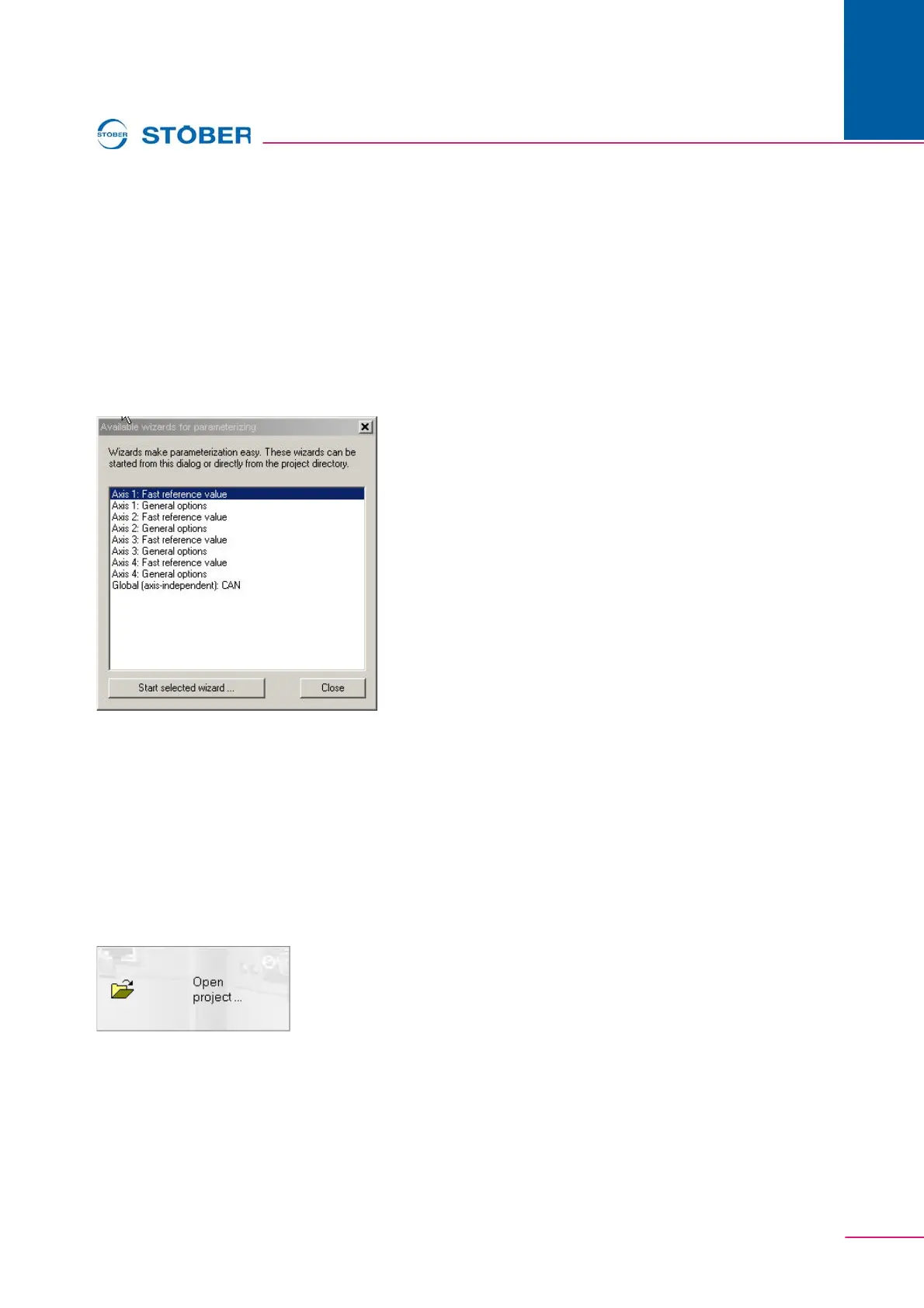
Fig. 4-2 Available assistants
After the configuration is concluded, a selection screen automatically appears
(Fig. 4-2 Available assistants).
The assistants can be selected there for the individual axes and started via the
applicable button.
The "close" button closes the screen.
4.2 "Open project"
If you want to process an existing project, select the middle button in the start
screen. A dialog appears which can be used to select and open a file.


 To Next Page