9
POSITool – Options
ID 442233.05
WE KEEP THINGS MOVING
Operation manual
54
9.2.2 Import
To import a file, select menu item Import parameter values... in the File menu.
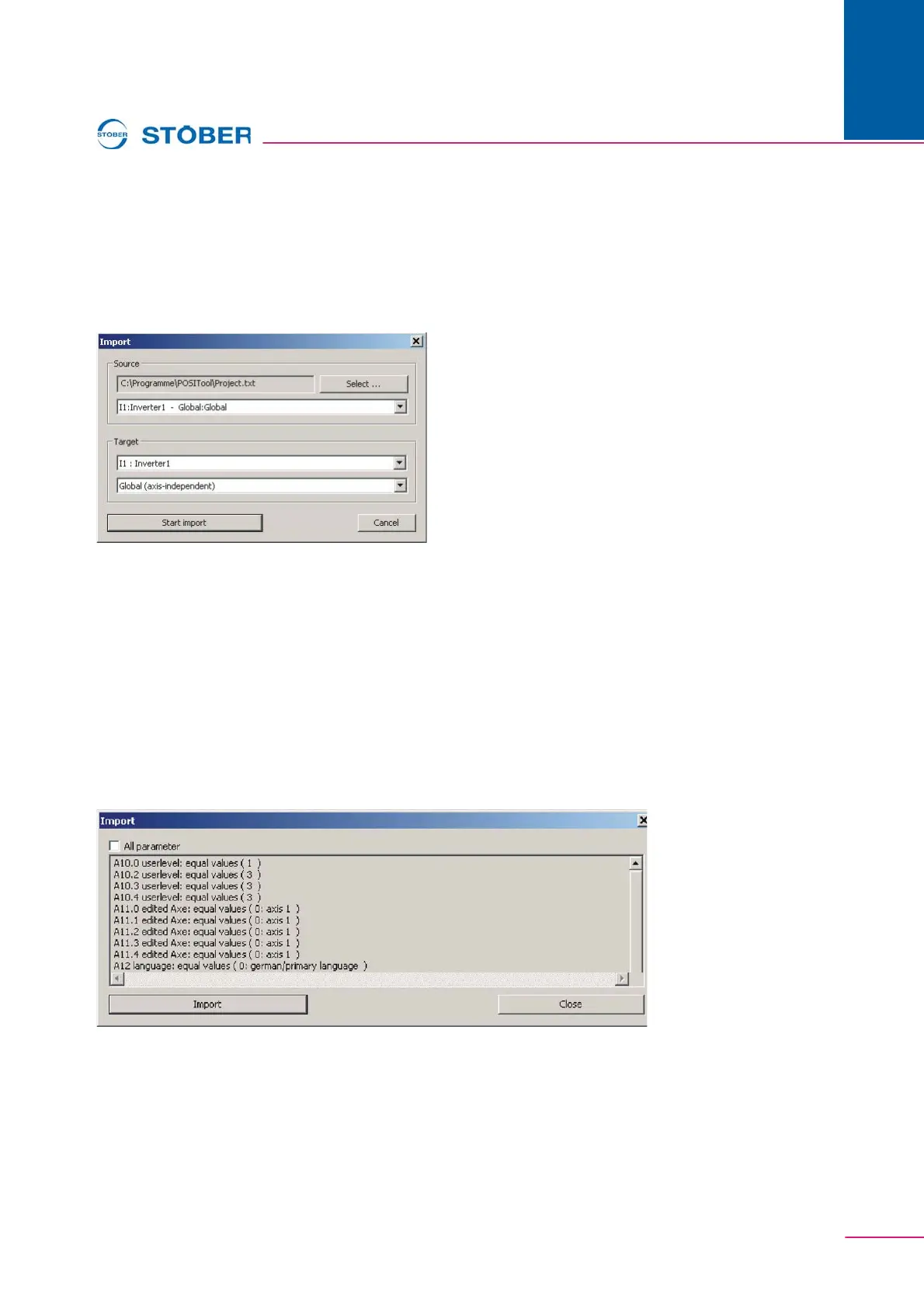
After the file is selected with the Open file dialog, the screen shown in appears.
An area of the CSV is assigned a target area in POSITool. This makes it possible,
for instance, to import the axis 1 area of the CSV file to axis 3.
Fig. 9-3 Setting dialog for the import
After assignment has been completed the import is started. A list of parameters
appears which exist in both the import file area and the target area. The first
section of the list shows the parameters which are identical in both areas. Then
the list appears with the parameters which are not set identically and the value in
the target area which the import changed.
When the checkbox All parameter is activated in the dialog, those parameters are
also shown which exist exclusively either in the area of the import file or in the
target area. The parameters which exist in the import file but not in the target area
are ignored during the import. Parameters which exist in the target area but not in
the import file remain unchanged.
Fig. 9-4 Parameter list with checkboxes


 To Next Page