Diagnosis
Operation manual
ID 442233.05
WE KEEP THINGS MOVING
43
8
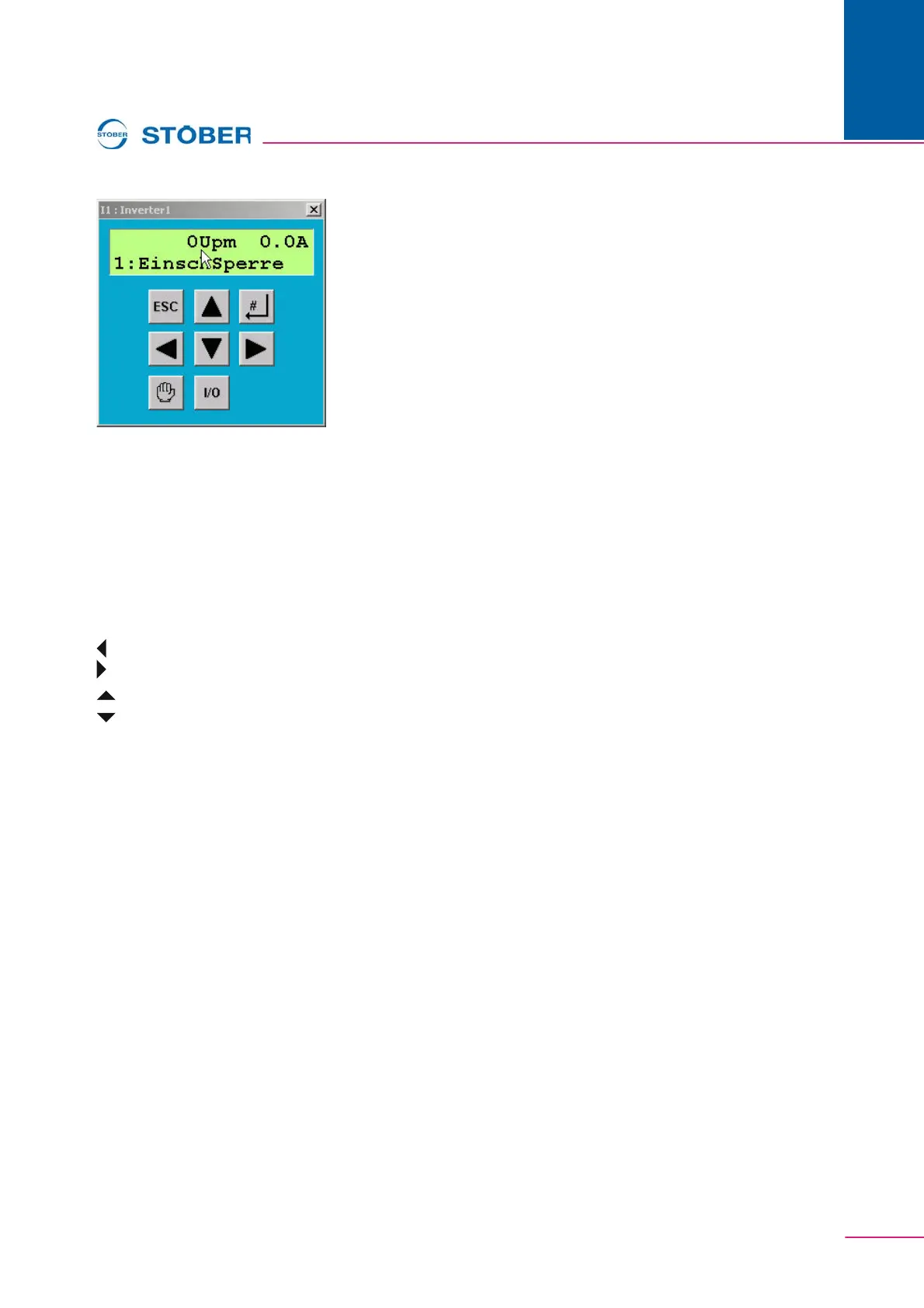
Fig. 8-3 Simubox
Simubox is opened in the inverter entry under Commissioning\Simubox. Simubox
can only be used in online mode. If it is opened in offline mode, a display like the
one in appears.
Simubox is also available as a stand-alone application (i.e., it can be opened
regardless of POSITool).
The buttons of Simubox can be activated with the keyboard of the PC:
ESC button: ESC key
# button: Return / Enter
button: Pfeiltaste nach links auf Ziffern- oder Curserblock
button: Pfeiltaste nach rechts auf Ziffern- oder Curserblock
button: Pfeiltaste nach oben auf Ziffern- oder Curserblock
button: Pfeiltaste nach unten auf Ziffern- oder Curserblock
Hand button: ‚H' key
I/O button: ‚I' or ‚1' key
8.4 Scope
The Scope function is used to record parameters. It is called in the inverter entry
under Commissioning\Scope - new picture.
Settings can always be made. A picture can only be started and read in online
mode.


 To Next Page