Setup of POSITool
Operation manual
ID 442233.05
WE KEEP THINGS MOVING
15
5
5 Setup of POSITool
This chapter explains the setup of POSITool. This includes the definition of
various areas and the explanation of management functions.
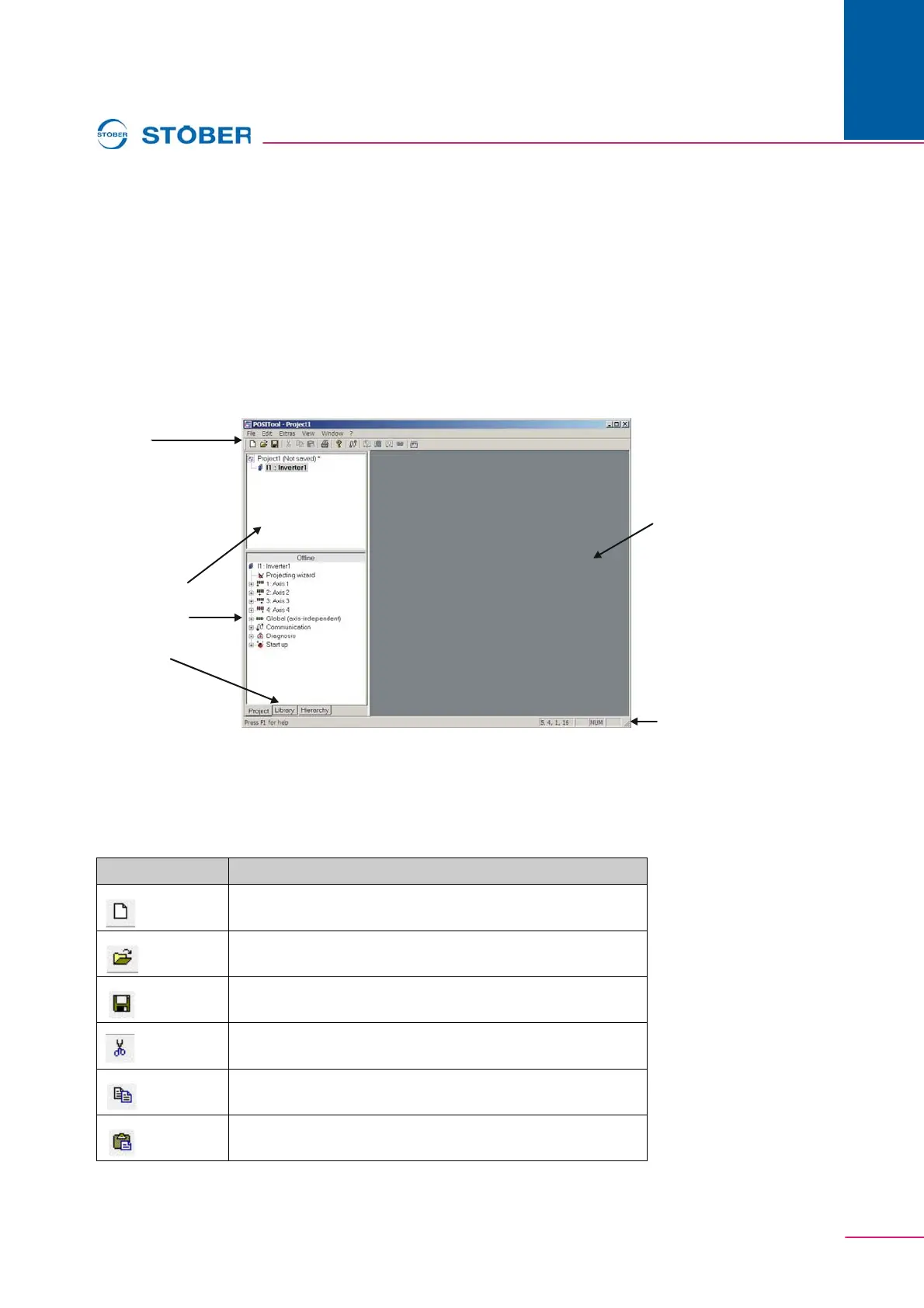
POSITool contains several areas which must be distinguished between (see ). To
the left you will find project administration with the project view, the library view
and the hierarchy view. The views can be selected with the tabs at the bottom of
project administration.
The right-hand side contains the working area. Configurations and parameter lists
can be opened and processed here.
Fig. 5-1 POSITool design
5.1 Toolbar
The buttons of the toolbars have the following functions:
Toolbar
Working
area
Status bar
Switch to:
+ libraries
+ hierachy view
Administrative
area:
Project view
with
inverter view
Button Function
Create new project
Open existing project
Save current project
Cut marking
Copy marking
Paste clipboard


 To Next Page