5
Setup of POSITool
ID 442233.05
WE KEEP THINGS MOVING
Operation manual
18
• New inverter adds a new inverter to a project. The new inverter directory is
indicated in the project view and can be edited there.
• New inverter from connected inverter adds an inverter configuration to a
project which (the configuration) is read from a connected inverter. The
reverse documentation is indicated in the project view.
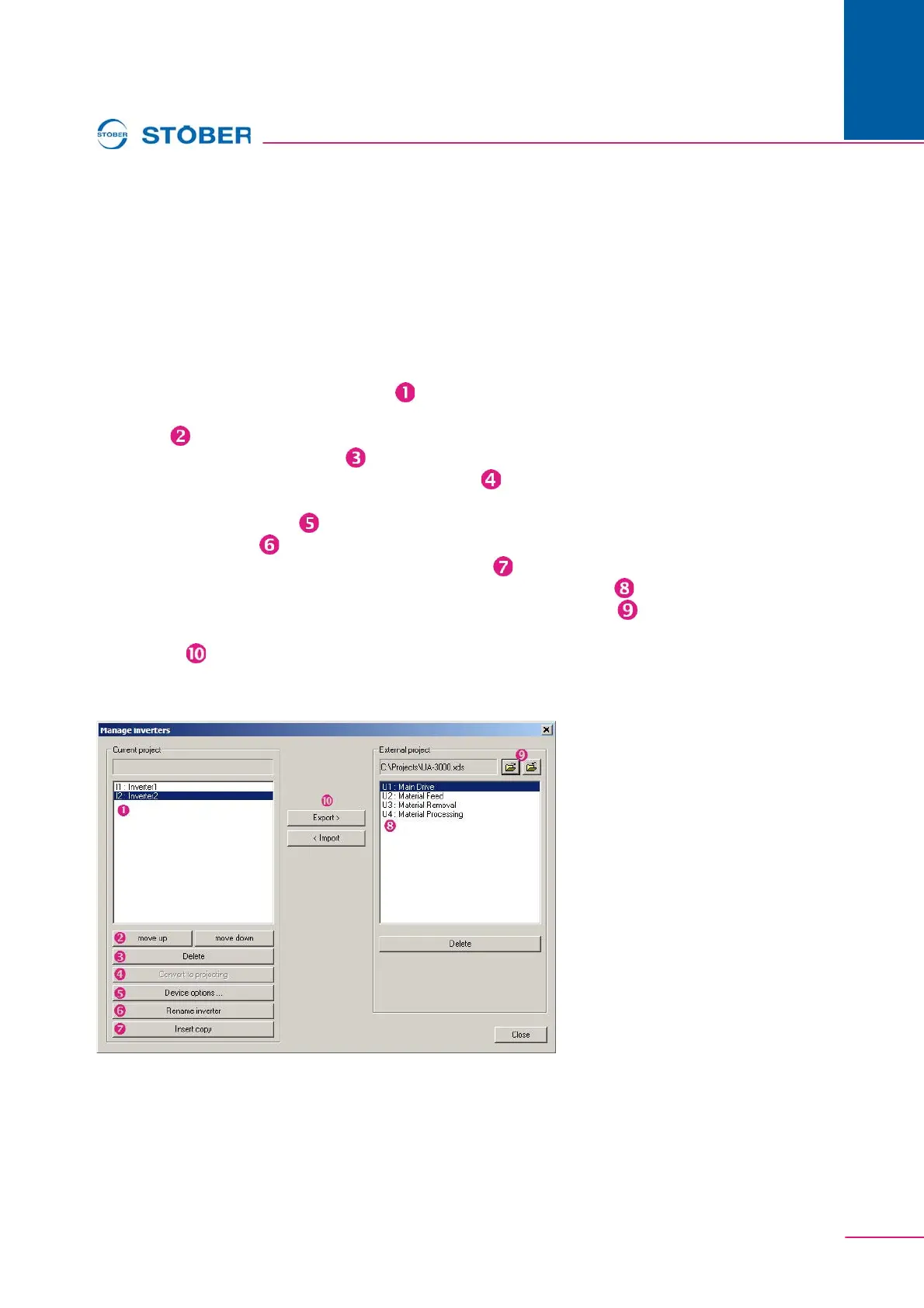
• Manage inverter manages the inverters entered in a project. When you select
this menu item, the dialog screen Manage inverters from appears.
On the left-hand side of the "Manage inverters" dialog screen are the inverters
which exist in the currently opened project ( ). The buttons offer you the
following options:
• Move ( ) the inverters in the list of the current project up or down.
• Delete inverter from the project ( ).
• Convert reverse documentations into configurations ( ), so that you can edit
the data record offline.
• Call the inverter settings ( ).
• Renaming inverter ( )
• Insert a copy of the highlighted inverter in the project ( ).
You can open an already saved project on the right side of the dialog screen ( ).
Open and close projects with the buttons on the upper portion of the screen ( ).
Use the buttons to export inverters between the lists and import inverters between
the projects ( ).
You can also delete inverters in the external project (Delete button underneath the
right-hand list).



 To Next Page