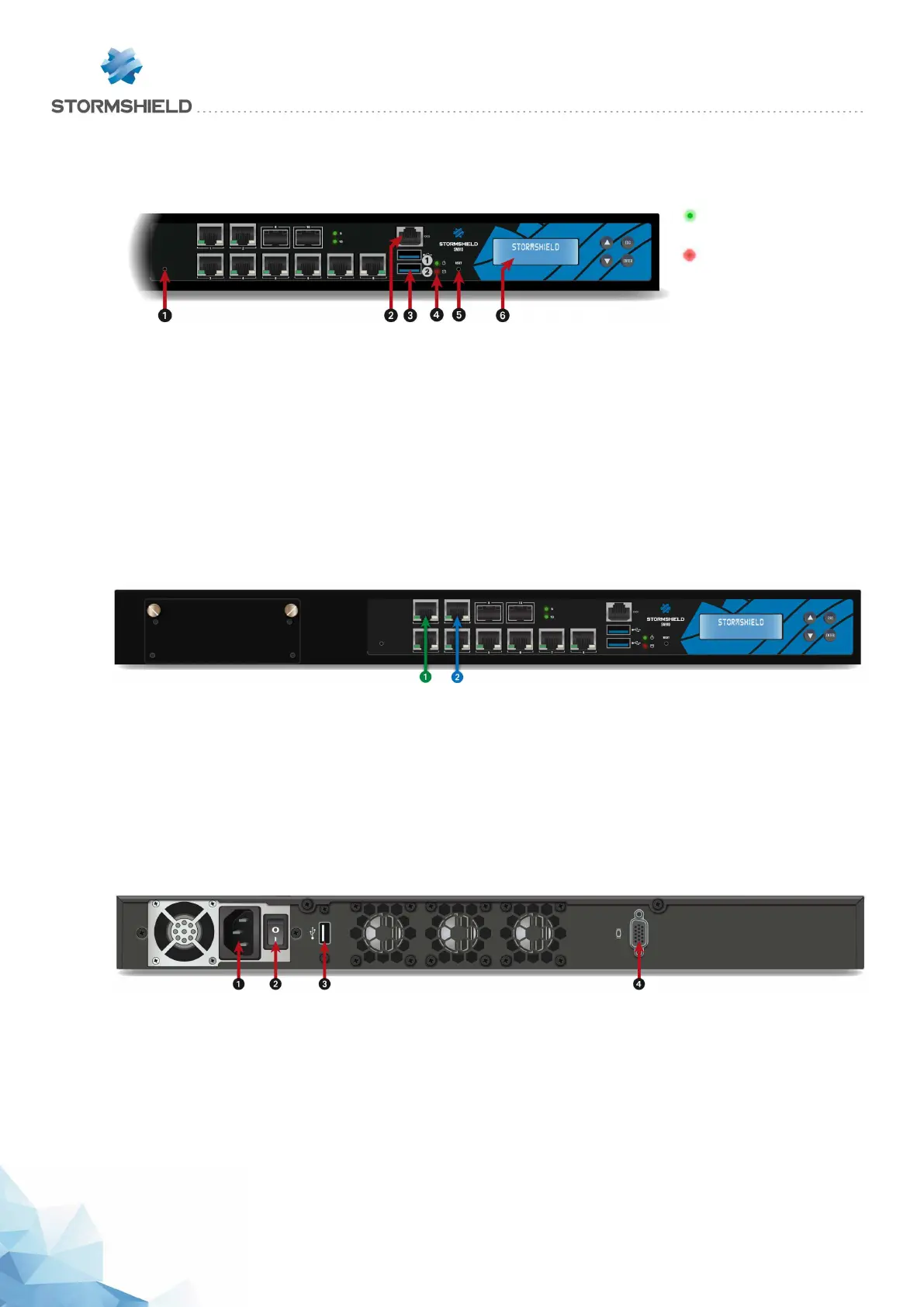
SN910 model
Front panel: connectors and LEDs
1 Online LED
(green)
2 SSD Activity
LED (red)
1 This is the button for resetting the appliance to its factory settings (defaultconfig).
2 The serial port allows accessing the product in console mode; it is possible to connect the
Firewall directly from a computer. The default baud rate on these models is 9600 baud (8N1).
3 Two USB 3.0 ports that can be used for secure configurations or upgrades. You may also plug
in a USB key, USB keyboard or approved USB modem.
4 The Power and SSD activity LEDs (from top to bottom).
5 The Reset button: electrically resets the Firewall.
6 LCD screen: indicates the version of the firmware installed, the active partition, the serial
number of the product as well as the HA status if it has been enabled.
Description
This model is fitted with a multi-core CPU, making it possible to increase
processing power.
This product has an internal power supply.
1 OUT Interface
2 INInterface
The SN910 model holds 8 1GbE ports and 2 SFP sockets for adding 1GbE transceivers. It allows
the addition of one extension module with RJ45 (1GbE) or fiber (1GbE or 10GbE) connectors.
Specifications of Stormshield Network-approved extension modules and transceivers are set out
in sections Extension modules (SN710 and upwards) and Fiber Ethernet connectors.
Rear panel: connectors
1 A mains socket.
2 The product’s on/off switch.
3 The USB 2.0 port can be used for secure configurations or upgrades. You may also plug in a
USB key, USB keyboard or approved USB modem.
4 The VGA port allows connecting a monitor.
SNS - PRODUCT PRESENTATION AND INSTALLATION 2019
PRESENTATION OF SN MODELS
Page 29/66 sns-en-SNrange_installation_guide-2019 - 09/2019



 To Next Page