PRESENTATION OF SN MODELS
Stormshield Network SN range models rely on the most advanced technologies to provide high
performance and optimum protection.
NOTE
For more information on Ethernet interfaces, please refer to the section Connecting to the
network under INSTALLATION PRECAUTIONS.
SN160 and SN160W models
SN160 and SN160W firewalls are fanless. The products come with an external power adapter.
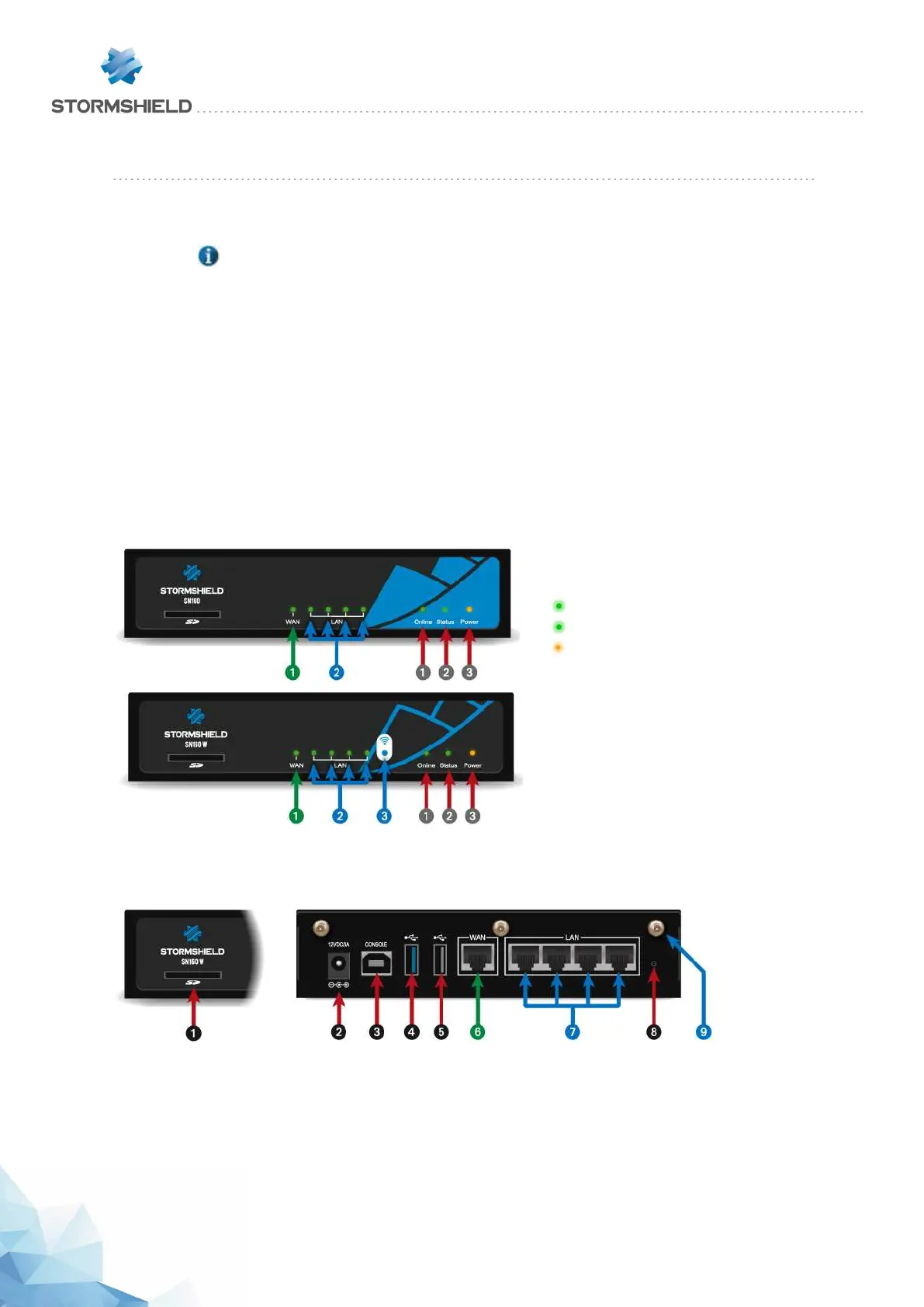
LEDs Front panel:
This model has its LEDs on the front panel as shown below:
1 Online LED (green)
2Status LED (green)
3 Power LED (yellow)
1 OUTinterface
2 INinterface
3 Wi-Fi interface
Connectors
The connectors on SN160 and SN160W models are located on the front and rear panels.
1 This is the slot for the SD card*.
2 Plugging in the mains adapter automatically starts this product.
3 The USB port allows accessing the product in console mode**; it is possible to connect the
Firewall directly from a computer. The default baud rate on these models is 115 200 baud
(8N1).
SNS - PRODUCT PRESENTATION AND INSTALLATION 2019
PRESENTATION OF SN MODELS
Page 24/66 sns-en-SNrange_installation_guide-2019 - 09/2019



 To Next Page