EasyManua.ls Logo

Summa S class 2 series - Page 27

Summa S class 2 series
113 pages
Print Icon
To Next Page IconTo Next Page
To Previous Page IconTo Previous Page
Loading...
S CLASS™ 2 cutter User’s Manual
Setup 1-17
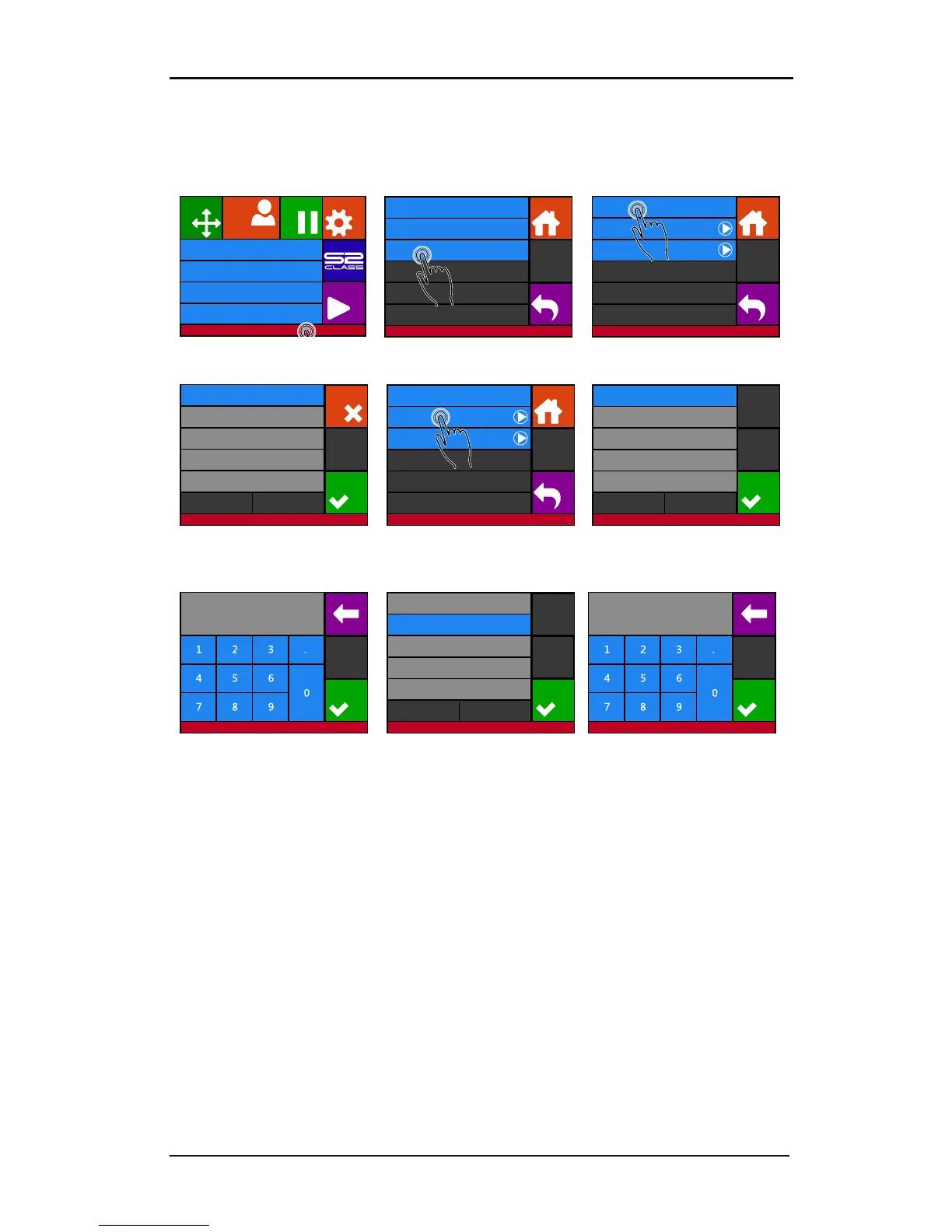
In case everything is set manually:
1. Power on the cutter (see section 1.4) and connect the Ethernet cable.
2. Press the status bar
3. Press LAN
4. Press DHCP
5. Press off and then Apply
6. Press Configure
7. Press the parameter that
has to be changed
8. Set the address correctly
and
press apply
9. Press the parameter that
needs to be changed
10. Set the address correctly
and press apply
Knife pressure 95 gr
Velocity 800 mm/s
Tool Tangential knife
Media size 50000 x 718 mm
Actions
Settings
Configuration 1
PauseOrigin
Summa USB port 1Eth. 192.68.1.7
Communication
Back
Home
USB Class Summa USB port 1
Tool commands Accept
LAN ...
Status
Configure
DHCP Off
Communication | LAN
Back
Home
On
Off
Cancel
Apply
Communication | LAN
Status
Configure
DHCP Off
Communication | LAN
Back
Home
IP 192.168.1.11
Communication | LAN
Appliquer
255.255.255.0Subnet
0.0.0.0Gateway
0.0.0.0DNS 1
0.0.0.0DNS 2
Apply
Apply
00.000.000.000
Communication | LAN
0
IP 192.168.1.11
Communication | LAN
Appliquer
255.255.255.0Subnet
0.0.0.0Gateway
0.0.0.0DNS 1
0.0.0.0DNS 2
Apply
Apply
00.000.000.000
Communication | LAN
0

Table of Contents

Related product manuals