S CLASS™ 2 cutter User’s Manual
Setup 1-31
1.7.2 Cutters with tangential head
1.7.2.1 Tangential knife installation
A knife is pre-installed in your cutter. For safety reasons, the knife depth has been set to
zero. Simply turn out the knife (see fig FIG 1-28) to start cutting. Below is the complete
description of how to remove or install a knife.
NOTE: To benefit fully from the advantages of the tangential knife, the amount
the knife extends is very important. The knife pressure may not control the knife
depth. The
two rollers of the nosepiece should always touch the media, thus
controlling the knife depth.
Removing the tangential knife
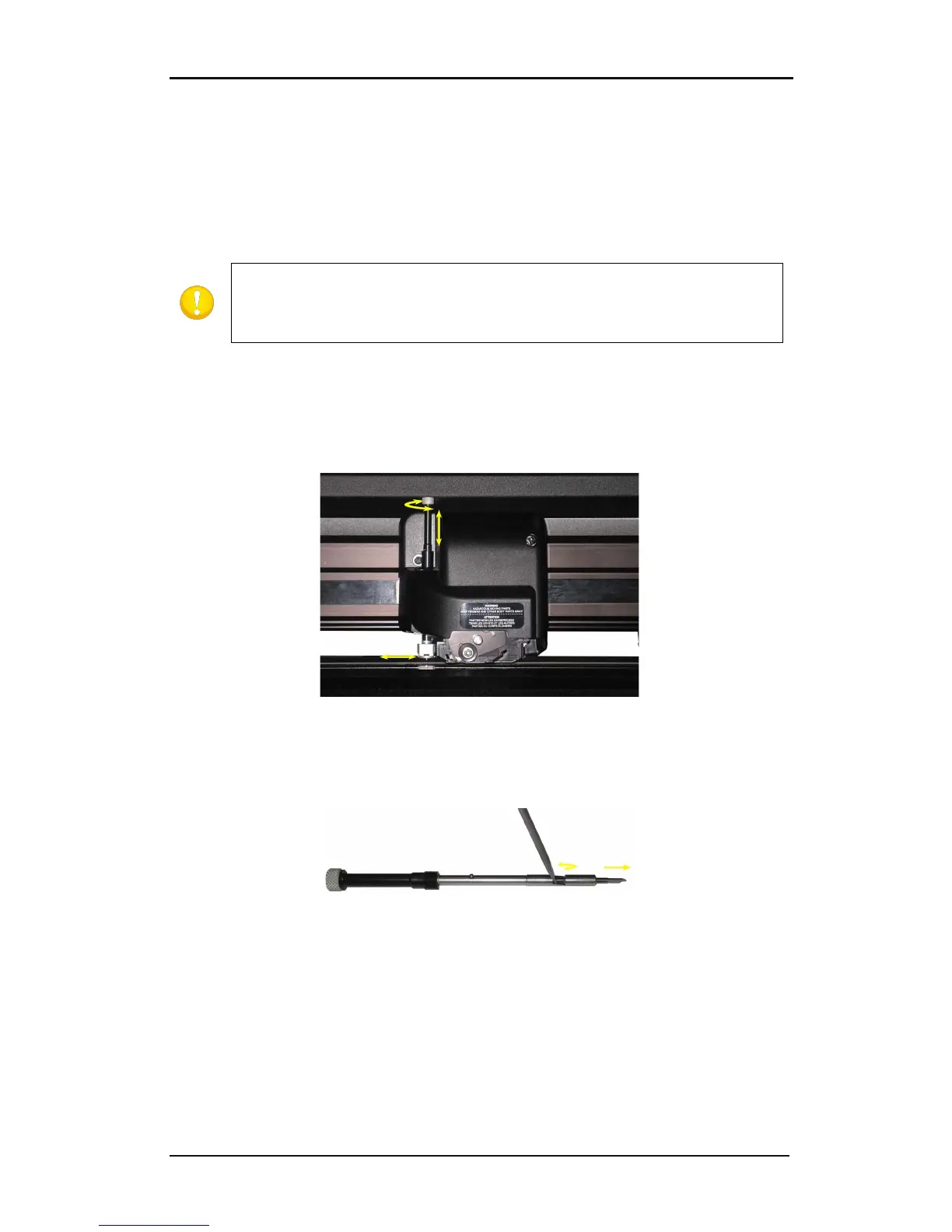
1. Turn the knife holder counterclockwise. The holder will rise up, eventually making it
possible to lift the knife holder out of the tangential head. The nosepiece is situated
underneath. Remove this part if another tool is used in the cutter.
FIG 1-28
1-28 REMOVING THE TANGENTIAL KNIFE HOLDER
2. The knife can be removed from the knife holder by using something like a flat
screwdriver to pry in the groove between the knife and the knife holder.
FIG 1-29
1-29 REMOVING THE KNIFE FROM THE TANGENTIAL KNIFE HOLDER











 To Next Page