S CLASS™ 2 cutter User’s Manual
Contour Cutting 3-14
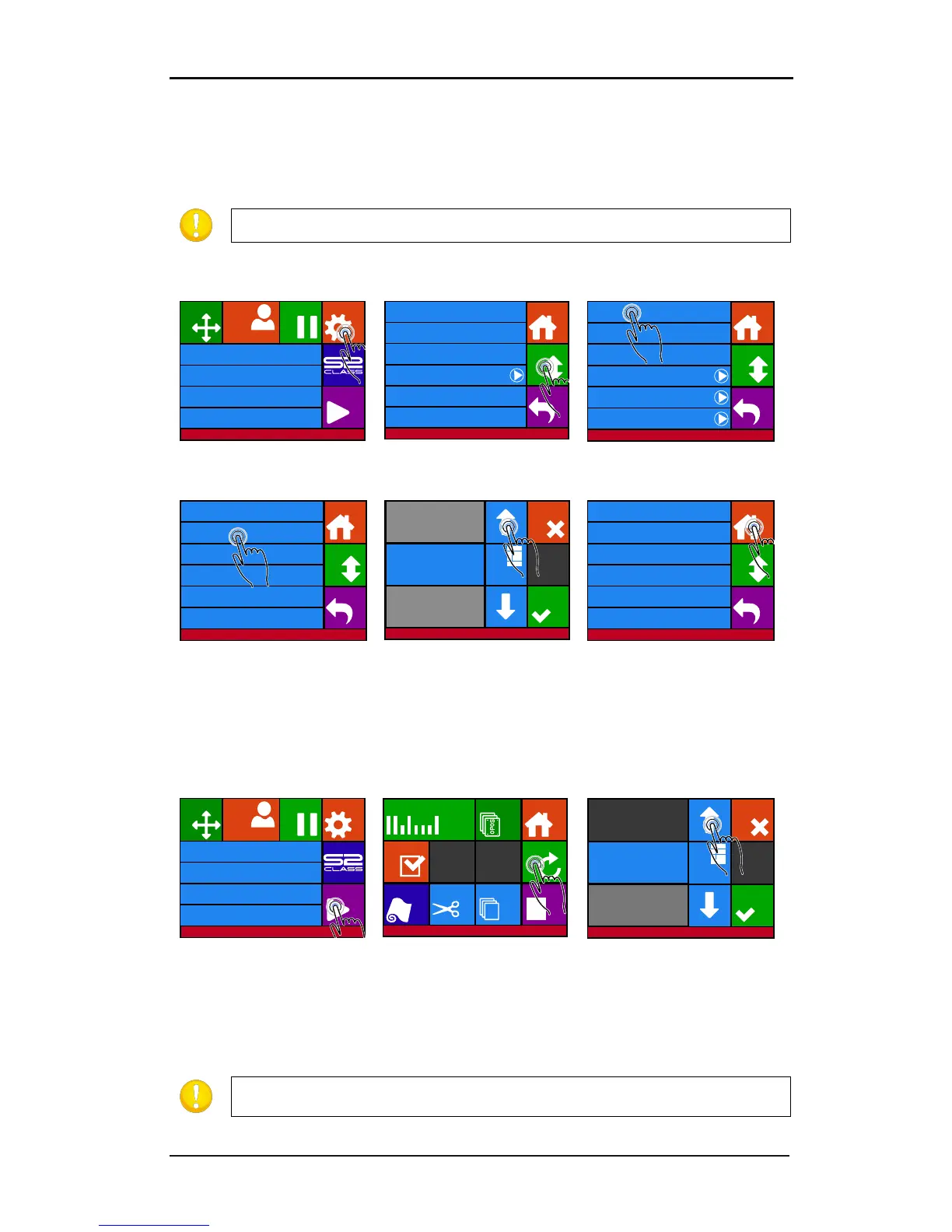
3.4.2 Cutting multiple copies of a graphic on the same roll
If the same graphic design has been printed on a roll with equal distance between these
graphics, this feature can be used.
Load the media.
5. Use the arrows to
change the value. Then press
apply.
6. Press Home to get online
again.
7. Make the first copy as you would make a normal OPOS job.
The cutter will stop after the first contour has been cut and will come online again.
change the value. Press
apply.
OPOS will sense the marks for the second contour and then cut that contour. This process of
sensing and cutting will repeat itself automatically until all remaining contours have been cut.
Knife pressure 95 gr
Velocity 800 mm/s
Tool Tangential knife
Media size 50000 x 718 mm
Actions
Settings
Configuration 1
Pause
Origin
Summa USB port 1Summa USB port 1
Knife pressure 95 gr
Velocity 800 mm/s
Tool Tangential knife
Settings
Back
More
Home
...General
Calibrate knife
Advanced cutting ...
FlexCut ...
Communication ...
OPOS ...
Settings
Back
More
Home
Length calibration
Coil setup
Confidence test
General ...
Settings | General
Menu units Metric
Language English
Autoload On
Cut off margin 10 mm
Recut offset 40 mm
Media sensor On
Back
Home
More
Menu units Metric
Cancel
Numpa d
Settings | General
Old value: 40 mm
New value: 45 mm
Range: 0 ... 4000 mm
Apply
Settings | General
Menu units Metric
Language English
Autoload On
Cut off margin 10 mm
Recut offset 45 mm
Media sensor On
Back
Home
More
Menu units Metric
Knife pressure 95 gr
Velocity 800 mm/s
Tool Tangential knife
Media size 50000 x 718 mm
Actions
Settings
Configuration 1
PauseOrigin
Summa USB port 1Summa USB port 1
Replot
Home
OPOS sheet
mode
OPOS Barcode
Open file
Cut sheet
Cut offLoad
Reset
Cut tests
Summa USB port 1
Cancel
Numpa d
Actions
Value: 1
Range: 1 ... 999
Apply
NOTE: The distance between the multiple copies should be at least 30mm.
NOTE: If the cut off command is used, the recut distance should be at least
30mm larger than the cut off distance.











 To Next Page