EasyManua.ls Logo

Summa S class 2 series - Combined Contour Cut and Cutting through

Summa S class 2 series
113 pages
Print Icon
To Next Page IconTo Next Page
To Previous Page IconTo Previous Page
Loading...
S CLASS™ 2 cutter User’s Manual
Contour Cutting 3-23
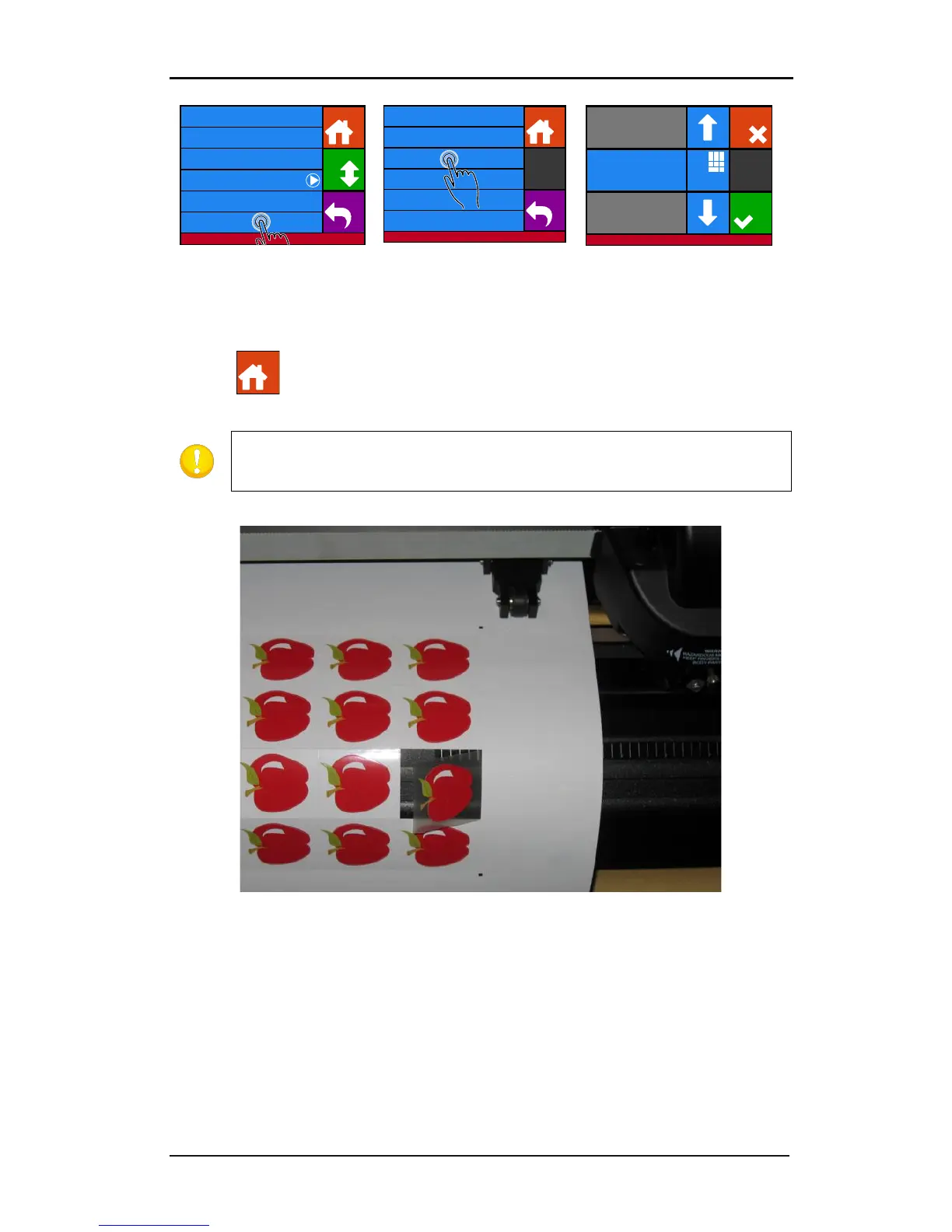
6. Press Advanced cutting.
7. Press Panel size.
8. Use the arrows or
Numpad to change to
value (between
3 and
10 cm) and press Apply.
9. Press to set the cutter online again.
NOTE: The above procedure has to be done even if the software on the
computer can activate FlexCut. It is also recommended to set the FlexCut
parameters on the cutter and not with the cutting software.
FIG 3-4
3-4 COMBINED CONTOUR CUT AND CUTTING THROUGH
Knife pressure 95 gr
Velocity 800 mm/s
Tool Tangential knife
Settings
Back
More
Home
...General
Calibrate knife
Advanced cutting ...
FlexCut ...
Settings | Advanced cutting
Long vectors Automatic
Sorting vectors Off
Panel replot 0
Panel size 50 cm
Panelling Off
Overcut 0.1 mm
Back
Home
Cancel
Numpa d
Settings | Advanced cutting
Old value: 50cm
New value: 5cm
Range: 0 ... 250 cm
Apply
Home

Table of Contents

Related product manuals