S CLASS™ 2 cutter User’s Manual
Basic Operation 2-7
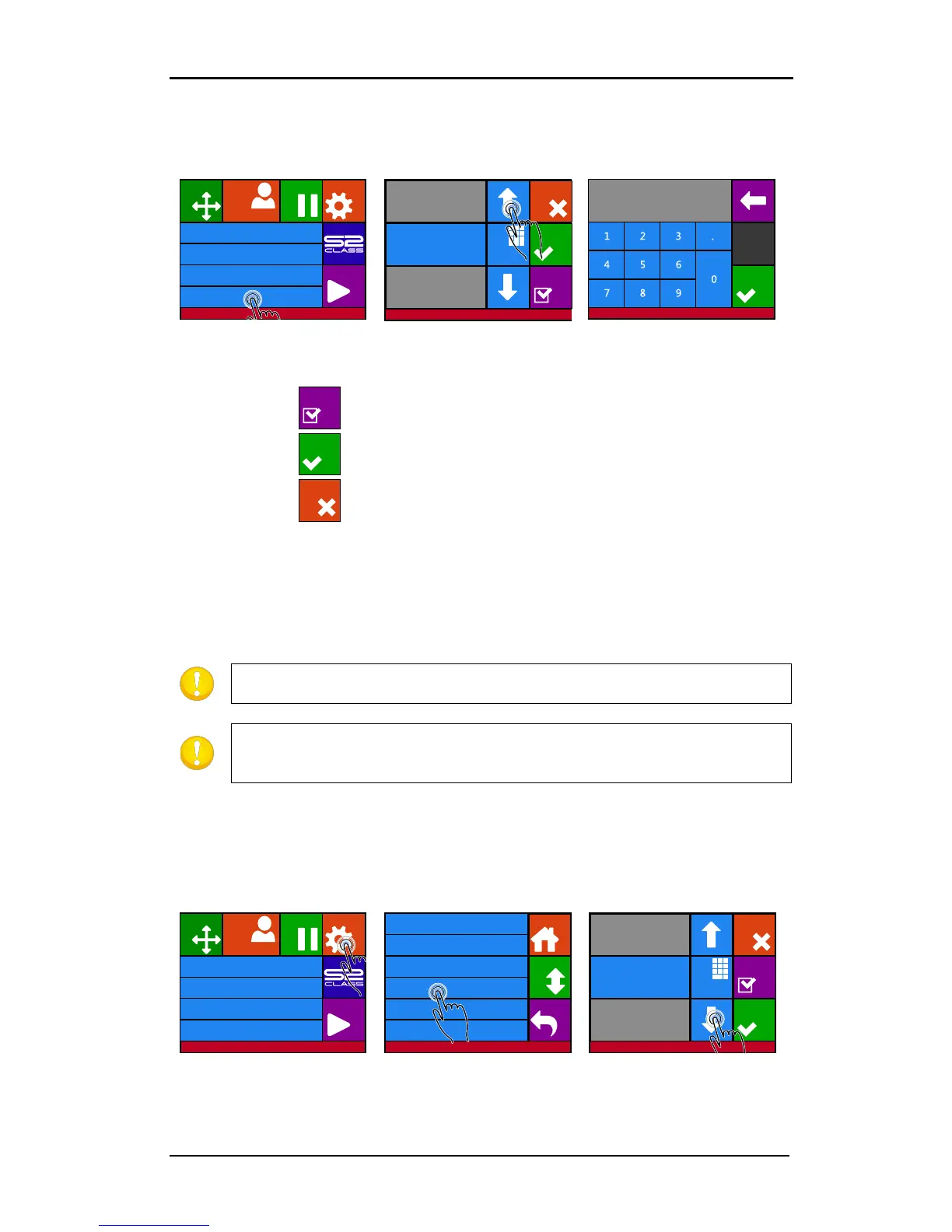
2.2.2 Changing the tool pressure
1. Power on the cutter and load the media.
3. Press arrow up or down
4. Or fill in the new value
after pressing Numpad.
1. Press to perform the internal knife pressure test.
2. Press to confirm the chosen knife pressure and exit the menu.
3. Press to leave the pressure unchanged.
2.2.3 Changing the drag knife offset
A very important parameter for a drag knife is the offset. The offset is the distance between
the knife center and the knife tip.
NOTE: The knife offset should be set each time the knife is changed and should
be checked if the knife shows signs of wear.
A typical knife offset for Summa knives is between 0.41 and 0.45 for
standard knives, between 0.9 and 0.97 for sandblast knives and between 0.49
and 0.52 for the 60 degree knife.
Changing the knife offset:
1. Power on the cutter, load the media and mount the drag knife (see section 1.7.1.1 or
1.7.2.4.)
3. Press on Knife offset.
4. Use arrows to change
knife offset
Knife pressure 95 gr
Velocity 800 mm/s
Tool Tangential knife
Media size 50000 x 718 mm
Actions
Settings
Configuration 1
PauseOrigin
Summa USB port 1
Cancel
Apply
Test
Numpa d
Old value: 85gr
New value: 95gr
Range: 0 ... 600gr
Summa USB port 1
Knife pressure 95 gr
Velocity 800 mm/s
Tool Tangential knife
Media size 50000 x 718 mm
Actions
Settings
Configuration 1
PauseOrigin
Summa USB port 1Summa USB port 1
Knife pressure 95 gr
Velocity 800 mm/s
Tool Tangential knife
Settings
Back
More
Home
Knife offset 0.45 mm
FlexCut ...
Advanced cutting ...
Cancel
Test
Numpa d
Settings
Old value: 0.45 mm
New value: 0.43 mm
Range: 0.00 ... 1.00 mm
Apply











 To Next Page