Chapter 1 Preparing to Install the Sun Fire X4170, X4270, and X4275 Servers 7
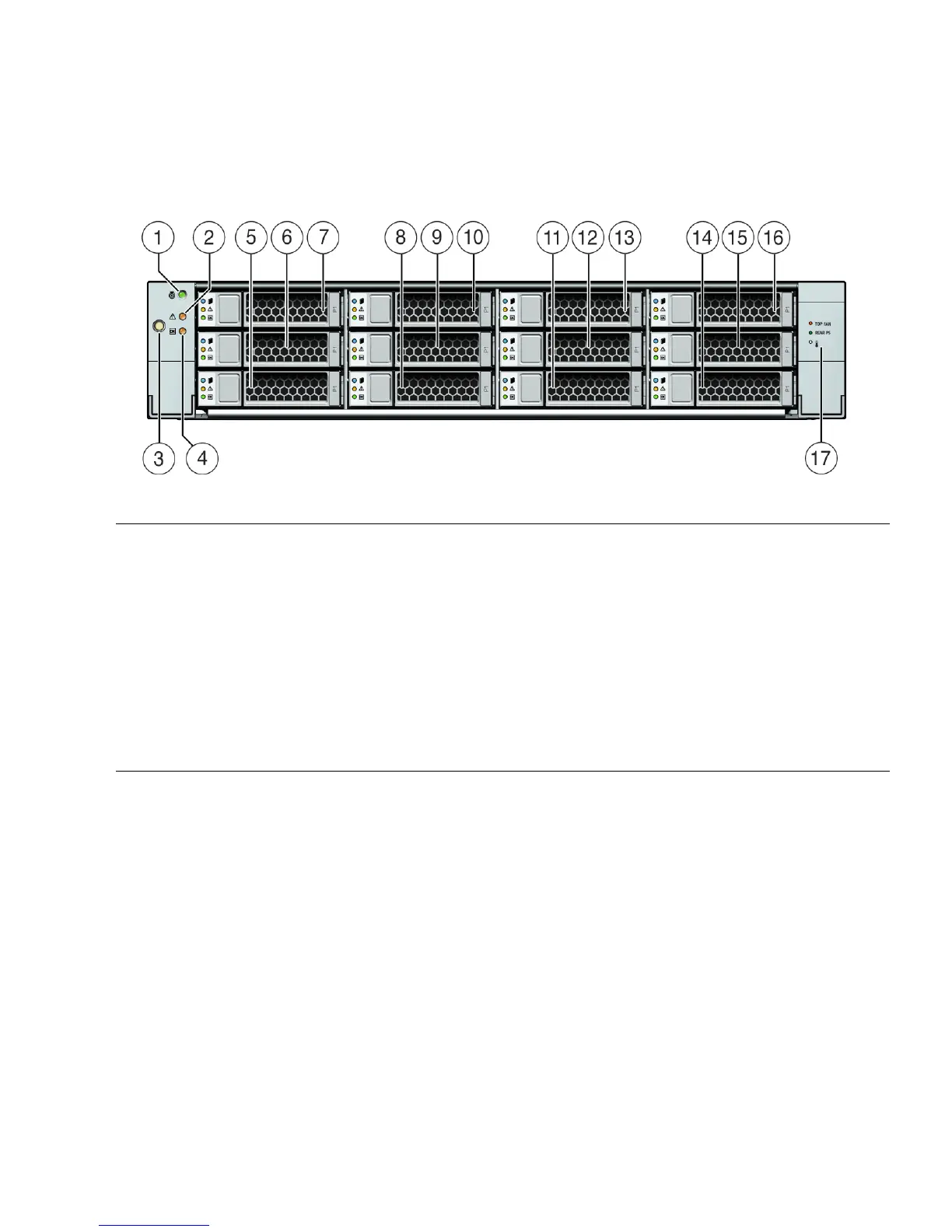
FIGURE 1-4 shows the Sun Fire X4275 Server front panel and describes its components.
FIGURE 1-4 Sun Fire X4275 Server Front Panel
Figure Leg end
1 Locator LED/Locator button: white 9 Hard disk drive 4 (optional)
2 Service Action Required LED: amber 10 Hard disk drive 5 (optional)
3 Power button 11 Hard disk drive 6 (optional)
4 Power/OK LED: green 12 Hard disk drive 7 (optional)
5 Hard disk drive 0 (optional) 13 Hard disk drive 8 (optional)
6 Hard disk drive 1 (optional) 14 Hard disk drive 9 (optional)
7 Hard disk drive 2 (optional) 15 Hard disk drive 10 (optional)
8 Hard disk drive 3 (optional) 16 Hard disk drive 11 (optional)
17 Fan Module Service Action Required LED: amber
Power Supply Service Action Required LED: amber
System Overtemperature LED: amber















 To Next Page