42 Sun Fire X4170, X4270, and X4275 Servers Installation Guide • December 2009
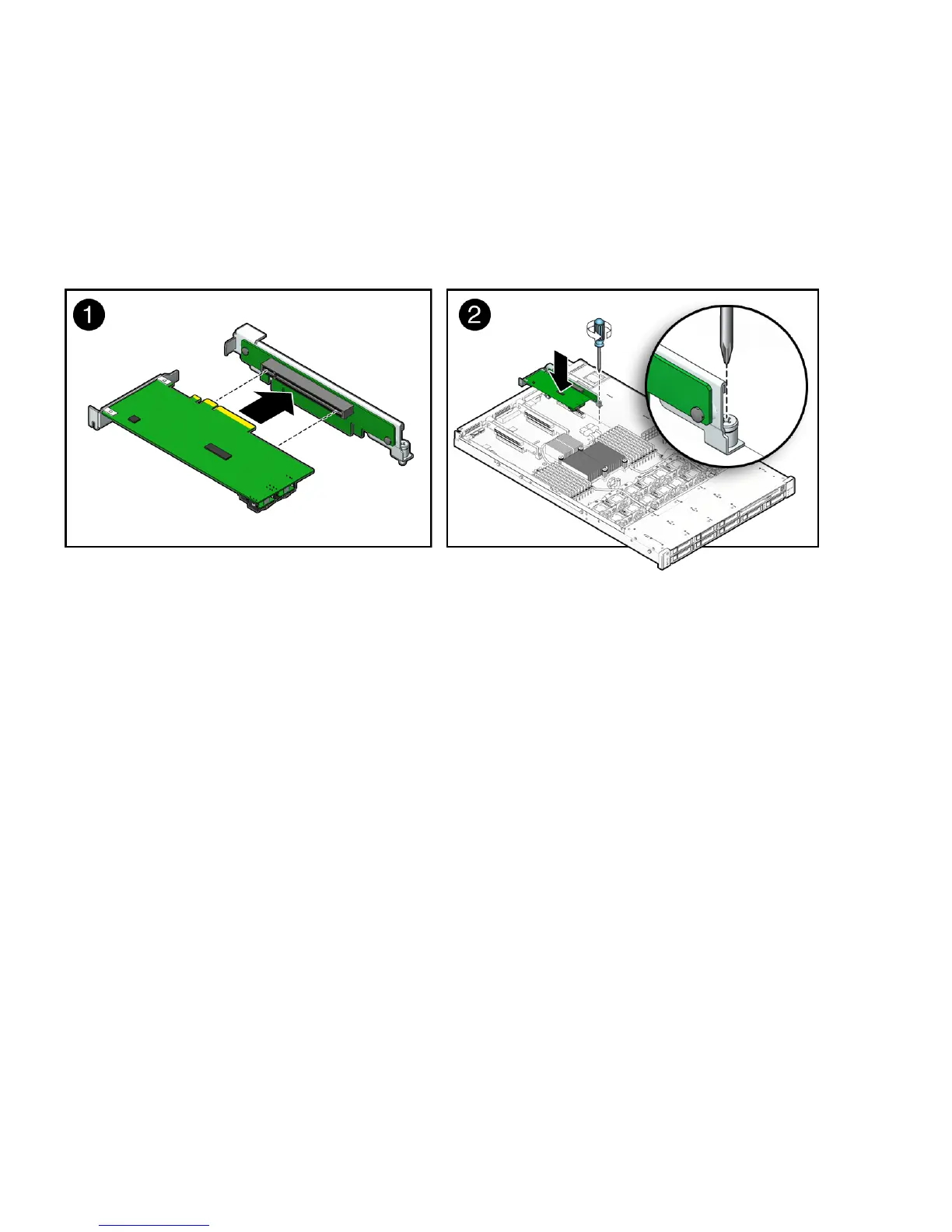
7. Install the PCIe card into the PCIe riser (seeFIGURE 2-14 [1]).
Each server has three PCIe risers. On the Sun Fire X4170 Server, each PCIe riser
can house only one PCIe card. On the Sun Fire X4270 and X4275 Servers, each
PCIe riser can house two PCIe cards.
FIGURE 2-14 Installing a PCIe Card
8. Install the PCIe riser with installed PCIe card into the PCI slot (see FIGURE 2-14
[2]).
a. Lower the PCIe riser and the installed cards into the server.
b. Tighten the captive No. 2 Phillips screw securing the riser to the
motherboard.
c. Install the back panel crossbar.
Slide the crossbar down over the PCIe risers. The crossbar is secured with two
captive Phillips screws.
9. If you are installing a SAS RAID host bus adapter (HBA) PCIe card, install and
connect the cables that connect the PCIe card to the hard disk drive cage;
otherwise skip to the next step.
See
FIGURE 2-15 for Sun Fire X4170 Server, FIGURE 2-16 for Sun Fire X4270 Server,
and
FIGURE 2-17 for the Sun Fire X4275 Server.















 To Next Page