Chapter 2 Installing Server Options 41
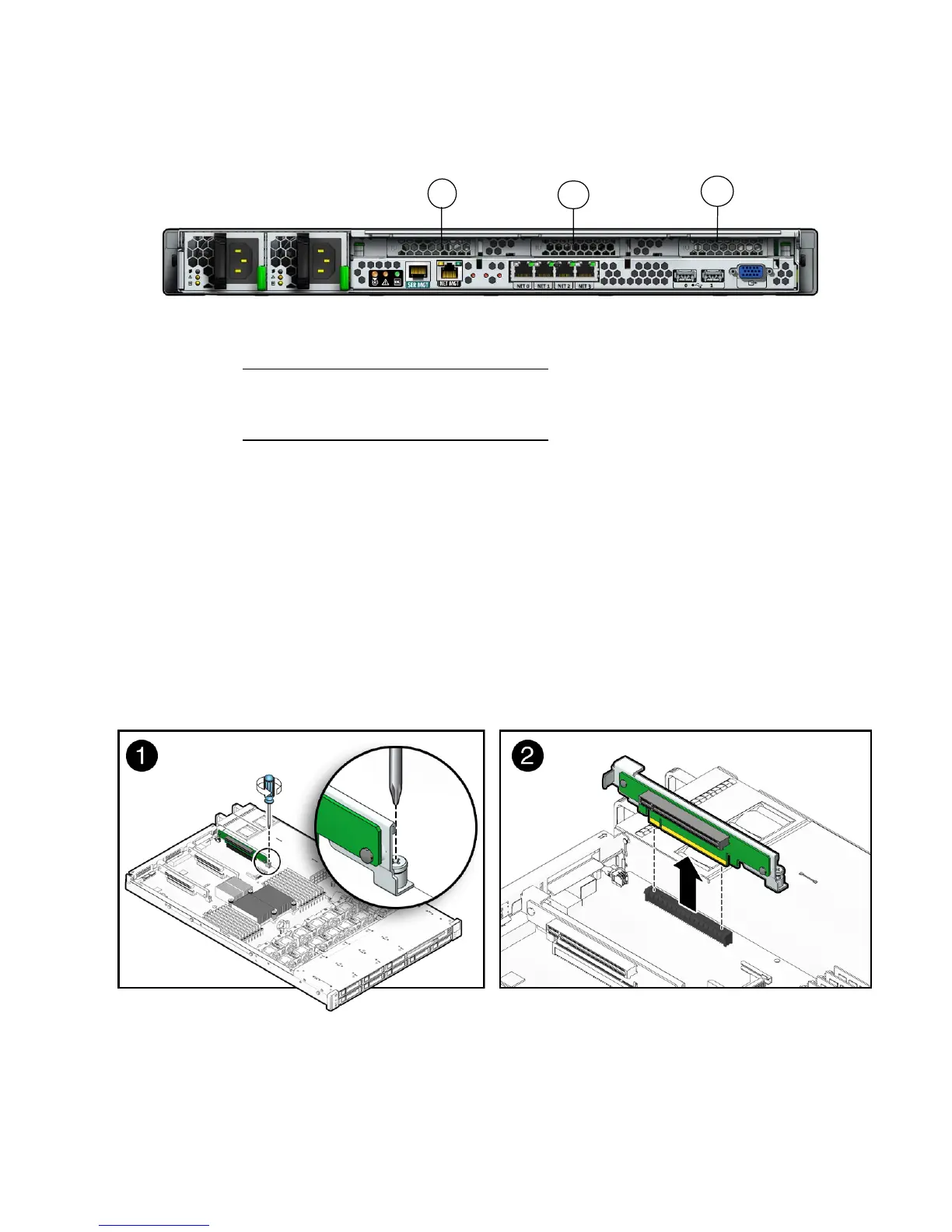
FIGURE 2-12 Location of PCI Slots on the Sun Fire X4170 Server
6. Remove the PCIe riser from the server (see FIGURE 2-13).
a. Using a No. 2 Phillips screwdriver, loosen the captive screw on the end of
the riser.
b. Lift up the riser and any PCIe cards attached to it as a unit.
Each server has three PCIe risers. On the Sun Fire X4170 Server, each PCIe riser
can house only one PCIe card. On the Sun Fire X4270 and X4275 Servers, each
PCIe riser can house two PCIe cards.
FIGURE 2-13 shows a Sun Fire X4170 Server PCIe riser.
FIGURE 2-13 Removing a PCIe Riser
Figure Leg end
1 PCI Slot 0
2 PCI Slot 1
3 PCI Slot 2
1
2
3















 To Next Page