Page 150 Troubleshooting
Resetting your eSYNC Cradle
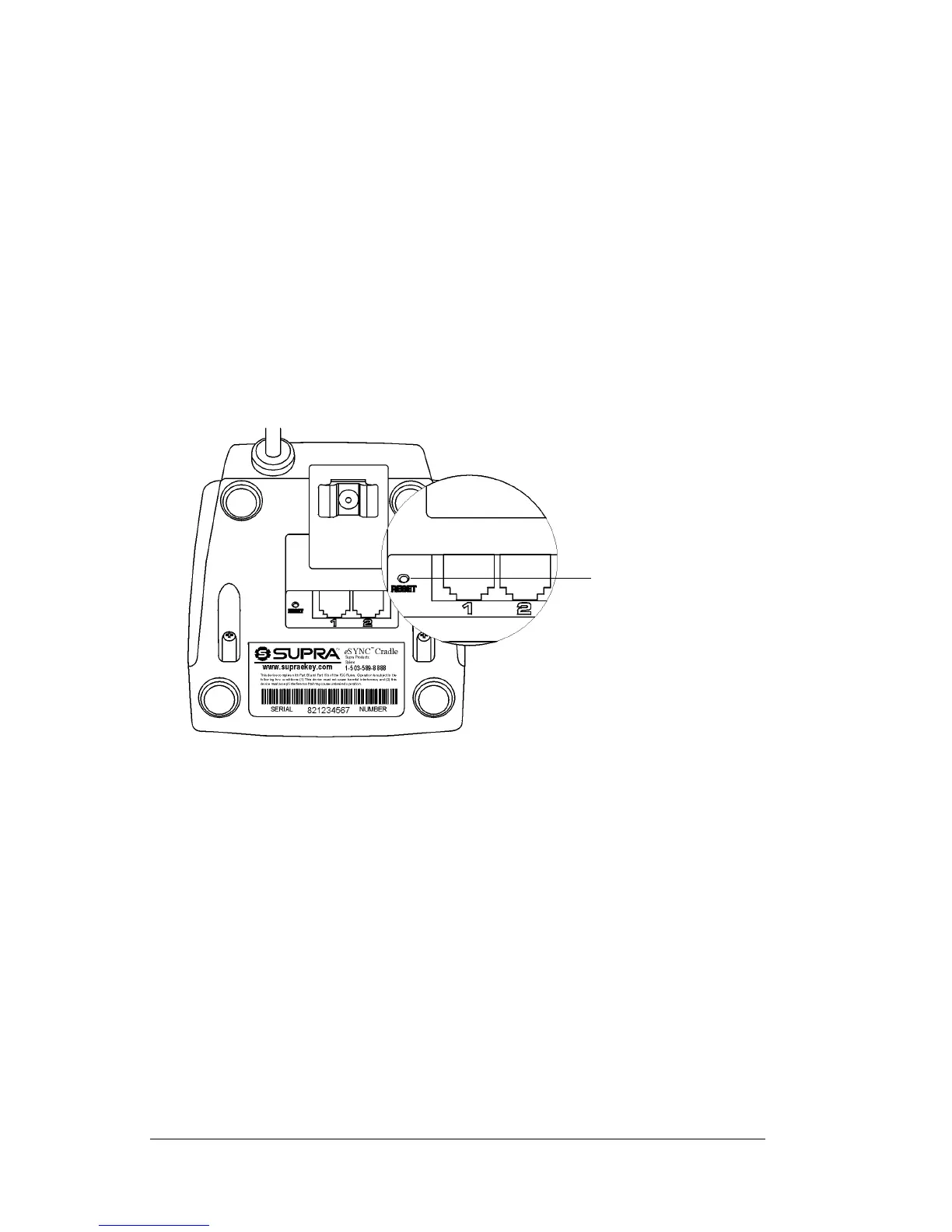
A tiny opening located next to the telephone ports houses the reset
switch. If you place your eKEY on the Cradle and no lights illuminate
in the Cradle's LED, this indicates that the Cradle has become locked
and will not function. The Cradle must be reset to perform the battery
recharge or complete an eSYNC.
Select one of the following methods to reset the eSYNC Cradle.
! Unplug the Cradle's power cord from the wall outlet then plug it
back into the outlet.
! Insert the reset tip tool, or the tip of an unfolded paper clip, into
the reset opening and gently press the reset switch inside the
opening to reactivate the Cradle.
Resetting your SUPRA handheld computer
Under normal circumstances, you will not have to use the reset
button. On rare occasions, however, your SUPRA handheld computer
may no longer respond to buttons or the screen. In this case, you need
to perform a reset to get your handheld running again.
Performing a soft reset
A soft reset tells your SUPRA handheld computer to stop what it's
doing and start over again. All records and entries stored in your
handheld are retained with a soft reset. After a soft reset, the Welcome
screen appears, followed by the General Preferences screen (to set
time and date).
Reset button



 To Next Page