Chapter 5 Page 67
Reading KeyBox Information
The KeyBox stores the Key serial numbers of each agent who has
accessed the KeyBox. It also records the dates and times the property
is shown. This information is transferred to your Key through the
Read KeyBox function.
Incident report
Anincidentreport can be generatedif a situationarises at a listing that
requiresimmediateattention. To determine who has recently accessed
the listing you must go to the listing and perform a Read KeyBox
operation.
Reading new KeyBox access information
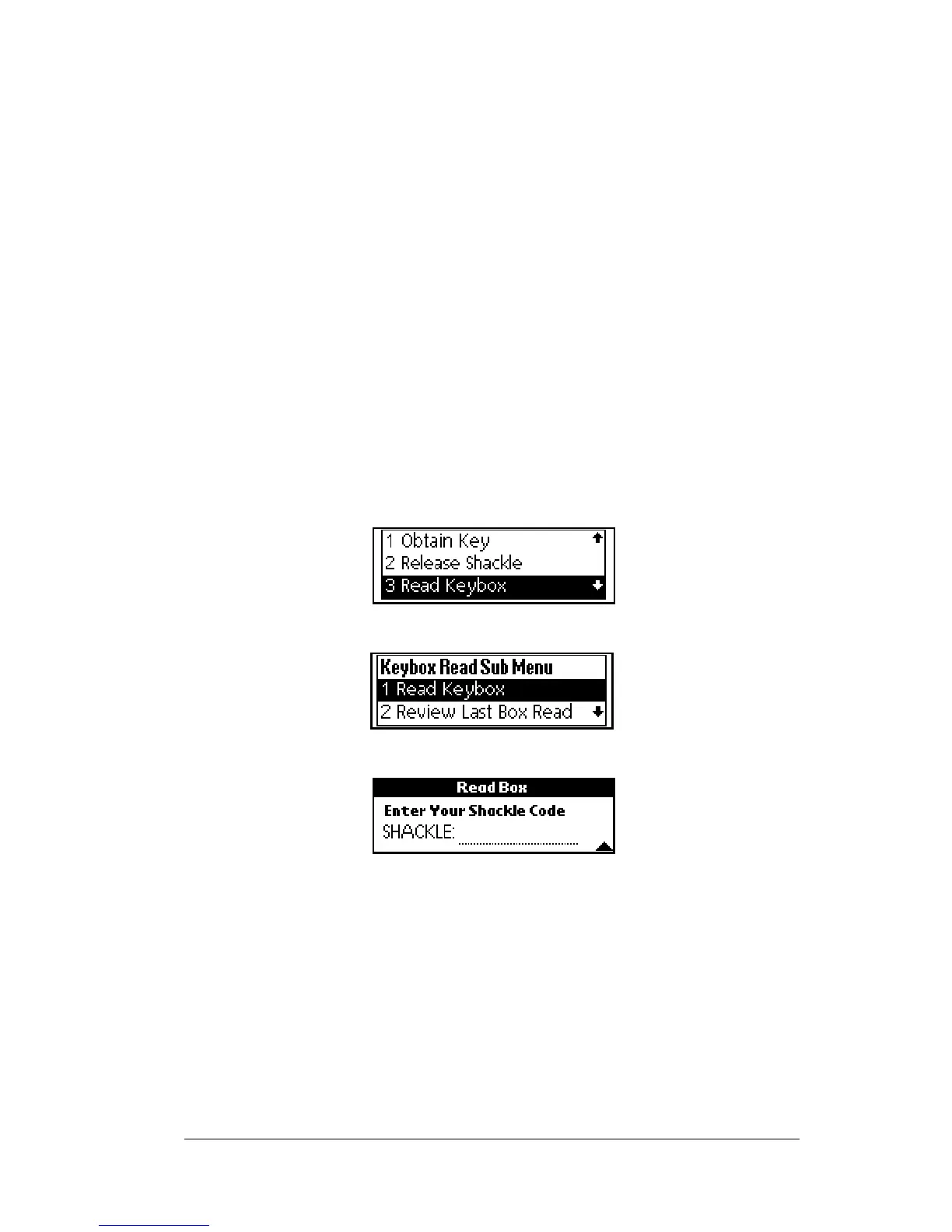
1. Close your eKEY shell.
2. Press the
on
button.
3. Highlight the
Read Keybox
option.
4. Press
enter
.The
Read Keybox
sub-option is highlighted.
5. Press
enter
to select it. The shackle code prompt appears.
6. Enter the shackle code when prompted.
7. Insert the back of your eKEY into the KeyBox so that it fits snugly
inside the KeyBox receptacle. The gold contacts on the eKEY must
match the contacts on the KeyBox.
Note: If you receive an error message, see Appendix A: Error Codes for
help in determining how to correct the error.
8. Open the eKEY shell front to view the KeyBox activity information
or press the down arrow button to view additional information



 To Next Page