Connections
16
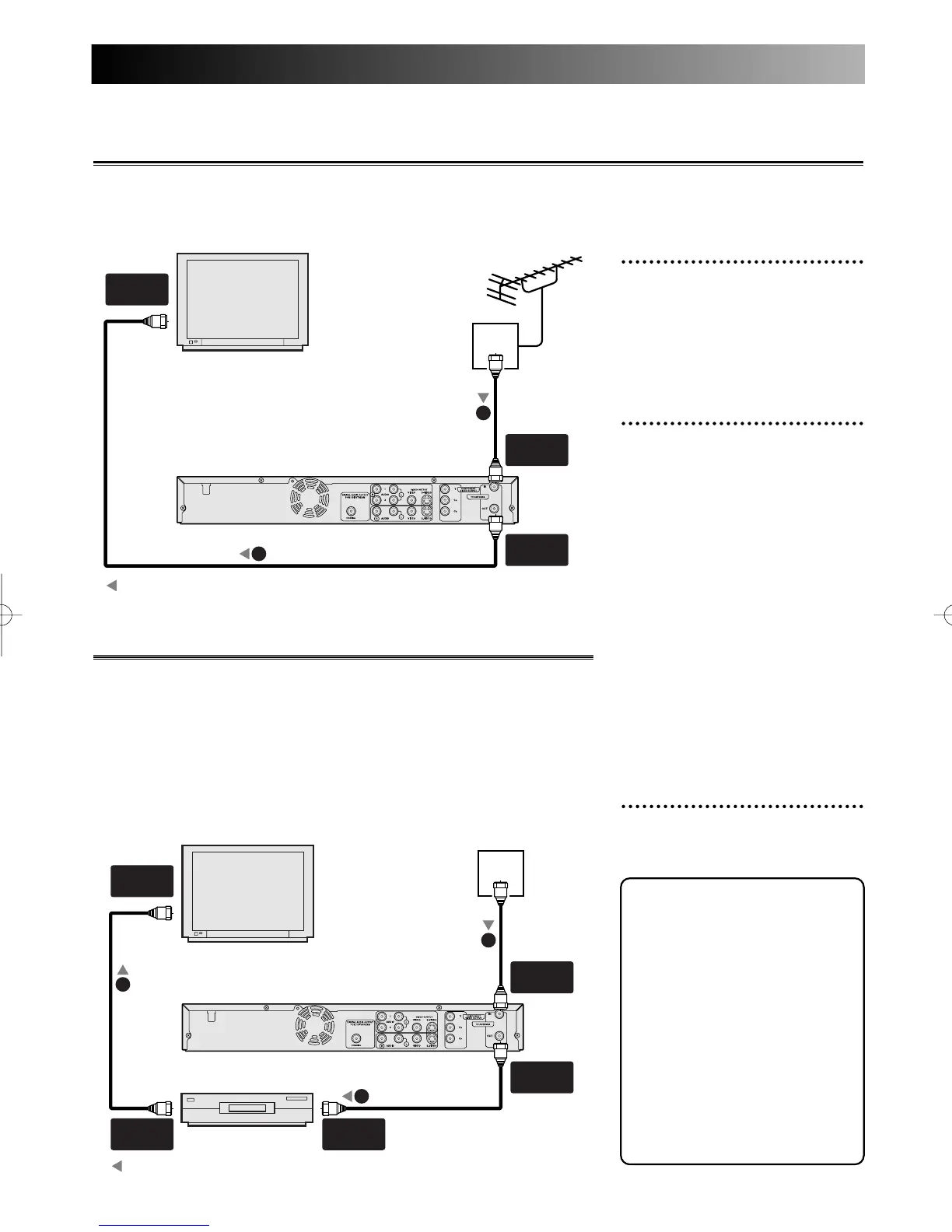
With this setup:
• You can record any non-scram-
bled channel by selecting the
channel on the DVD recorder.
• You cannot record scrambled
channels that require a cable
box.
1
Use a standard antenna cable
as shown.
When connecting to a cable box with only a few
scrambled channels
If you are using a cable box or satellite receiver with only a few
scrambled channels, follow the setup on this page. If many or all the
channels are scrambled, we recommend using the setup on the follow-
ing page.
Note:
Antenna and antenna cable are not included.
A piece of RF cable is included.
TV
VHF/UHF
IN
VHF/UHF
OUT
ANT.
IN
ANT.
OUT
VHF/UHF
IN
DVD Recorder
To Antenna
Cable
box
antenna
cable
1
RF
cable
1
RF cable (supplied)
1
: signal flow
Note to the Cable TV
System Installer :
This reminder is provided to
call the Cable TV system
installer’s attention to Article
820-40 of the National
Electrical Code, which
provides guidelines for proper
grounding - in particular,
specifying that the cable
ground shall be connected to
the grounding system of the
building, as close to the point
of cable entry as possible.
1
Use a standard antenna cable
to connect the wall jack to
the TV ANTENNA IN jack
on the DVD recorder.
2
Use a standard antenna cable
to connect the TV ANTEN-
NA OUT jack on the DVD
recorder to the antenna
input jack on the TV.
Use a standard antenna cable to connect the wall jack to the TV ANTENNA IN jack on the DVD recorder.
Connection to antenna
Note:
Antenna and antenna cable are not included.
TV
VHF/UHF
IN
ANT.
IN
ANT.
OUT
DVD Recorder
Antenna
antenna
cable
1
RF cable (supplied)
2
: signal flow
E6500UD.QX 03.12.8 19:06 Page 16



 To Next Page