Connections
Connections
21
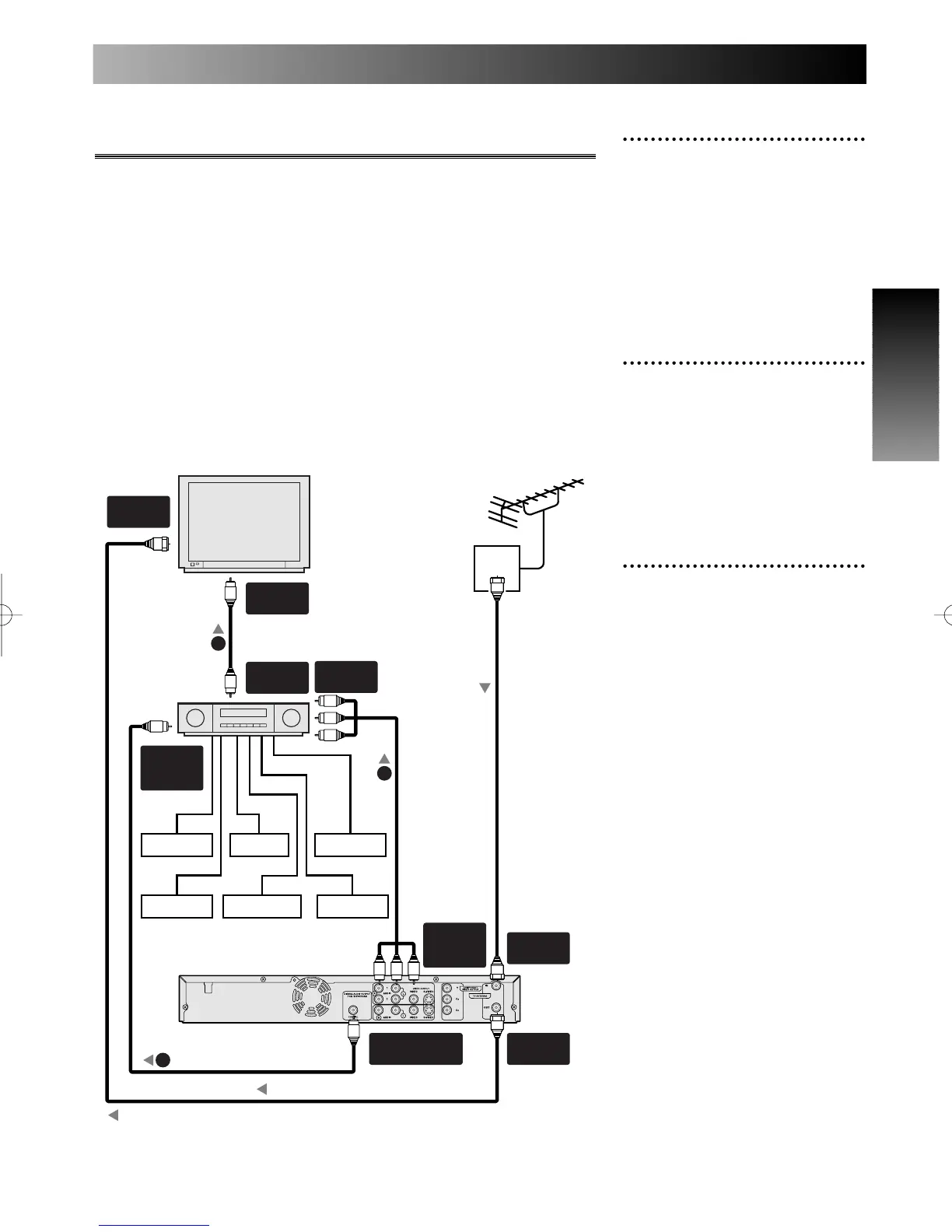
1
Use a coaxial digital audio
cable to connect the COAXI-
AL DIGITAL AUDIO OUT-
PUT jack on the DVD
recorder to the coaxial digi-
tal audio input jack on the
AV ampifier.
2
Use a standard AV cable to
connect the AUDIO OUT-
PUT and VIDEO OUTPUT
jacks on the DVD recorder to
the audio and video input
jacks on the AV amplifier.
3
Connect the AV receiver’s
video output to a video input
on your TV.
Connection to AV amplifier with a coaxial digital
audio cable
To enjoy multichannel surround sound you need to connect this
recorder to an AV amplifier/receiver using the coaxial output.
In addition to a digital connection, we recommend also connecting
using the stereo analog connection.
You'll probably also want to connect a video output to your AV
amplifier/receiver. Use the standard (composite) video output (as
shown here), or the S-Video or component video connections.
Refer to your AV amplifier/receiver owner's manual for further infor-
mation.
Note:
Antenna, antenna cable, and coaxial digital audio cable are not included.
A piece of Audio/Video cable is included.
ANT.
ANT.



 To Next Page