Connections
Connections
19
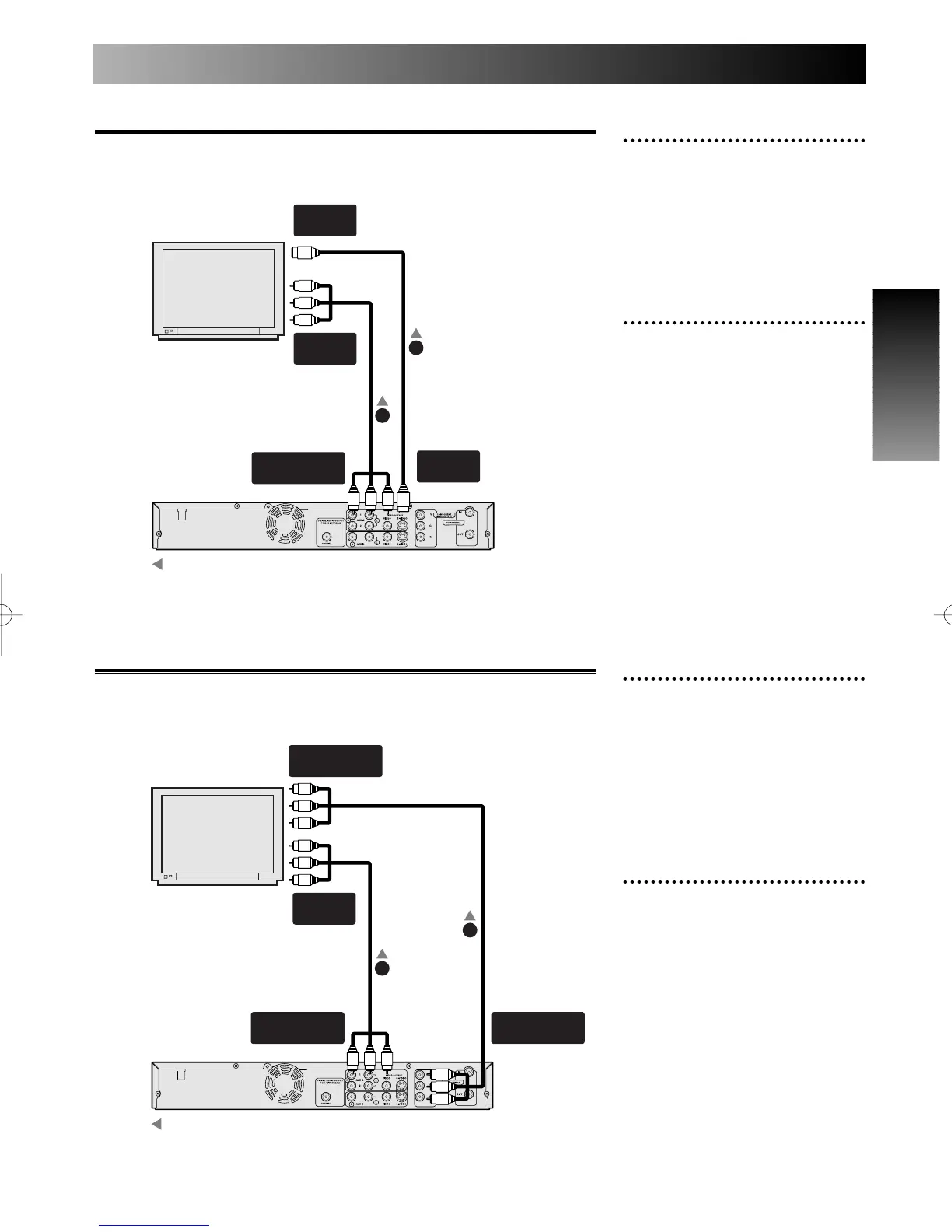
1
Use a S-Video cable to con-
nect the S-VIDEO OUTPUT
jack on the DVD recorder to
the S-Video input jack on the
TV.
2
Use a standard audio cable to
connect the AUDIO OUT-
PUT(L/R) on the DVD
recorder to the audio input
jacks on the TV.
Connection to TV with a S-Video cable
Note:
S-video cable is not included.
1
Use a component video cable
to connect the COMPO-
NENT VIDEO OUTPUT
jacks on the DVD recorder to
the component input jacks
on the TV.
2
Use a standard audio cable to
connect the AUDIO OUT-
PUT(L/R) on the DVD
recorder to the audio input
jacks on the TV.
Connection to TV with a component video cable
Note:
Component video cable is not included.



 To Next Page