55
5
SYSTEMA EOLO RT rev. 09ENIT04052021
FUNZIONAMENTO
5.6 CONFIGURATION OF OPERATING PARAMETERS SCP674V202
Carry out the conguration using the following equipment:
- SCP674V122T2 terminal;
- Master control panel SCM... If present (see instructions supplied with the master control panel).
5.6.1 Programming with SCP674V122T2 terminal
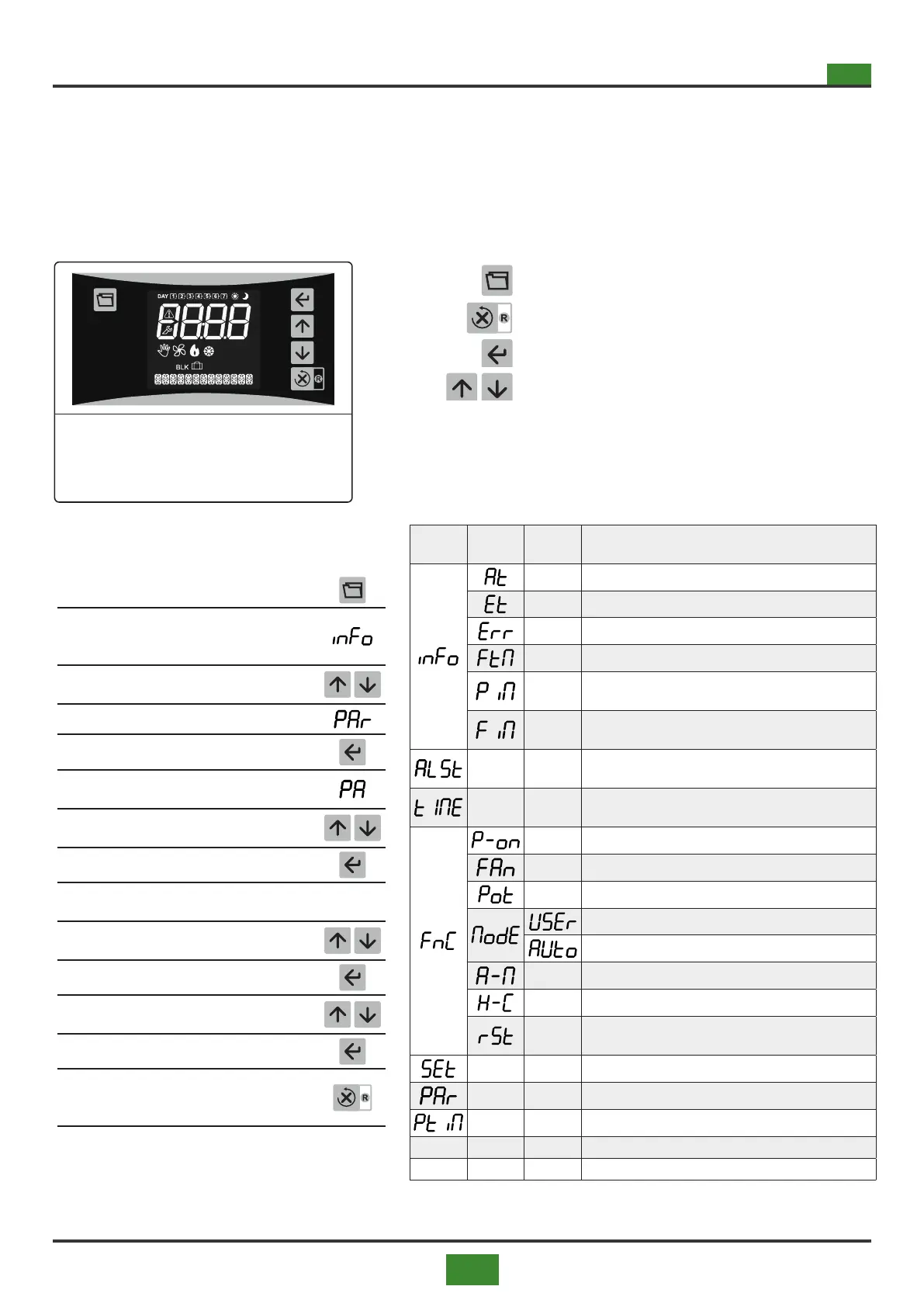
Fig.5.5 SCP674V122T2 terminal
Tab 5.19 Menus and submenus
Programming access button
Exit button - RETURN
Value conrmation button - ENTER
Scroll buttons
To access the instrument menus/parameters,
proceed as follows:
1) Press briey
2)
The rst menu appears on the display
(see tab. 7.12 for the various menu
items)
3)
Use the scroll buttons to scroll through
the various menus
4) Scroll to the parameters menu
5) Press ENTER to conrm
6)
The parameter PA (password) appears
on the display
7)
Enter password (see section 7.9.2 on
page 58) using the scroll buttons
8) Press ENTER to conrm
9)
The rst parameter appears on the di-
splay
/A
10)
Scroll to the desired parameter with the
scroll buttons
11) Press ENTER to conrm
12)
Move with the scroll buttons to the de-
sired value
13) Press ENTER to conrm
14)
To exit programming press RETURN or
wait 30 seconds without acting on the
keypad for automatic exit
MENU
MENU
Level 1
MENU
Level2
DESCRIPTION
Room probe visualisation
External probe display (only present if /P2 ≠ no)
Warnings for internal use:
1. if Err = 0 there is no problem.
2. if Err ≠ 0 means that there are or have been er-
rors.
Supply air temperature. That is the average of pro-
bes P3 and P4.
Flow rate of the air supplied at that time by the ma-
chine.
Flow rate of the air delivered at that moment by the
machine
Pending alarms menu
Clock menu
ON/ OFF, device stand-by
Fixed speed of fan output in USEr mode
Fixed power of PWM output in USEr mode
Manual operating mode
Automatic operating mode
Thermostat operation mode, automatic or manual
(ON or OFF)
Thermostat action type, summer / winter
Reset relay activation, burner reset start
Set point (comfort / economy)
Parameter menu
Timer menu


 To Next Page