TECAN
3. Installation Procedure
2006-03 Instructions for Use for sunrise Absorbance Reader No. 30008746 Rev. No. 1.4 3-5
3.8.2 Starting the “Sunrise Instrument Settings”
In case an instrument is already connected to one of Tecan's programs, close the
program or disconnect the instrument.
The “Sunrise Instrument Settings” software is started by clicking the “Sunrise
Instrument Settings” icon on the desktop if present or go to Start – Programs –
Tecan – and select “Sunrise Instrument Settings”.
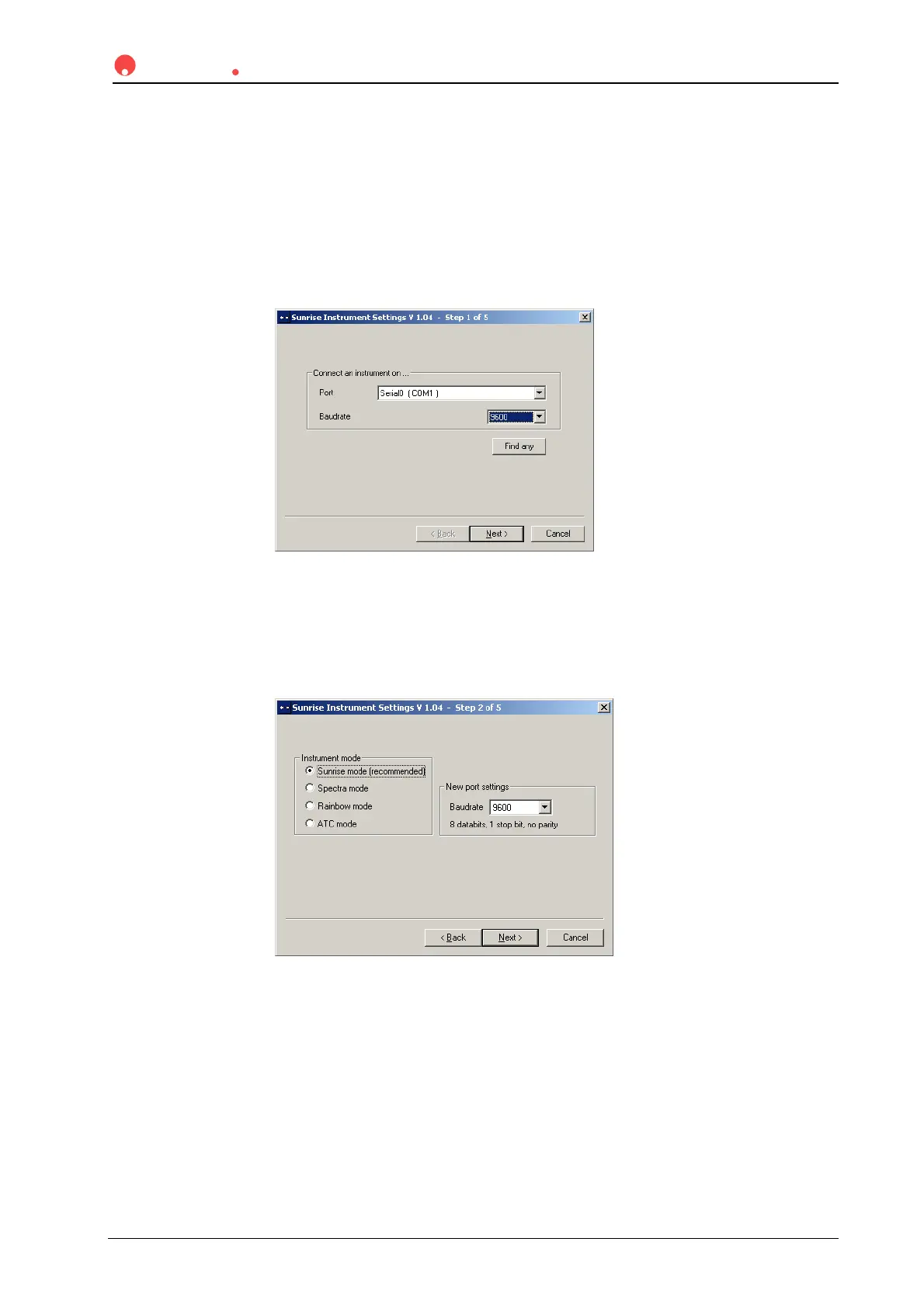
The following dialog box appears:
In the “Sunrise Instrument Settings” dialog box, select the communication port
and the baud rate. Click Next.
3.8.3 Define Instrument Mode
The following dialog box appears:
To use an instrument with software designed for previously manufactured Tecan
readers, select the appropriate instrument mode and baud rate. Click Next.
sunrise mode It is recommended to use the sunrise mode with 9600 baud
Spectra mode Simulates a SPECTRA Reader
Rainbow mode Simulates a Rainbow Reader
ATC mode Simulates an ATC Reader



 To Next Page