4. The sunrise Touchscreen
TECAN
4-4 Instructions for Use for sunrise Absorbance Reader No. 30008746 Rev. No. 1.4 2006-03
4.4.2 Data Handling
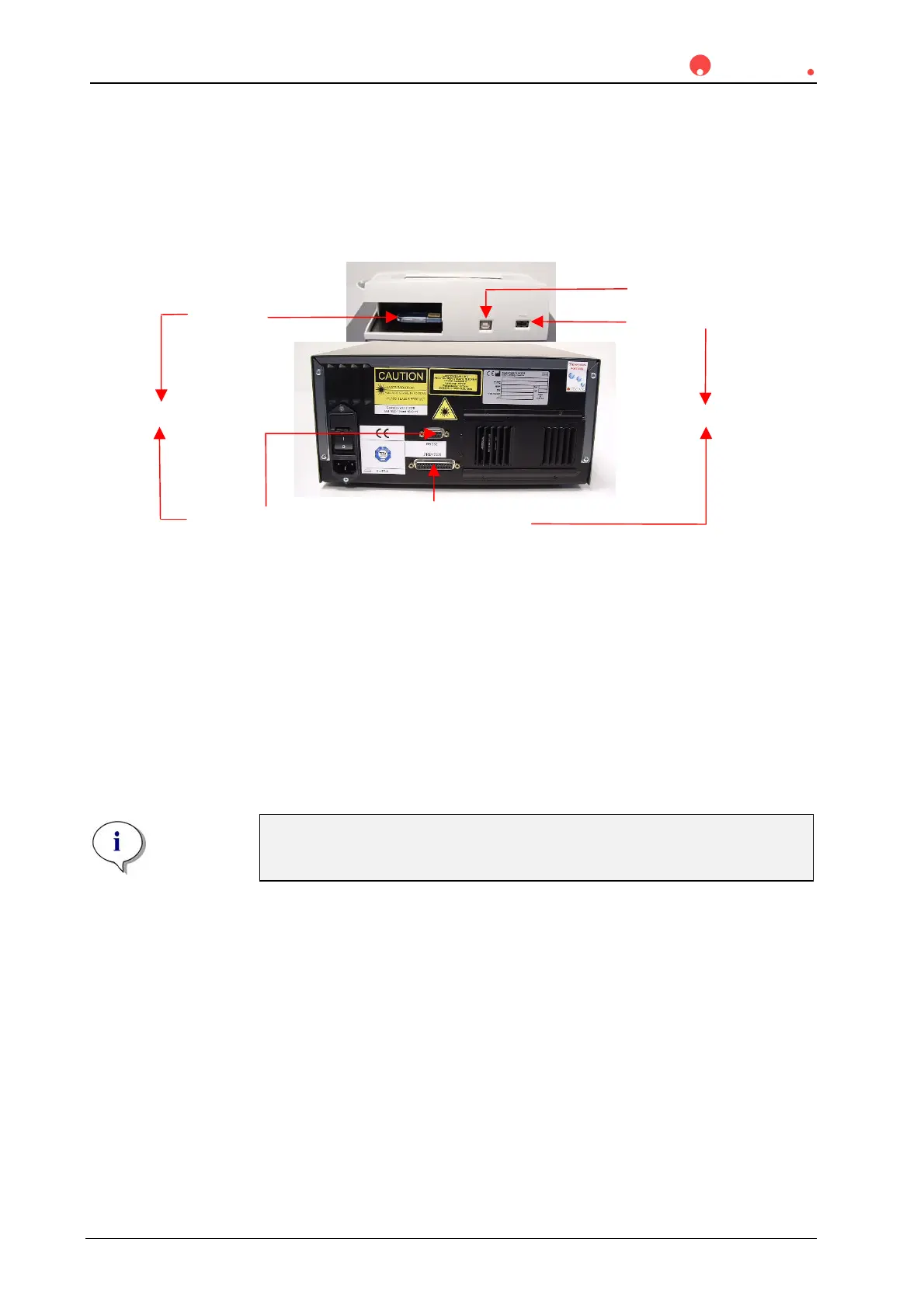
The illustration below shows the concept of data handling of the instrument.
The standard storage memory for onboard operation is the USB stick. The USB
stick offers a capacity of >= 32 MB to save results and defined methods.
Depending on the size of the files, up to 1000 files can be stored permanently on
the USB stick. Additional USB sticks can be ordered for memory extension. But at
the same time there should never be more than one USB stick in use with the
instrument to prevent mismatches. Data can be transferred to a PC by plugging
the USB stick into a PC.
Additionally, the
sunrise can be connected to the personal computer (PC) and
by-pass the onboard software (serial RS232 interface).
Please Note
Only from Tecan approved USB sticks may be used. Otherwise data
leakage may be possible.
Printer USB interface
USB stick
(data exchange)
Service interface
Printer interface (parallel port)
(only available with touchscreen option)
PRINTER
COMPUTER
Serial RS232 interface
(remote control)



 To Next Page