10 TEGAM WAY • GENEVA, OHIO 44041 • 440-466-6100 • FAX 440-466-6110 • sales@tegam.com
6-5
INTERNAL JUMPERS
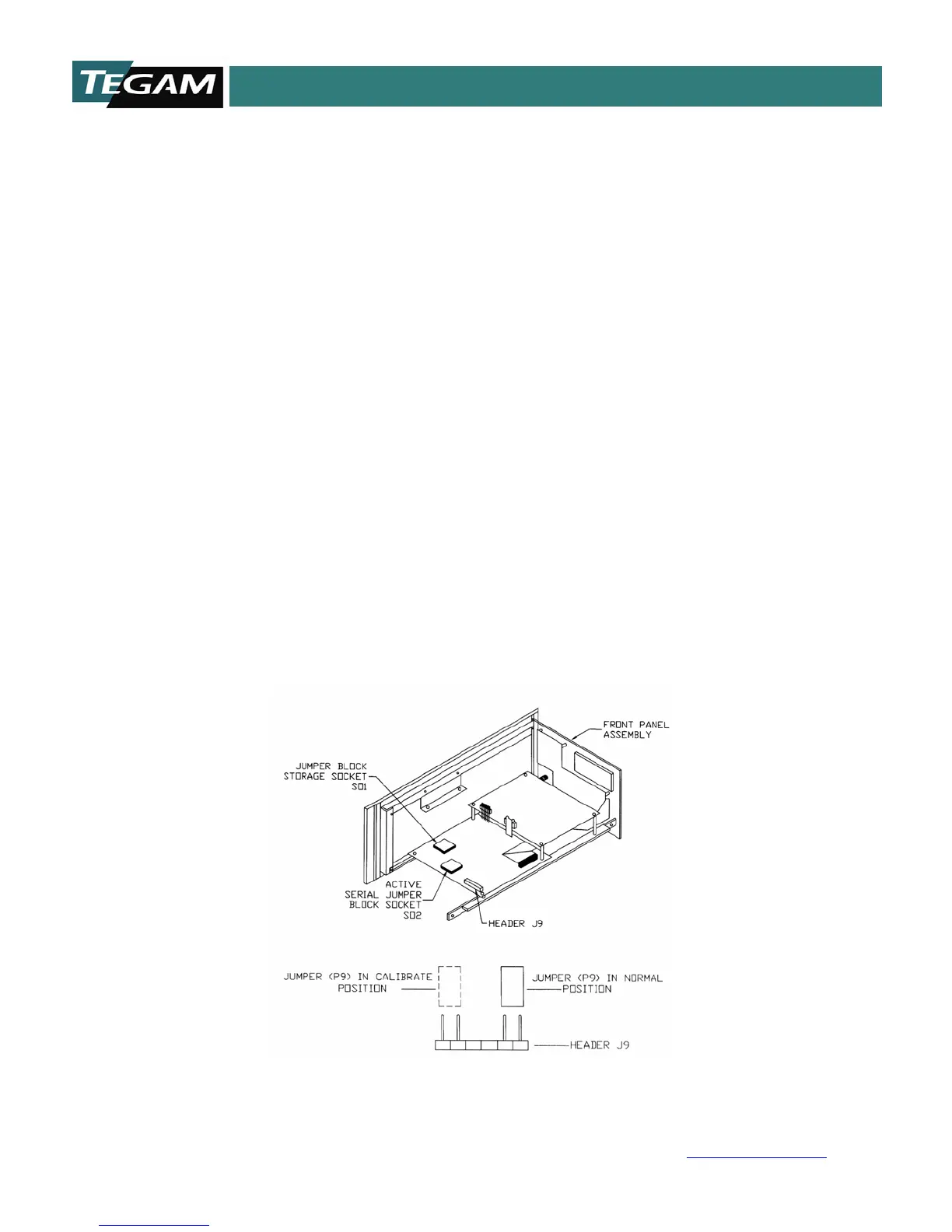
The Model 1750 has two internal user-changeable, jumpers, the calibration jumper, P9 and the
RS232/RS422 configuration jumper. The unit is shipped from the factory with P9, in the operate position
and configured for RS232. To change either of these configurations, follow the instructions below:
1. Remove all input cabling and line cords before opening unit.
2. Remove top cover Philip screws.
3. Slide the top cover backwards and off the unit.
4. Jumpers should be visible and can be modified.
Calibration Enable Jumper
To change the 1750 from operating mode to calibration mode, move jumper P9 from the normal,
(operate) position to the calibrate position. After performing a calibration, be sure to return the jumper
back to its normal position. Refer to Figure 6.1 for more details.
RS232/RS422 Configuration Jumper
To change the unit from RS232 operation to RS422 the communications printed circuit blocks must be
swapped. From the factory the RS232 block is in SO2, which is designated as the active socket. The
RS422 block is stored on SO1. Simply remove the RS232 block from the SO2 socket and replace it with
the RS422 block. Place the RS232 block into SO2 for storage.
Figure: 6.1 Internal Jumpers



 To Next Page