Versa User Manual www.teledynetekmar.com
Installation
MAKING ELECTRONIC CONNECTIONS
Power Cord
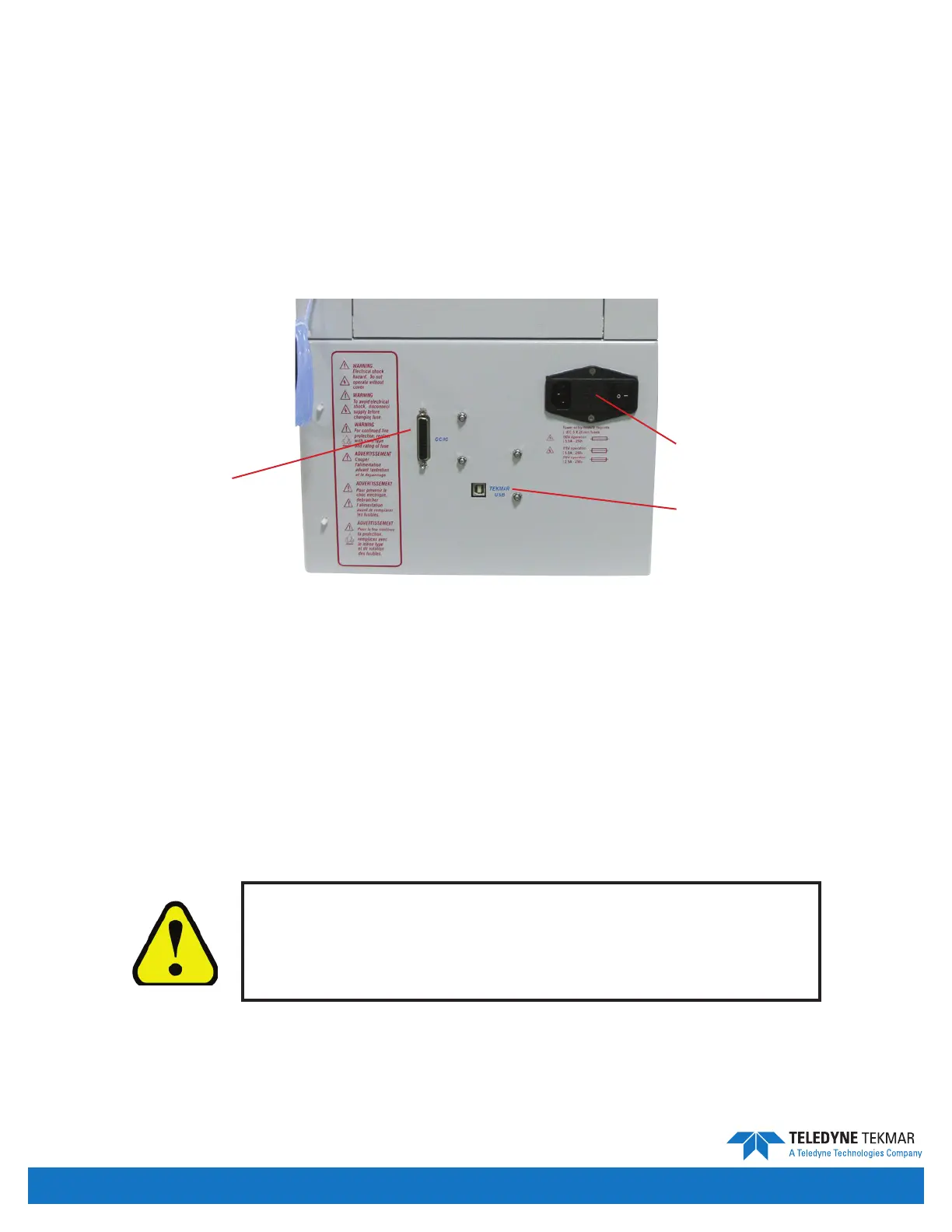
1. Connect the power cord that is included in the packing materials for the Versa to the power entry module on the
back right of the unit.
2. Connect the power cord to the wall making sure the wall outlet can supply 5 amps of current for 115 volt units or
2.5 amps of current for 230 volt units. Use of a surge protector is not required but highly recommended.
GC/IO Interface Cable
The Versa must be connected electronically to the GC using the GC/IO interface port. Instructions for connecting
a Versa to a specic model of gas chromatograph will accompany the interface cable required for your specic
Versa setup.
USB Interface Cable
In order for Versa TekLink
TM
2G to communicate with the Versa unit, a USB cable connection is required. Use the USB
cable included in the Packing Box to make the connection betwen an available USB communications port, on the PC
running Versa TekLink
TM
2G, and the Versa unit.
Do not attempt to make any connections while power cords
are attached to either the Versa or the PC. Connecting cables
while power cords are connected may damage the electronic
components in the Versa unit and/or the PC.
Figure 2-1: Rear of Versa
USB Connection
Power Entry Module
GC/IO Interface
Introduction • Page 2-4


 To Next Page