Versa User Manual www.teledynetekmar.com
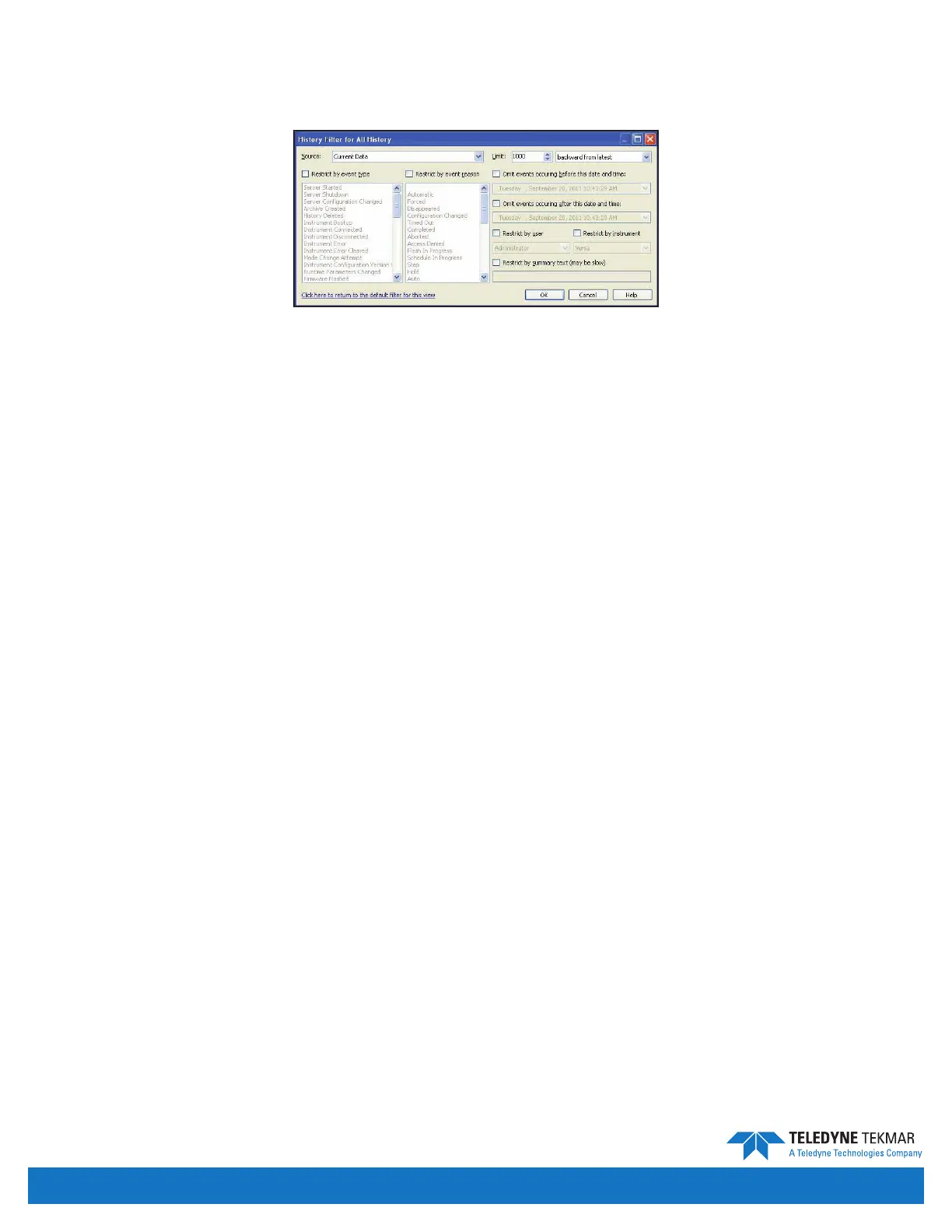
The All History log is a lterable log of all the events that have occurred in the system. To adjust the event lter click
the link “Click here to adjust the event lter” at the top of the History screen. After choosing the desired lter options,
click OK to view the ltered log.
The Source dropdown menu displays selections for the source of the event history data to be ltered (current date or an
archive le).
The Limit text box displays the amount of events to be displayed. The arrows change the number by 1000 positively or
negatively depending on the arrow. The Limit dropdown menu after the text box displays selections for the ordering
of the events to be listed.
The Restrict by event type check box will restrict the events displayed by the event types selected in the menu below
the check box when the check box is selected. You do not need to hold shift or control to select multiple event types.
The Restrict by event reason check box will restrict the events displayed by the event reasons selected in the menu
below the check box when the check box is selected. You do not need to hold shift or control to select multiple
event reasons.
The Omit events occurring before this date and time check box will restrict the events displayed if they have
occurred before the time and date selected in the text box below. Clicking the down arrow will display a calendar
from which the date can be selected. To edit the time simply input the time desired in the text box.
The Omit events occurring after this date and time check box will restrict the events displayed if they have occurred
after the time and date selected in the text box below. Clicking the down arrow will display a calendar from which the
date can be selected. To edit the time simply input the time desired in the text box.
The Restrict by user check box will restrict the events displayed to the events that occurred when the user, selected in
the dropdown menu below the check box, was logged into the system.
The Restrict by instrument check box will restrict the events displayed to the events that occurred when the
instrument, selected in the dropdown menu below the check box, was connected to the system.
The Restrict by summary text check box will restrict the events displayed to the events containing the text indicated
in the text box below the check box.
The Click here to return to the default lter for this view link will return all the selections to the default lter settings.
SYSTEM PROPERTIES
The System Properties screen can be accessed by clicking Tools | System Properties from the Connect to Instrument
screen and the menu bar. The System Properties screen displays options and selections for the conguration of the
Versa server.
Figure 4-29: History Filter Screen
Introduction • Page 4-12


 To Next Page