Versa User Manual www.teledynetekmar.com
Versa TekLink™2G Installation
Your system should have approximately 50 megabytes of free space and a CD-ROM drive or USB. See the Minimum
Computer Requirements section for further requirements.
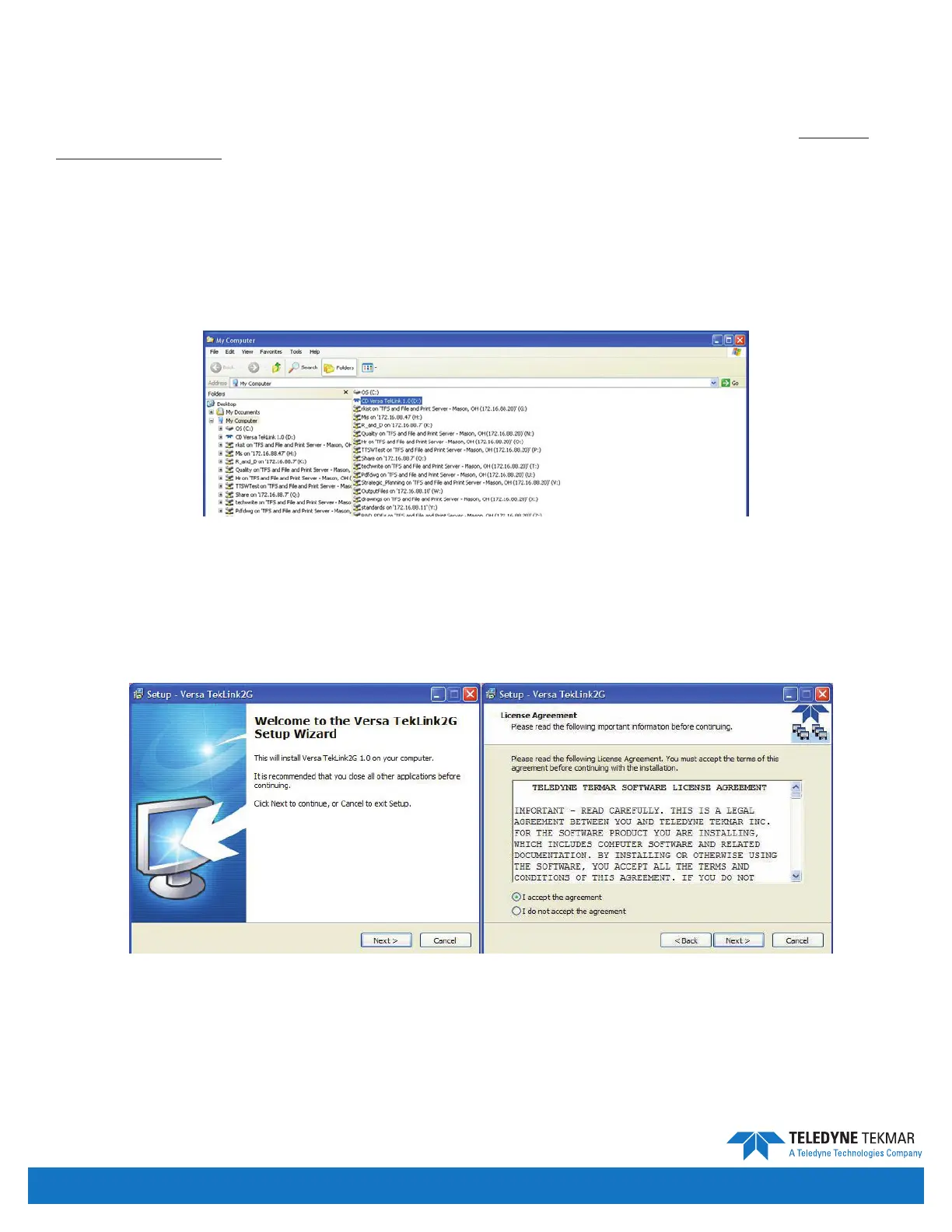
1. Start Windows® and insert your Versa TekLink
TM
2G CD into the drive. All other programs should be shut down
during installation.
Note: If you do not have a CD drive, copy the contents of the CD to a USB drive and install from there.
2. If the program does not automatically start, double-click the Versa TekLink
TM
2G icon and follow the screen
prompts. The rst screen that appears is the Installation Selection Screen.
3. Select Versa TekLink
TM
2G and click “Install”, this will start the Versa TekLink
TM
2G Setup Wizard.
4. Click the Next button. A screen appears that contains the software License Agreement. Read the agreement and, if
you agree to the terms of the license, select the “I accept the agreement” radio button and click Next to proceed
with the installation.
Figure 2-3: Installation Selection Screen
Figure 2-4: Step 3 and 4
Introduction • Page 2-6


 To Next Page