Versa User Manual www.teledynetekmar.com
DIAGNOSTICS
The Diagnostics screen can be accessed by clicking
Tools | Diagnostics. In this screen you can run individual
diagnostics for specic components.
Note: The Diagnostics screen is only accessible from Standby
or Purge Ready.
The tabs within the Diagnostics screen allow for system
monitoring while operating and advanced troubleshooting.
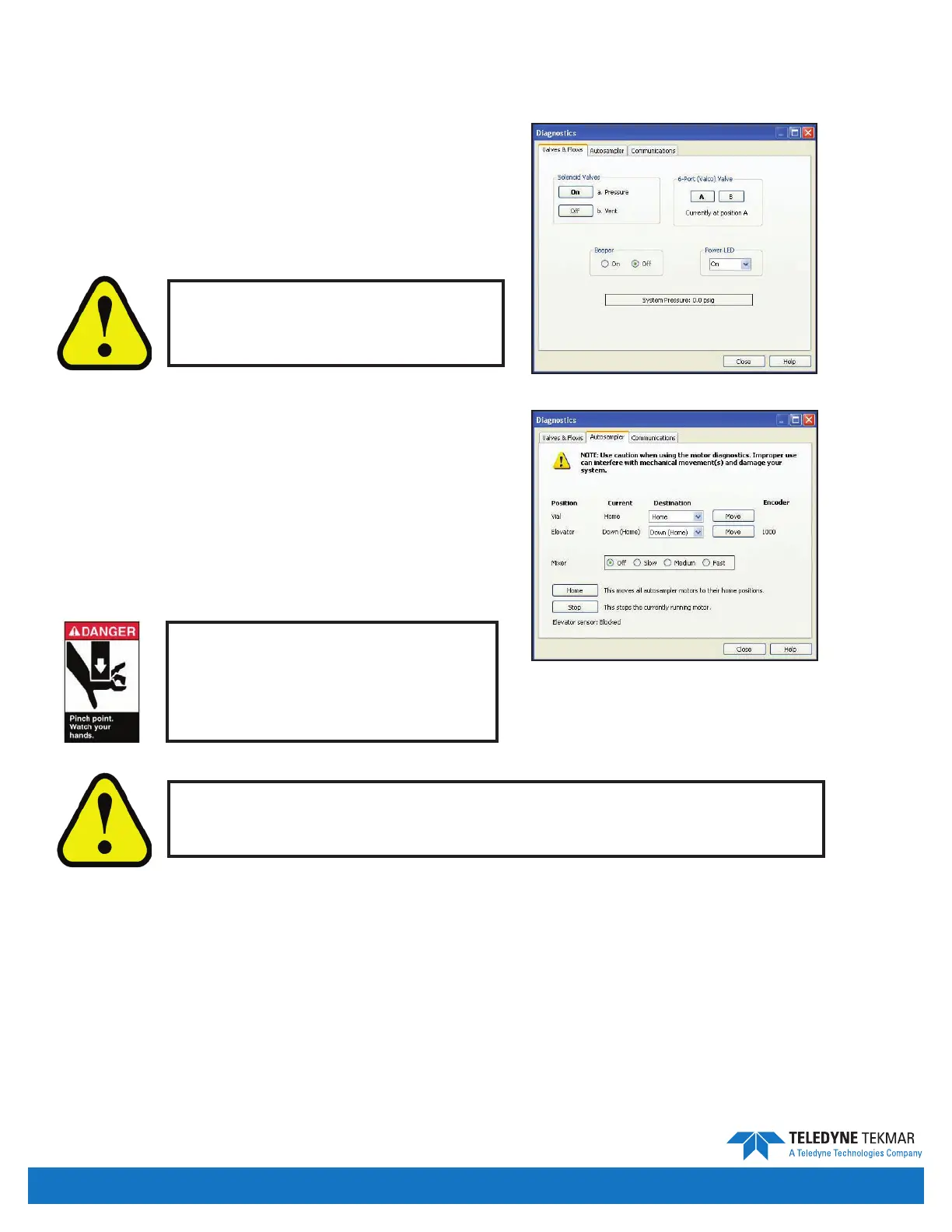
Valves & Flows Tab
The Valves and Flows tab in Diagnostics allows the user to
toggle the Versa valves ON and OFF to test them individually.
The 6-port valve can be toggled to its two positions, A and B.
Autosampler Tab
The Autosampler tab displays the current positions of the
carousel and the elevator along with their encoder values.
• The Position eld lists the components that can be manipulated.
• The Current eld lists the current position for the corresponding component.
• The Destination eld displays a dropdown list containing valid destinations for each component.
• The Move button causes the corresponding component to move to the position designated in the Destination eld.
• The Encoder eld displays the raw encoder feedback.
• The Home button commands the Versa to move all of the autosampler parts to their home locations.
• The Stop button stops the currently running motor.
• The Elevator Sensor states the current status of the sensor in the Versa.
Software Features
Figure 4-23: Diagnostics - Valves and Flows Tab
Figure 4-24: Diagnostics - Autosampler Tab
Use of the Diagnostics screen by
untrained users can cause damage
to the Versa.
Use caution when using the autosampler diagnostics. Improper use can
interfere with mechanical movement(s) and damage your system.
Pinch Point Hazard! Keep hands
and other appendages away from
the carousel and elevator during
operation.
Introduction • Page 4-10


 To Next Page