Versa User Manual www.teledynetekmar.com
21 CFR Part 11 Compliance • Page 5-6
DATA VERSIONING, HISTORY, AND ARCHIVE
Version – Each method and schedule has a version component built into the le. Anytime that le is changed or
modied it will version itself. From the Version tool bar, a drop list shows the latest Version Number with the ability to
call the entire list of previous versions.
History – Each time the version is changed a History Event is created that records the Version Number, Creation Date
Time Stamp, Username, and Change Justication.
Archive – When archiving is initiated, the le is copied into the Archive Directory designated in the System
Properties screen. After archiving, the le is deleted from the current le directory if the Delete This File After Next
Archive option box is selected.
VIEW/PRINT SYSTEM HISTORY AND ERROR LOGS
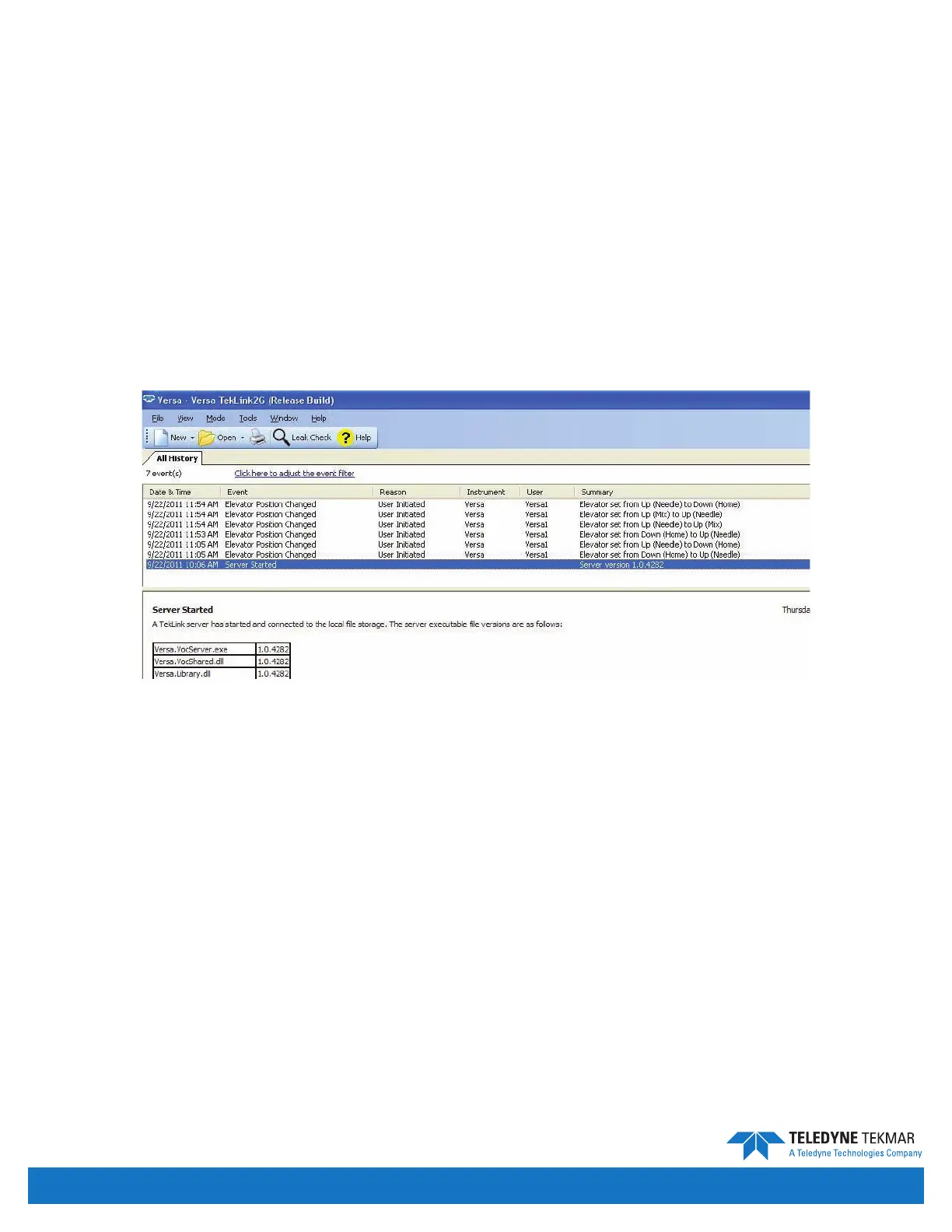
The History screen can be accessed by clicking View | All History. The All History log is a lterable log of all the
events that have occurred in the system. To adjust the event lter click the link “Click here to adjust the event lter” at
the top of the History screen. After choosing the desired lter options, click OK to view the ltered log.
The top pane of the History screen displays the time and date, event type, event reason, the instrument connected
while the event occurred, and brief details of the events that have occurred and have not been ltered out by the
criteria set by the user in the History Filter screen shown in the next gure.
The bottom pane of the History screen displays more detail about the event.
Figure 5-10: History Screen


 To Next Page