Versa User Manual www.teledynetekmar.com
Using a personal computer, running Microsoft Windows®
XP™ Pro or higher, Versa TekLink™2G enables you to
program, monitor, schedule, and control custom operating
sequences. Before setting up methods and running
samples, familiarize yourself with the Versa TekLink™2G
software. To allow for full functionality, the Versa
TekLink™2G software must be interfaced with a functional
Versa/GC system.
SELECTING AN INSTRUMENT
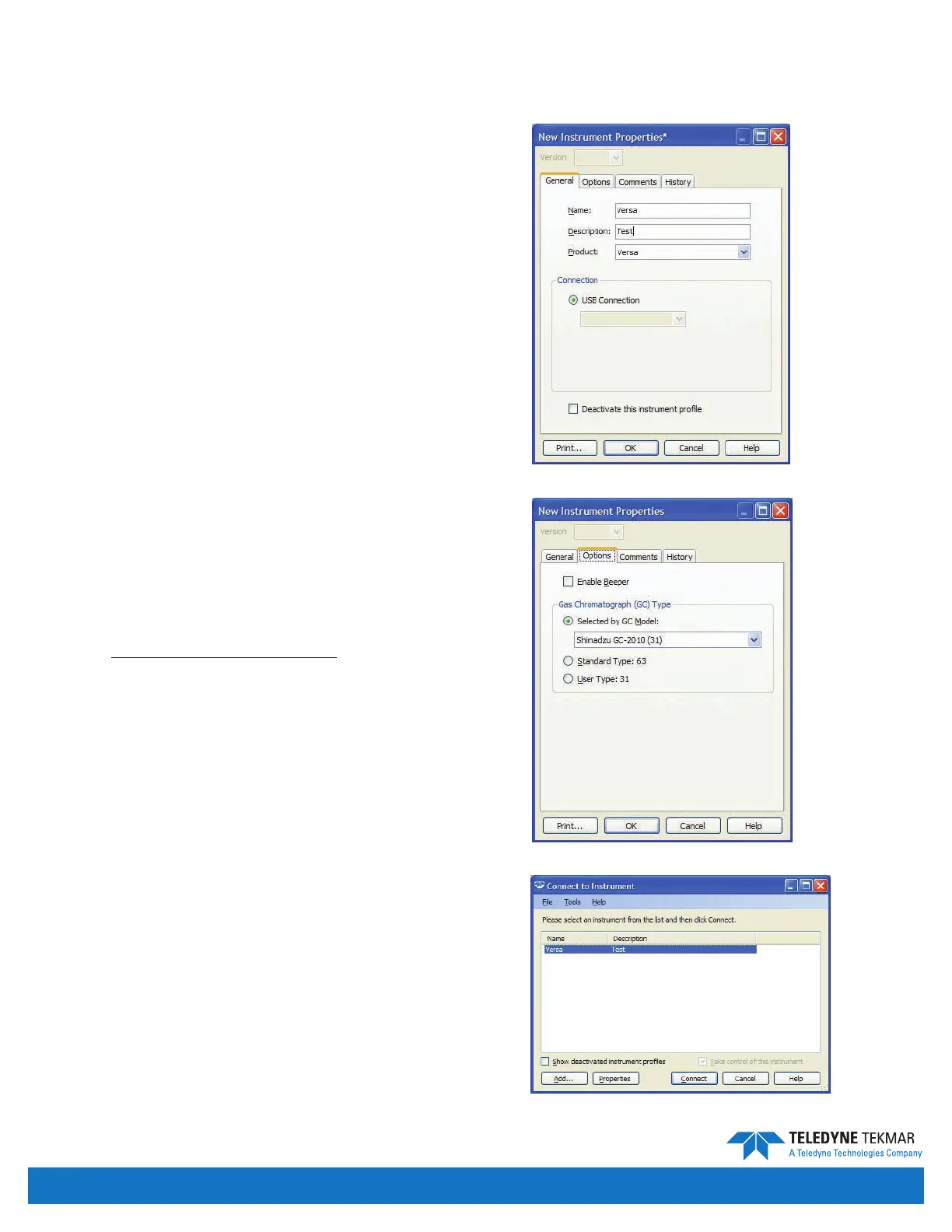
The Connect to Instrument screen allows the user to create
a new instrument conguration or connect to an existing
instrument conguration.
To create a new instrument prole, follow the instructions
below:
1. Click the Add button. From the Add Instrument screen,
shown to the right, you must specify a unique name for
the instrument.
2. To specify the conguration of the instrument, click
the Options tab. From this screen, shown to the right,
the user can enable the beeper and congure the
GC communication requirements as noted in the
instruction sheet supplied with the GC/IO cable. (For
further information on these options please refer to
the Conguring an Active Instrument section of this
manual)
To connect to an existing instrument prole, double click
the appropriate instrument from the list on the Connect to
Instrument screen.
Software Conguration
Figure 4-1: New Instrument Screen - General Tab
Figure 4-2: New Instrument Screen - Options Tab
Figure 4-3: Connect to Instrument Screen
Introduction • Page 4-2


 To Next Page