Versa User Manual www.teledynetekmar.com
Schedule Editor
An existing schedule can also be edited by clicking File |
Open | Schedule. Browse to the folder where you store
your schedules and open the desired schedule.
To edit a schedule, click on the line number you wish
to change.
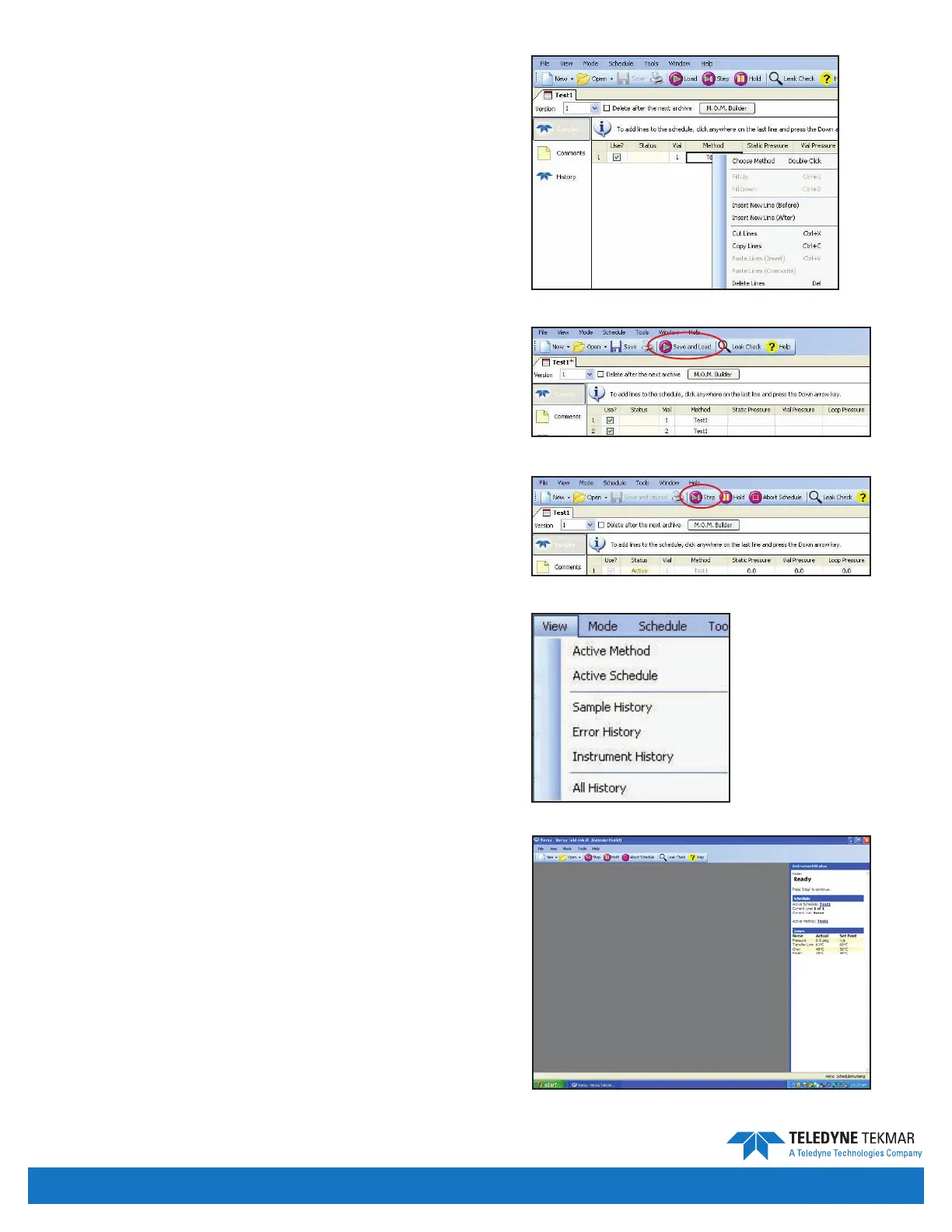
To add, delete, cut, copy, or paste a line of the schedule,
right-click with the mouse and select from the menu.
Select the line where you want the action to occur.
Save and Load
Select Save and Load to save the method and load the
schedule to the Versa.
Start
After the system has reached the set temperatures for all
zones, click the Step button to start the schedule.
Updating an Active Schedule
There are a couple ways to open or view an active schedule:
• Click View | Active Schedule.
• Click the active schedule displayed in the Instrument
Status pane.
Note: You can make schedule changes while the Versa
is running, but you cannot change a line of
the schedule that is currently running, or has
completed. Changes can only be made to the lines
of the schedule that have not yet executed.
Figure 4-18: Right Click Menu
Figure 4-19: Save and Load
Figure 4-20: Step Button
Figure 4-21: View Menu
Figure 4-22: Status Pane
Introduction • Page 4-9


 To Next Page