Versa User Manual www.teledynetekmar.com
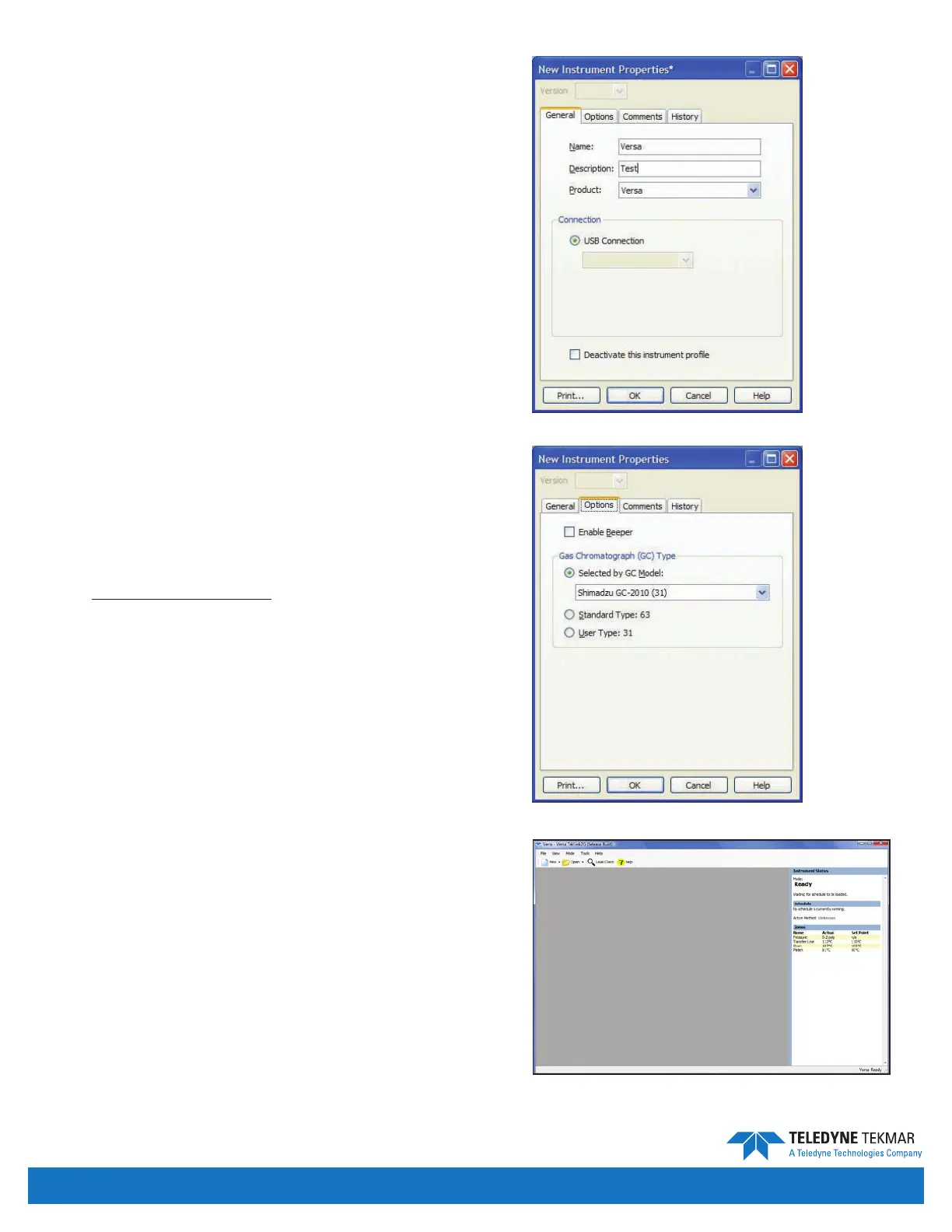
14. Clicking the Add button causes the New Instrument
Properties screen to appear. From this screen, you
must specify a unique name for the instrument and
select one of the available ports that the instrument
will use for
communication.
Name - The user must enter the name of the active or
selected instrument.
Description - A user-dened, brief set of text to identify
the instrument.
Product - Shows product type.
Connection - The Versa connects through a USB port to
the user PC.
Deactivate This Instrument Prole - Disables the
instrument prole and releases the USB port, thus allowing
it to be used for another instrument.
15. To specify the conguration of the unit, click the
Options tab. From this screen, the user can enable
the beeper, and congure the GC communication
requirements as noted in the instruction sheet
supplied with the GC/IO cable. (For further
information on these options please refer to the
Conguring an Active Unit section of this manual.)
16. Power the Versa on.
17. Connect to the unit that has just been setup.
18. To verify the name and status of the active unit, view
the Instrument Status window of the Main screen.
Figure 2-14: New Instrument Screen - General Tab
Figure 2-15: New Instrument Screen - Options Tab
Introduction • Page 2-11
Figure 2-16: Main Screen on Versa


 To Next Page