Versa User Manual www.teledynetekmar.com
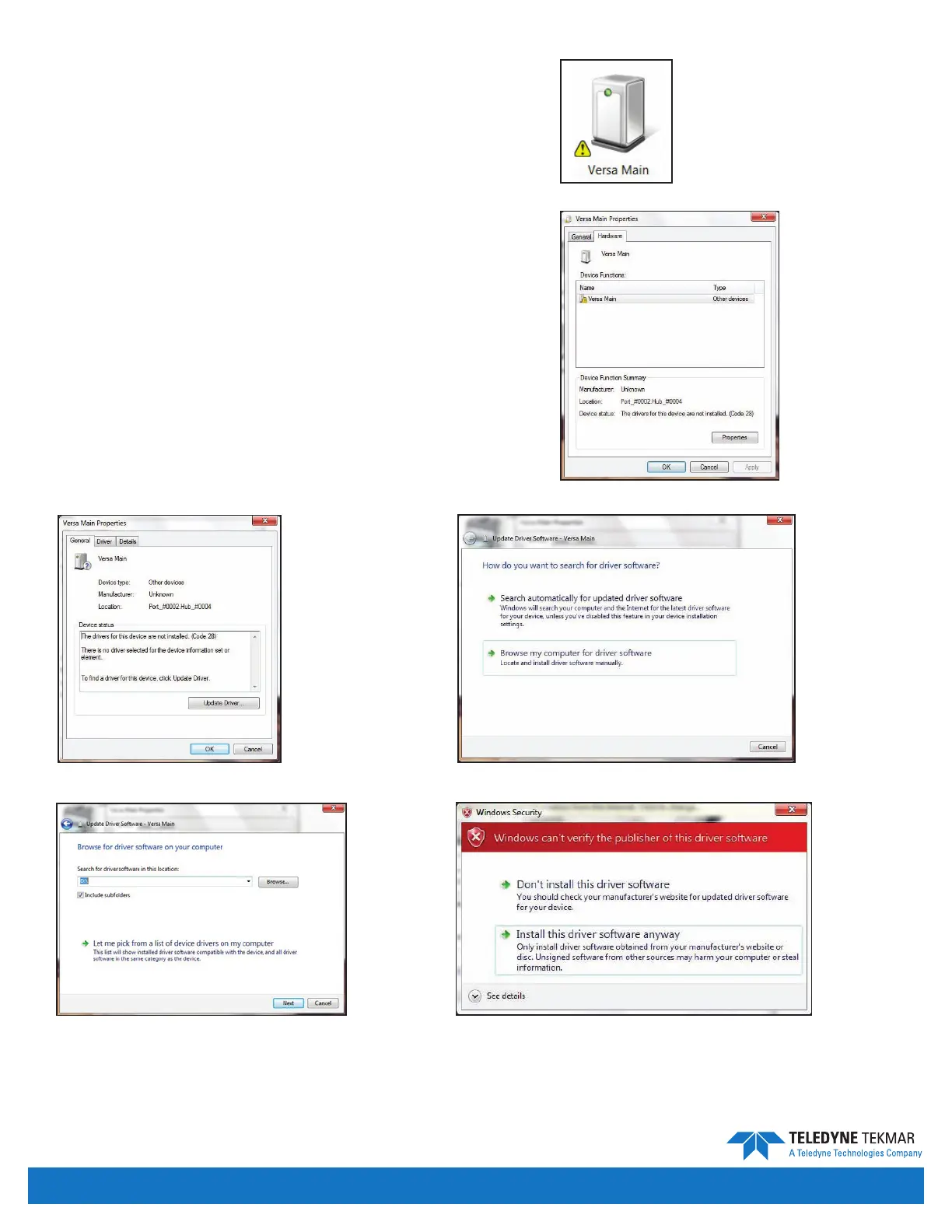
If you are running Windows Vista or Windows 7:
1. Make sure your Versa unit has been turned on, and
navigate to Start | Control Panel | Hardware & Sound
| Devices & Printers on your PC. Then double-click on
the Versa Main icon.
2. Choose the Hardware tab. Then click on Properties.
3. Click Update Driver, and select Browse my
computer for driver software. Browse to the install
CD and click Next.
4. A Windows Security screen will appear. Choose Install
this driver software anyway. The driver software will
begin installing. This may take a few seconds.
5. Once the drivers are installed successfully, close out of
all windows and reboot the Versa unit. After rebooting
the unit and starting Versa TekLink™2G, you will see a
connection to the Versa.
Figure 2-20: Versa Main Icon
Figure 2-23: Browse Computer for Updated Driver Software
Figure 2-22: Versa Main Properties
Figure 2-21: Hardware Tab
Figure 2-25: Windows Security Screen
Figure 2-24: Navigate to the Install CD
Introduction • Page 2-13


 To Next Page