140
GPON ONT
5.8.3 SIP Debug Settings
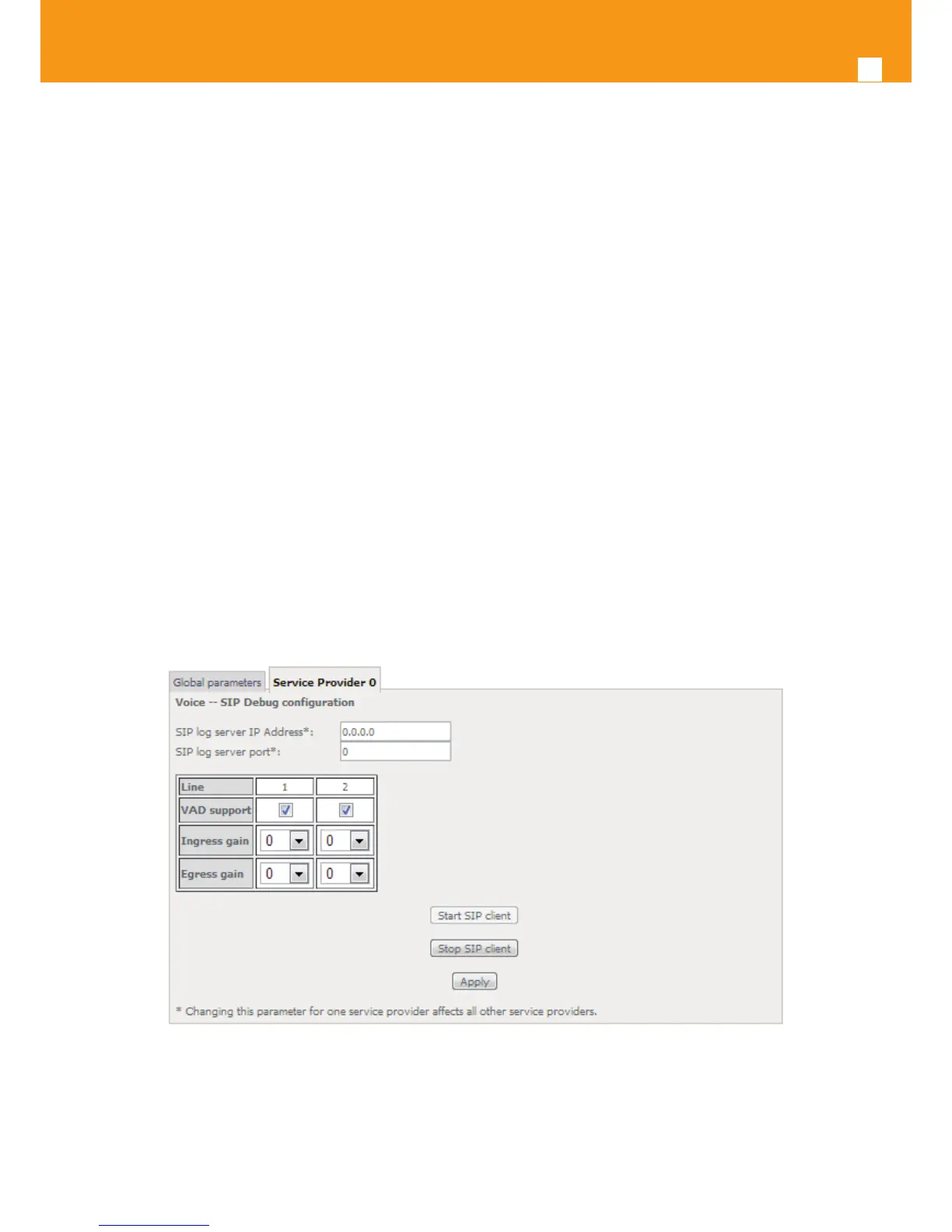
Selection of Voice menu, item SIP Debug Settings will display a SIP Debug Settings–Service Provider conguration window, Figure 5-171.
Figure 5-171, provides a conguration example for the Service provider parameters ( SIP Debug Conguration)
In order to congure Service Provider- SIP Debug Conguration, Figure 5-171:
STEP 1. Type in the SIP log server IP Address;
Note: Changing this parameter for one service provider aects all other service providers;
STEP 2. Type in the SIP log server port;
Note: Changing this parameter for one service provider aects all other service providers;
Congure line debug option at the Line table:
STEP 3. To enable VAD support for a line select the respective checkbox;
STEP 4. To congure Ingress gain for a line select Ingress Gain Value from the respective selection combo box;
STEP 5. To congure Egress gain for a line select Egress Gain Value from the respective selection combo box;
To nalize the conguration use the Apply button at the bottom of the window.
To make eective the conguration just done, use the Start SIP client button.
Figure 5-171: Voice, SIP Debug Settings conguration window


 To Next Page